Connect. Learn. Grow with the Nutanix Community.
Recently active
This post was authored by Brian Maher, Sr. Global Alliance Product Marketing Manager As the saying goes, “what a difference a year makes.“ Back in July 2018, Veeam launched support for Nutanix’s AHV hypervisor with Veeam Availability for Nutanix AHV. This new addition was to complement the existing support Veeam has had for vSphere and Hyper-V for Nutanix customers. Within a few months, the alliance relationship started picking up speed, and it was clear that Nutanix customers embraced Veeam Availability for Nutanix AHV by the number of licenses being sold in such a short amount of time. With the addition of AHV support, Veeam can now provide customers a common backup and recovery platform for Nutanix Acropolis environments that supports: Nutanix AHV, VMware vSphere and Microsoft Hyper-V environments Granular Data Recovery for Microsoft SQL, AD, Exchange, SharePoint and Oracle that provides agentless, granular and rapid recovery of individual objects, files and individual appl
This post was authored by our friends at HYCU For many, the choice to move to hyper-converged and embrace the foundational principles set forth by Nutanix were easy. By breaking down silos to make management of the entire storage, network and compute stack simple and flexible, Nutanix helped change an industry. The benefits of 1-click simplicity and seamless scale-out for your Enterprise Apps that Nutanix enables now is endless. The choice at the time hyper-converged was emerging, was easy. At HYCU, we firmly believe there is a new time of choosing that is emerging. We believe that the simplicity that you expect with Nutanix needs to extend to the backup and recovery you use. And, we believe that data protection innovations should complement your platform of choice. It’s that belief that led us to create the industry’s first purpose-built data protection for Nutanix. We aligned ourselves to the look-and-feel of Nutanix, working closely with the User Interface (UI) team. It’s more tha
This post was authored by Evan Slack, Director of Nutanix Sales, Carahsoft The passing of legislation such as the Management Government Technology Act (MGT Act) in late 2017 shows that improving IT infrastructure and operations are top priorities for the federal government. For example, agencies need to meet the data center requirements mandated by not only the Data Center Optimization Initiative (DCOI), but also the Federal Information Technology Acquisition Reform Act (FITARA). These mandates help optimize and consolidate data centers to deliver better services for the public and provide more ROI for taxpayers. The Nutanix-Carahsoft partnership can help you meet all your requirements as well as prepare you to take advantage of the quick capital opportunities available through the passing of the MGT Act. There’s no one-size-fits-all solution to modernizing a datacenter or adopting a cloud model, because every public sector institution has different requirements. That said, agency
This is a guest post from our friends at Lenovo What if you could accelerate deployment and performance of your workloads without the hassle of complex, costly operations and maintenance? With Lenovo ThinkAgile HX Series, you can deploy applications faster while reducing your TCO by nearly three times - and we’re ready to show you at Nutanix .NEXT in Anaheim, CA! Increase Your FreedomVisit Lenovo at .NEXT to explore how you can accelerate your business workloads at any scale, all the time with our best-in-class hyperconverged offering. Lenovo optimizes your workloads to create maximum results with industry standard servers that are consistently rated #1 in Customer Satisfaction and #1 in x86 Server Reliability. Highlighted workloads at .NEXT include: SAP HANA - ThinkAgile HX Solution for SAP HANA delivers extreme speed, high availability and dramatic efficiency for SAP HANA workloads in HCI clusters. Blockchain – Blockchain applications on ThinkAgile HX deliver mission-cr
This post was authored by Sachin Chheda Senior Director of Solutions Marketing In a previous blog, I touched on the topic of making infrastructure invisible allowing IT and organizations to focus on applications and initiatives — leverage constructs common in the cloud. In the next two blogs, we discuss a general level framework for applications and business services, covering the following areas — cataloging applications, tools, and building a roadmap for modernization. Building a CatalogIt may seem daunting to catalogue the different applications and workloads but done correctly well orchestrated auditing and subsequent cataloging of workloads make decisions on future strategy quick and simple. There are quite a few documented models for creating an application catalog. In conversations with Nutanix experts and our customers, I was captured a few key areas to consider, listed below: Function: Honest description and classification of the app/workload functionality includ
This post was authored by Gabe Contreras, Nutanix Services Consulting Architect When it comes to running Elasticsearch on any platform getting the right settings can take time to get right based on your use case. Small throughput deployments may have been deployed in the cloud, but what about deployments processing millions of documents a minute? It’s no surprise that many companies run these larger deployments on bare-metal. Numerous Nutanix customers have made the leap to running Elasticsearch on our Enterprise Cloud. Our customers have found the following benefits: Faster provisioning Simplified Infrastructure Improved availability Greater flexibility Increased efficiency In most real-world Elasticsearch and general big data environments, these advantages outweigh any potential benefits you might get from running on bare metal. For Nutanix customers the ability to better manage and run big data applications and general server virtualization is a major factor.
This post was authored by Devon Helms Senior Product Marketing Manager - Storage Services Data is growing at an exponential rate, and growth in unstructured data is driving it. Even 15 years ago, 100TB of data was considered a large amount of data to store. Today, most of our customers are having to manage a multiple of that. Legacy NAS storage solutions were not designed for this rapid growth. They make the challenge of data management even greater. IT Administrators struggling with this rapid data growth and legacy systems spend about 80% [1] of their time keeping the lights on and only 20% innovating for the business. Nutanix Files is designed for simplicity, flexibility and data intelligence. With the release of Nutanix Files 3.5 we are adding several new capabilities. What’s new with Nutanix Files 3.5?Nutanix Files analytics brings deep intelligence to your file dataFile data accounts for a large portion of the data in most organizations. According to IDC, by 2025 the wor
This post was authored by Michael Haigh, Technical Marketing Engineer Nutanix and this post is also co-hosted at JFrog Anyone working with containers and Kubernetes knows the value of a rock-solid container registry. In this post, we’ll show you how to deploy JFrog Artifactory Enterprise, in a highly available configuration onto Kubernetes with Nutanix Karbon. If you’re not familiar with Artifactory, it is a binary repository manager, allowing you to easily store and categorize all of your software artifacts. While this is an important tool for any enterprise, it is especially critical for a successful DevOps toolchain. To get a free trial of Artifactory Enterprise, navigate over to JFrog’s website and fill out the form. One of the most challenging aspects of any stateful Kubernetes application is persistent storage. However, with Nutanix Karbon and our integrated CSI Volume Driver, managing your persistent storage is extremely simple. In this blog post we’ll be using the default
Every data center uses file, object or volume storage. Why not use some for free? Nutanix Unified Storage, the simple, flexible, and software-defined storage solution from Nutanix solves complex storage challenges for the modern datacenter. And now, Nutanix AOS customers get 1 TB of Nutanix Unified Storage capacity for free per AOS cluster. This gives Nutanix AOS customers the chance to experience this powerful unified storage solution in their own environment and for many, it’s enough to provide a department share for small workloads.What is Nutanix Unified Storage?Nutanix Unified Storage™ (NUS) is a software-defined data services platform that consolidates the management and protection of siloed block, file, and object storage into a single, unified platform. NUS harnesses the power of rich data services such as analytics, ransomware protection, lifecycle management, and data protection. These features enable organizations to seamlessly adapt to the ever-changing requirements of mode
Welcome back to the podcast, this week Dwayne and I chat with Ruben Spruijt and we talk end user computing - like will this be the year of VDI? Xi Frame architecture, VDI at scale, Native integration with cloud storage and GPUs. It’s very informative and enlightening. 👉Learn more about Nutanix Xi Frame - bit.ly/2ECaoIs Follow us on Twitter Ruben Spruijt - twitter.com/rspruijt Dwayne Lessner - twitter.com/dlink7 Angelo Luciani - twitter.com/AngeloLuciani Nutanix Nation - twitter.com/NutanixNation Resources Test Drive Frame - https://fra.me/test-drive Nutanix online community - https://next.nutanix.com/ Nutanix community blog - bit.ly/2ECb14M Nutanix user groups - bit.ly/NutanixUserGroup If you enjoy The Nutanix Community podcast, consider providing a rating and review in iTunes or your podcasting platform of choice. It helps people find the show easier and will help me make improvements in the series by seeing what you have to say. Subscribe to the podca
This post was authored by Nutanix Technology Champion (NTC) Mattias Sundling, Head of Datacenter and Cloud Services, A3 Being a Service Provider we constantly onboard customers that have been running on-prem virtual environments. The majority of them are running on VMware ESXi and Microsoft Hyper-V. In order to streamline the process of moving these workloads to our public cloud service with minimum impact on VM availability and time spent on our side we have been using Nutanix Move (previously called Xtract) since its first beta version. That release was over a year ago and supported VMware ESXi. So, we were quite excited to see there was a beta program for Move with Hyper-V support. We installed the new version that runs as a virtual appliance on your target AHV cluster and connected it to a customer’s Hyper-V hosts. Nutanix Move then pulls all inventory from all hosts and allows you to create a migration plan of selected VMs. By supplying administrator/root credentials all gue
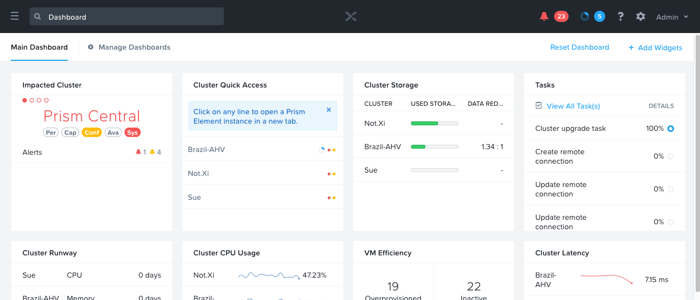
Welcome come back to the podcast – This week Dwayne and I chat with Michael Haigh about Nutanix Calm – we discuss the latest software release, Nutanix Playground, HTTP Task and a Jenkins plugin. Related Links Nutanix Calm forums on Nutanix Community - bit.ly/2DxkD0c Nutanix Calm 2.6.0 Release Notes -bit.ly/2DtMu1y Nutanix Calm Administration and Operations Guide -bit.ly/2SqqHSt YouTube Playlist Calm in Action - bit.ly/2DEnPaH YouTube Playlist Calm Overview - bit.ly/2DtPs6c Learn more about Nutanix Calm - bit.ly/2Dwmfaz Michael Haigh - twitter.com/michaigh Dwayne Lessner - twitter.com/dlink7 Angelo Luciani - twitter.com/AngeloLuciani Nutanix Nation - twitter.com/NutanixNation If you enjoy The Nutanix Community podcast, consider providing a rating and review in iTunes or your podcasting platform of choice. It helps people find the show easier and will help me make improvements in the series by seeing what you have to say. Subscribe to the podcast using iTunes, Stitch
This week on the podcast - I chat with Tapan Mehta (Head of Healthcare and Life Sciences Marketing at Nutanix), It’s another industry spotlight and it’s a sector that touches all of us - Healthcare. We talk about What are the key trends facing the industry in 2019? Accelerating use of AI/ML and data visualization and Increasing Cloud Adoption. Related Links Report Reveals Healthcare Industry’s Increased Affinity for Hybrid Cloud Dwayne Lessner - twitter.com/dlink7 Angelo Luciani - twitter.com/AngeloLuciani Tapan Mehta - twitter.com/tmehta01 Sachin Chheda - twitter.com/StorSC Nutanix Nation - twitter.com/NutanixNation If you enjoy The Nutanix Community podcast, consider providing a rating and review in iTunes or your podcasting platform of choice. It helps people find the show easier and will help me make improvements in the series by seeing what you have to say. Subscribe to the podcast using iTunes, Stitcher or SoundCloud. Follow NutanixNation on Twitter for news and announcemen
This post was authored by Devon Helms, Senior Product Marketing Manager - Storage Services Since we launched Acropolis File Services (AFS) less than two years ago, we have been pleased with the speed of end user adoption. We now have close to one thousand customers with petabytes of data under management. Many of these customers have deployed AFS as a standalone NAS cluster, replacing a legacy NAS solution. These customers have helped us realize that the substantial engineering investment we have made over the past four years has resulted in a solution that can effectively compete in the NAS market. As a result, on November 15th of last year, we launched Nutanix Files and Files Pro. Files is for customers who want to add NAS capabilities to their existing AOS cluster. Files Pro is for customers who want to deploy our solution as a dedicated NAS cluster. Capacity based licensingBoth Nutanix Files and Nutanix Files Pro are introducing the new “used capacity” based licensing. “U
This post was authored by Devon Helms, Nutanix Senior Product Marketing Manager Moving from legacy (or heritage) systems to hyper-converged brings with it an array of advantages, including speed, simplicity, and operational efficiencies. Perhaps the biggest benefit is that modern infrastructure provided by HCI enables organizations to deal with the new realities of business. In the new business reality, performance needs change rapidly and require infrastructure to be dynamic enough to adapt to the changing needs. Administrators are expected to manage and protect an ever-growing amount of data and need simplicity and automation to handle the task. And the adoption of cloud requires the lines between on-prem and remote to be blurred. Legacy systems are simply not designed to cope with today’s high-performance requirements, with disparate compute and storage resources (often scattered over multiple sites and across clouds) creating layers that impact reliability - particularly in bus
This week I chat with Sachin Chheda and Rohit Goyal and we do a deep dive into the Energy and Utilities sector. We discuss digital transformation, being agile - always-on and edge computing with IoT. To learn more about Nutanix Enterprise Cloud, and how energy companies can modernize IT operations and retain control of the security of proprietary data while moving to the cloud - see links below. Related Links Sachin Chheda Twitter Rohit Goyal Twitter Angelo Luciani Twitter Energy and Utilities Info Nutanix Brings Enterprise Cloud Platform to Oil and Gas - datasheet If you enjoy The Nutanix Community podcast, consider providing a rating and review in iTunes or your podcasting platform of choice. It helps people find the show easier and will help me make improvements in the series by seeing what you have to say. Subscribe to the podcast using iTunes, Stitcher or SoundCloud. Follow NutanixNation on Twitter for news and announcements. See you next time!
This post was written by Sabrina Leung, Customer Marketing Nutanix NEXTconf is taking over Anaheim May 7th - 9th and we’re looking forward to hosting our fourth annual .NEXT Customer Awards! We want to recognize all the work our customers have put in towards advancing their organization at our NEXT Americas 2019 event. The nomination period for the .NEXT 2019 customer awards is now open and will remain so until March 8, 2019. Each year we look for a fearless leader, a group of transformers, disruptive teams, and a giving back initiative with heart to recognize on the main stage. We’re asking you - our valued customer, partner, or field team member, to nominate a Nutanix customer who’s acted with innovation, made an impact, and moved with momentum in their organization. Our distinguished panel of judges will go through a robust review process to select the top three finalists in each category. Winners will be revealed and presented their award during our keynote by the Nutanix lead
This post was authored by Bryan Crowe Senior Staff Designer Nutanix Prism Central is a multi-cluster management tool that is used to manage all of your Nutanix infrastructure. When it was first introduced 4 years ago it had a modest list of features and 5 managed entity types (e.g. VMs). Since then we’ve introduced over 20 new entity types and numerous features such as Planning, DR, etc. Additionally, customers are increasingly managing large amounts of hosts, clusters and VMs from within a single Prism Central. This infusion of capabilities and increase in infrastructure footprint has led to the Prism Central interface reaching the scale limits of its original design. This caused us to rethink the direction of the Prism Central experience. ApproachSearch is a powerful tool to deal with scale. It facilitates a more intent based interaction with the system that flattens hierarchy and enables efficiency. For example, spotlight search on macOS enables, among other things, users to typ
This post was authored by Kong Yang Senior Solutions Marketing Manager The results of the Nutanix Enterprise Cloud Index show while 88% of 2000 respondents expect that hybrid cloud will positively impact their business, hybrid cloud skills are scarce in IT organizations. Hybrid cloud skills ranked second in scarcity even though 74% of respondents feel the need for specialized skills to bridge hybrid cloud. More importantly, more than half (54%) of the 2000 respondents agreed that their organization has difficulty retaining IT talent. So this brings up the age old question of buy or build IT talent, which I happened to cover in an article on Network Computing entitled “The Flawed for IT Talent.” Below is the article that was originally published on Network Computing. IT leaders often rely on lengthy job descriptions to fill openings, overlooking latent talent. IT leaders are at the digital revolution crossroad where applications, business development, and IT operations converge
Welcome back to the podcast, this week Dwayne and I chat with Harjot Gill, General Manager for Xi Epoch – our Observability and analytics platform – essentially measuring what matters when it comes to the health and performance of multi-cloud applications. Related Links Harjot Gill | Twitter Dwayne Lessner Twitter Angelo Luciani Twitter If you enjoy The Nutanix Community podcast, consider providing a rating and review in iTunes or your podcasting platform of choice. It helps people find the show easier and will help me make improvements in the series by seeing what you have to say. Subscribe to the podcast using iTunes, Stitcher or SoundCloud. Follow NutanixNation on Twitter for news and announcements. See you next time!
Happy New Year everyone, hope you had a wonderful holiday and excited about the new year ahead. This week, Dwayne and I chat with Mike McGhee about Nutanix Files – which is our software-defined scale-out file storage solution. We cover deployment scenarios, uses cases and we have fun with DNS. Related Links Mike McGhee Twitter Dwayne Lessner Twitter Angelo Luciani Twitter If you enjoy The Nutanix Community podcast, consider providing a rating and review in iTunes or your podcasting platform of choice. It helps people find the show easier and will help me make improvements in the series by seeing what you have to say. Subscribe to the podcast using iTunes, Stitcher or SoundCloud. Follow NutanixNation on Twitter for news and announcements. See you next time!
This post was authored by Mike McGhee, Director TMM - NC2, NUS, NDB at NutanixNutanix has long supported a feature called a volume group. A volume group is a logical construct used to create and group virtual disks for the purpose of storage presentation to VMs or physical servers. Database instances like Oracle (including RAC) and Microsoft SQL Server (including Failover Cluster Instances (FCI) are commonly used in conjunction with volume groups. Volume groups were designed to serve several purposes, including:Decoupling VM and storage lifecycles Snapshot and storage replication based on volume group (virtual disk) boundaries instead of VM boundaries Storage presentation for physical (bare metal) workloads Sharing storage for clustering between multiple VMs or physical servers Scaling up storage performance for applications running in a single VM or physical serverIt is this last point of scaling up performance where I’d like to focus. Nutanix makes it possible to load balance virtual
We know joining a new online space can feel a little overwhelming at first—so here’s a quick guide to help you jump right in and start making connections.👋 Start here:Check out our welcome post — I'm new here, how do I get started? — it’s a great first step to get your bearings and learn how things work.💬 Join the buzz:Once you're familiar with the categories, the best way to dive into the action is by heading to the 'Recently active' section on the homepage. It highlights the latest topics our members are chatting about, asking questions in, or sharing tips.✨ Pro Tip: When you return to the community, we’ll remember your preferred view—so if you left off on ‘Recently active,’ that’s what you’ll see next time. Easy!🔄 Explore and engage:Feel free to switch between different categories and the ‘Recently active’ tab. You never know what new conversations or topics you’ll discover!👍 Lend a hand (or a Like):See a question you can help with? Jump in! Found a helpful post? Smash that Like
Here are the Nutanix NEXT Community Terms of Service Your Acceptance By using or visiting the Nutanix, Inc. (“Nutanix”) website or any Nutanix products, software, and services provided to you on, from, or through the Nutanix website (collectively the "Service") you signify your agreement to (1) these terms and conditions (the "Terms of Service" or “Agreement”), (2) our Privacy Policy, (3) the Nutanix Next Community Guidelines (“Guidelines”), and (4) our Terms of Use, and all also incorporated herein by reference. It is a contract in electronic form between you (“you,” “your,” and “yourself”) and Nutanix, Inc. and its successors, subsidiaries, and affiliates (“Nutanix,” “we,” “us,” and “our”). By using the Services or registering with us, you are agreeing to the Terms of Service and may use our Services as long as you comply with the terms. If you do not agree to any of these terms, the Terms of Use, the Privacy Policy, or the Guidelines, please do not use the Service. Registe
We are here to helpIf you are new to the community and have any questions, just ask. The moderators and other participants are always happy to help.Be a valued member of your communityWe focus on being helpful to one another and discuss information that is beneficial to other members of the community. Provide insight that warrants good feedback. Before posting, consider whether the material is both appropriate and relevant. Moreover, avoid posting the same question in multiple discussions. Try to identify the best place for your question and post it there. If in doubt, ask. Multiple postings create confusion among fellow members and to the community moderators, who remove them. Additionally, they are difficult for you, the poster, to track.Don’t do anything your mom would disapprove ofJust as in a live community, you want to build a personal yet professional reputation. Everyone wants a positive experience in the community; please be gracious to your fellow members. Nutanix, reserves t
Already have an account? Login
Enter your E-mail address. We'll send you an e-mail with instructions to reset your password.