Question

Failure to remove host AHV - ncli host get-remove-status empty

  • Oct 14, 2024 5:28 AM UTC
  • 12 replies
  • 751 views

Pbrito

I was honored by my company, and recieve 1 block 4 nodes NX-3060-G5 for use on my own projects. It’s a old node without support and inside of EOL list.


What happened is that, i don’t know how, received an alert saying that AHV had a crash on files. But 20 seconds after the host was okay, and the alert was solved itself.


But, 3 machines which was working into this node crashed too, preventing access through console, migrate the VMs, power off, etc.


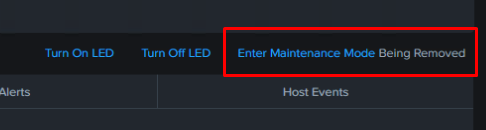
I tried remove the host for reimage it, but is stuck:
 

And when I ran the NCLI command to remove the host, trying get the status, shows the follow:



Anyone could help me for solve this issue? Any tips?

This topic has been closed for replies.

12 replies

Forum|alt.badge.img+2
  • Trailblazer
  • Oct 14, 2024 5:54 AM UTC

None, host might already removed from cluster.


Pbrito
  • Author
  • Adventurer
  • Oct 14, 2024 5:58 AM UTC

None, host might already removed from cluster.

So you’re saying I just have to go on reimaging the node?

If i’m not wrong, when the host is removed, it disappears from hardare inventory in GUI, right?


Forum|alt.badge.img+2
  • Trailblazer
  • Oct 14, 2024 6:00 AM UTC

did u chck with , host get-remove-status


Yes, u  right ! Once the host removal process completed , it should disappear from the hardware inventory in the PE UI


Pbrito
  • Author
  • Adventurer
  • Oct 14, 2024 6:05 AM UTC

did u chck with , host get-remove-status


Yes, u  right ! Once the host removal process completed , it should disappear from the hardware inventory in the PE UI

Yes soo, I already removed the node from the block too, and doesn’t disappear from UI.


I don’t know if I’m leaving something behind.


Forum|alt.badge.img+2
  • Trailblazer
  • Oct 14, 2024 6:13 AM UTC

sometime it might take time to update in the prism UI , however u can check as below


  1. run NCC checks 
  2. ncli host list
  3. restart cluster service (gensis first)
     

Pbrito
  • Author
  • Adventurer
  • Oct 14, 2024 6:51 AM UTC

sometime it might take time to update in the prism UI , however u can check as below


  1. run NCC checks 
  2. ncli host list
  3. restart cluster service (gensis first)
     

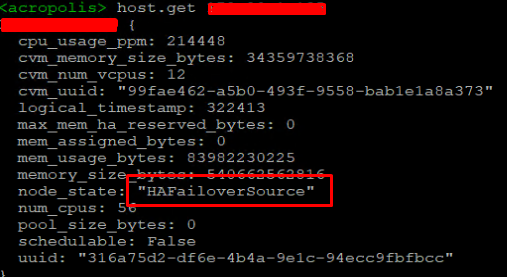
Return from NCLI host list

Seems that the node got stuck in HAFailover status.


Have a way to take it off?


Forum|alt.badge.img+6
  • Adventurer
  • Oct 15, 2024 9:38 PM UTC

I am having a similar issue.  Following….


Forum|alt.badge.img+6
  • Adventurer
  • Oct 15, 2024 9:41 PM UTC

I find this message after running ncli host list


 MARKED_FOR_REMOVAL_BUT_NOT_DETACHABLE


Forum|alt.badge.img+2
  • Trailblazer
  • Oct 16, 2024 5:22 AM UTC

have you tried by restart genesis 


Forum|alt.badge.img+6
  • Adventurer
  • Oct 16, 2024 1:17 PM UTC

I havent but will today, was next on my list before calling support


Forum|alt.badge.img+6
  • Adventurer
  • Oct 16, 2024 1:29 PM UTC

restarting genesis didnt do anything


Forum|alt.badge.img+6
  • Adventurer
  • Oct 17, 2024 2:15 PM UTC

my issue turned out to be that i am using old G6 nodes to move a G8 cluster to AHV from esxi.  When removing the G6 nodes from the cluster AHV wouldnt move vm’s off the G6 node because of a differant CPU architecture.  Need to plan shutting down and manually migrating vms to the G8’s