
Question

Questions about brownfield deployment

  • June 2, 2026
  • 2 replies
  • 17 views

Hi 

When entering a workload in Sizer, there is an option to select the existing CPU.

For example, let’s assume that we are planning to deploy 100 VMs, each with 4 vCores and 8 GB of memory.
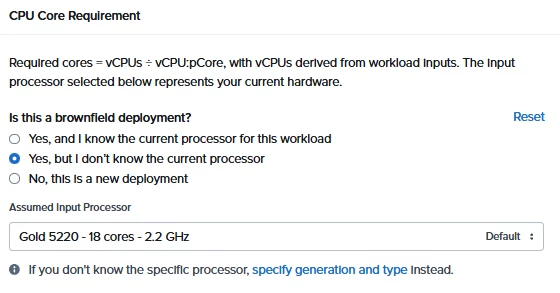


If I select “Yes, but I don’t know the current processor” and then choose Default, the estimated CPU utilization is approximately 75% when configured with a 3-node cluster, each node having 2 CPUs with 32 cores.

However, if I edit the workload and select “Yes, but I don’t know the current processor”, the estimated CPU utilization increases to around 110%.

In other words, I am not sure which criteria I should use when performing sizing.

Why does the estimated utilization differ so significantly even though the workload itself is the same?

Is there any detailed guidance available for this? It may be that I have not been able to find it, so I would appreciate your assistance.

2 replies

JeroenTielen
Forum|alt.badge.img+8

Since you have access to sizer you must be working at for a partner. You can contact  partnerhelp@nutanix.com or your local Sales Engineer. 


But to continue on your question, if you select (for the second time) “Yes, but I don’t know the current processor” which cpu is selected then?


  • Author
  • Voyager
  • June 2, 2026

Since you have access to sizer you must be working at for a partner. You can contact  partnerhelp@nutanix.com or your local Sales Engineer. 


But to continue on your question, if you select (for the second time) “Yes, but I don’t know the current processor” which cpu is selected then?


I created a workload consisting of 100 VMs, each with 4 vCores (1:3) and 8 GB of memory.

The CPU of the sized 3-node HCI physical servers is 2 x Intel Xeon 6530P Processor (32 cores, 144 cache, 2.3 GHz, DDR5 6400MHz) (64 cores).

  1. When I select “Yes, but I don’t know the current processor,” the Assumed Input Processor is selected as Gold 5220 - 18 cores - 2.2 GHz.
    In this case, the Sizing Summary estimates CPU utilization to be around 75%.
  2. When I select “No, this is a new deployment,” the Assumed Input Processor is selected as Intel 6737P (2.9GHz/32-core/270W) - 32 cores - 2.9 GHz.
    In this case, the Sizing Summary estimates CPU utilization to be around 110%.

My understanding is that option 1 would be used if the customer already has an existing workload running, while option 2 would be used for a new deployment.

However, this result seems somewhat unusual.

The 3 HCI nodes I sized have a total of 192 physical cores. If we assume a virtualization ratio of 1:3, this would provide 192 x 3 = 576 vCores.

If we add 100 VMs with 4 vCores each at a 1:3 ratio, the workload would consume 400 vCores.

Based on this, I do not understand how the estimated CPU utilization could exceed 100%.

Fundamentally, I would like to understand whether it is appropriate to select option 2 in this scenario.