


What’s new in NAI 2.7?
We’ll go through each major feature and the concepts behind it.
Nutanix Agent Gateway is Generally Available (Unified Endpoints, formerly the AI Gateway - Hybrid cloud fallback and control)
- Think of the Agent Gateway as your centralized traffic controller for all LLM inference. Whether you're calling GPT-4 on Azure, Claude on Anthropic, or your self-hosted Llama model on NAI, everything routes through one unified endpoint with consistent authentication, rate limiting, and monitoring. If your primary provider goes down or hits rate limits, traffic automatically fails over to your configured backup. You get production-grade reliability and complete visibility without rewriting your application code.
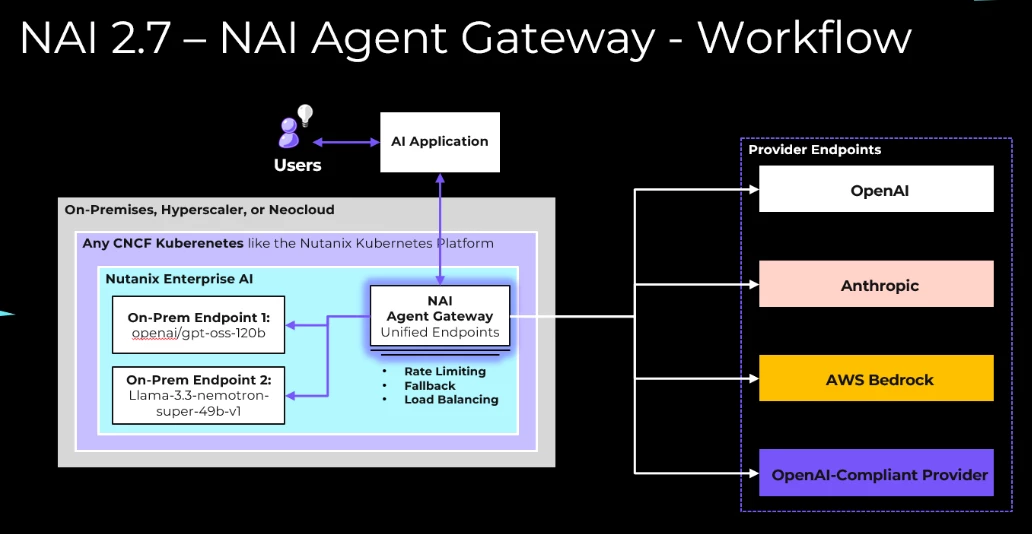
A diagram of how Unified Endpoints work as an Agent Gateway in NAI 2.7
Palo Alto Prisma AIRS Model and Endpoint Scanning Integration
- You would not deploy application code without scanning it. Why are you deploying LLMs without scanning them? NAI 2.7, with Palo Alto Networks Prisma AIRS, scans every model as it downloads before it ever runs. And once it is running, you can red-team the endpoint against known AI attack vectors and get a risk score mapped to OWASP and NIST. That is the security your CISO can present in a board meeting.
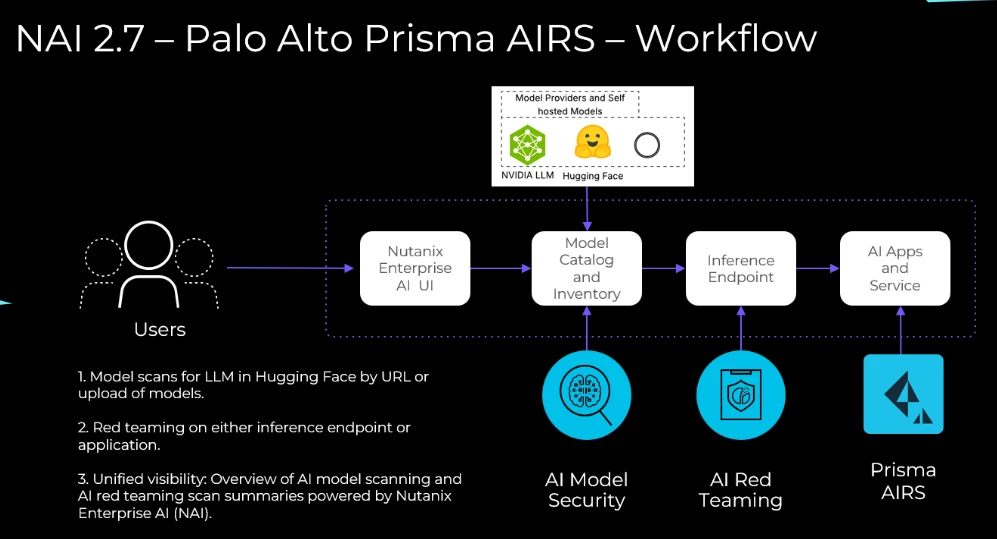
A diagram of how Palo Alto Prisma AIRS integrates with NAI for model scanning and endpoint red teaming.
Local MCP Servers (Tech Preview)
- MCP is the babblefish or Star Trek communicator for connecting apps and data to AI. Nutanix helps solve the 'control' problem on how you govern those connections at enterprise scale. Instead of every agent directly hitting your GitHub, Stripe, or internal databases, everything routes through our Agent Gateway. You define exactly which tools each API key can access, like how maybe your customer service agents get read-only database access while your DevOps agents get full GitHub write permissions. Every request is logged, audited, and rate-limited. It's like moving from the Wild West of direct API calls to a governed, observable architecture.
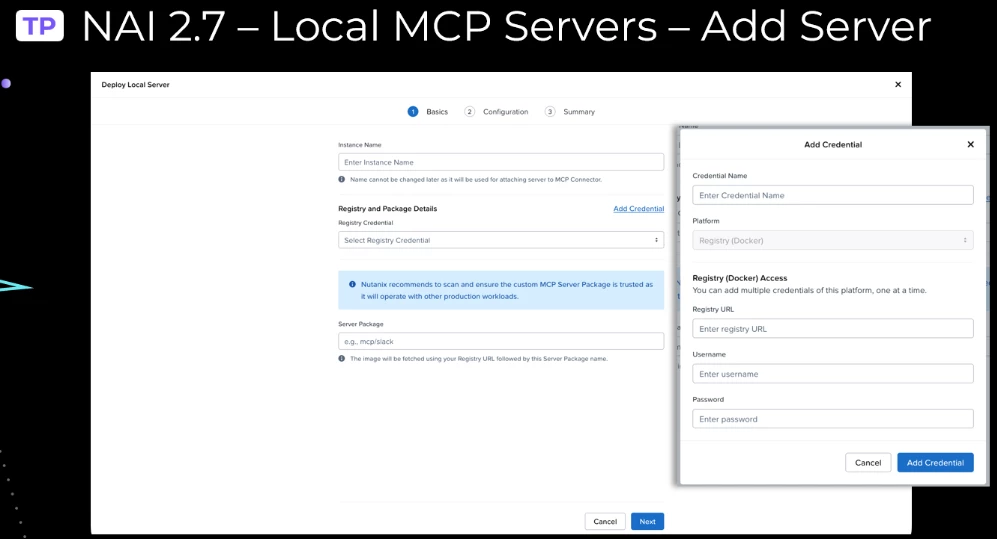
Visual user interface images of how to add a local MCP server in NAI 2.7
Batch Inferencing
- Batch inferencing is for the workloads that do not need to be fast, they just need to be done. Running 50,000 golden set evaluations? Embedding your entire document repository? Classifying a dataset? None of those need a real-time response. Submit a file, walk away, come back when it is done. NAI batch processing uses your GPU capacity efficiently without competing with your interactive users.
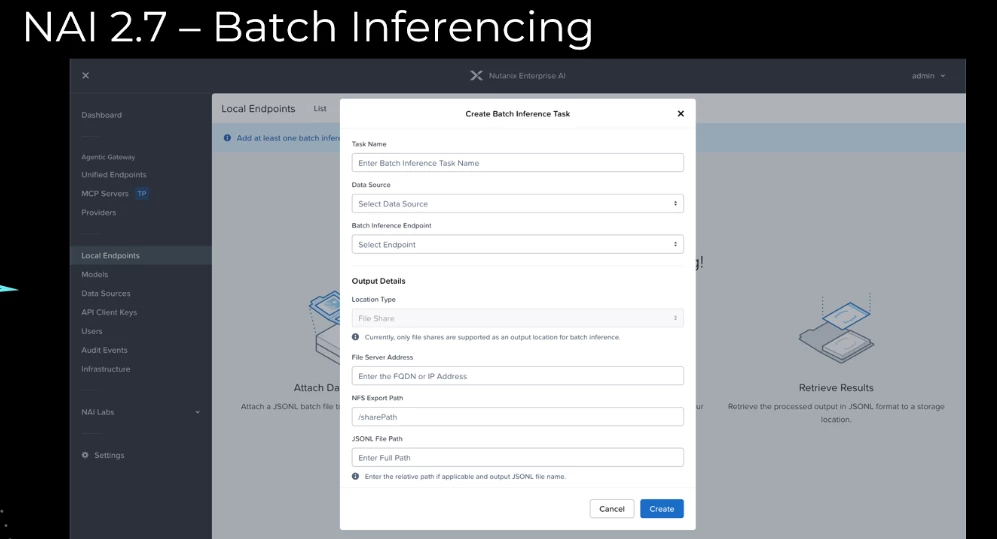
Visual user interface image of how to configure batch inferencing in NAI 2.7
NAI Labs - Agent (Tech Preview)
- Nutanix shipped a working agent, so you do not have to build one from scratch to see the value. NAI Labs now defaults to an agent application that uses MCP tools through a unified endpoint. Open it, run it, see how the pieces connect (model plus MCP). If you want to see agentic AI in action, this is your starting point.
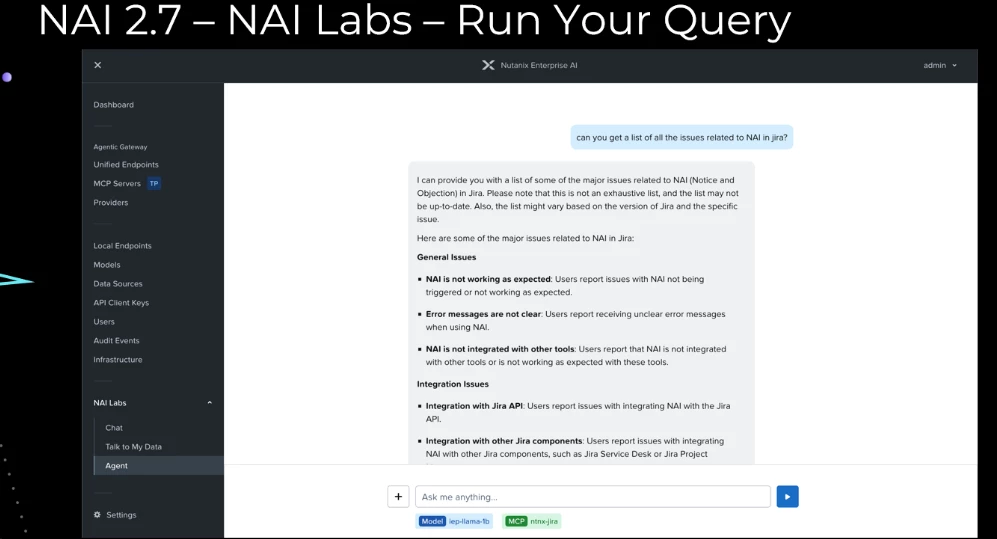
Visual user interface image of using NAI Labs new test Agent in NAI 2.7
New Pre-Validated Models
Hugging Face:
- google/gemma-4-26B-A4B-it - mid-scale MoE (Mode of Experts) Gemma 4 instruction-tuned
- google/gemma-4-31B-it - full-scale Gemma 4 instruction-tuned
- google/gemma-4-E2B-it - The "E" in E2B and E4B stands for "effective" parameters.
- nvidia/NVIDIA-Nemotron-3-Nano-30B-A3B-FP8 - efficient MoE, quantized for throughput
- nvidia/NVIDIA-Nemotron-3-Nano-30B-A3B-BF16 - full precision MoE for quality-sensitive workloads
NVIDIA NIM:
- nim/llama-nemotron-embed-vl-1b-v2 - visual-language embedding for multimodal RAG
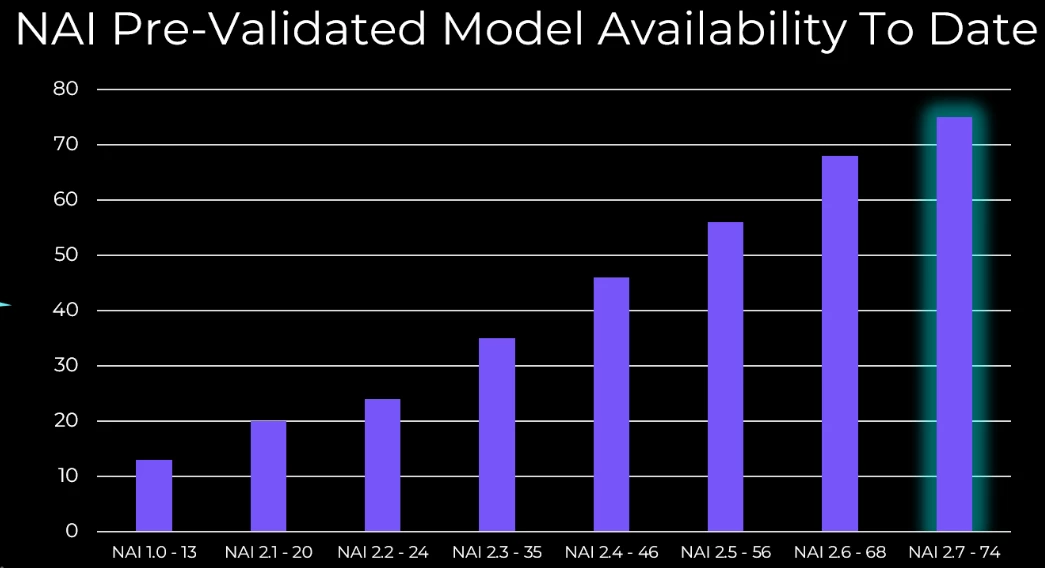
Visual graph of the pre-validated model availability in NAI from launch to the latest models in 2.7 (74 total)
What now?
- Check out the dedicated NAI YouTube playlist to learn and get educated on all things Nutanix Enterprise AI
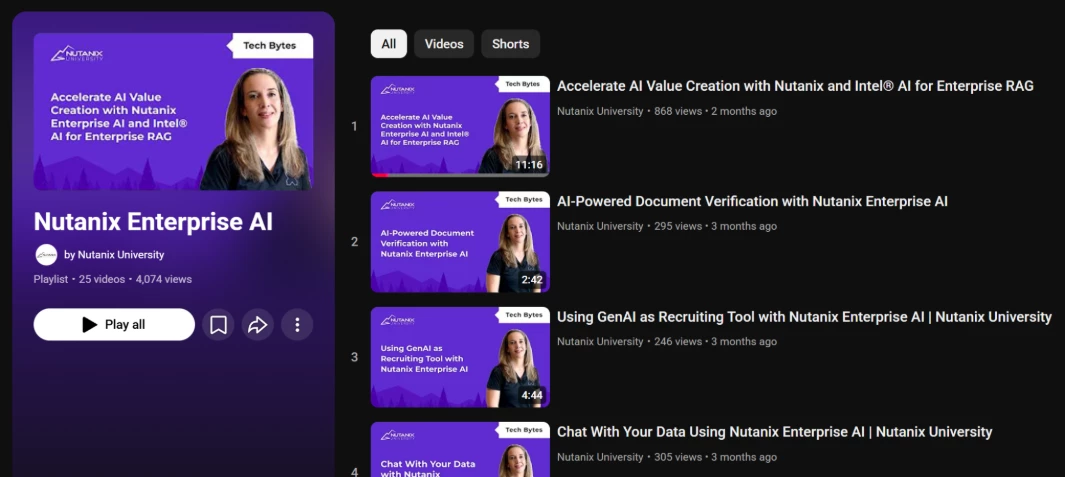
Image showing a preview of the Nutanix Enterprise AI playlist on YouTube
- Nutanix customers can download a 60-day license to play with on the support portal that can run on any Kubernetes: https://portal.nutanix.com/page/downloads/list
- Get started with installing NAI here: https://portal.nutanix.com/page/documents/details?targetId=Nutanix-Enterprise-AI:top-nai-install-t.html
What is Nutanix Enterprise AI?
A Kubernetes application that enables model deployment and model (LLM) routing with control for your GenAI applications and developers, including workflow security, observability, and governance that can save you money.
- Model Control and Governance - a centralized inferencing control plane that deploys and manages LLMs and their endpoints (OpenAI-compliant APIs) that’s simple, secure, and sovereign
- Run AI Securely, Anywhere - NAI deploys on any CNCF-certified Kubernetes, that can run at the edge, datacenter, public clouds, or even in an air-gapped environment.
- Scale to All Your AI Apps and Data - Standardize generative AI infrastructure across an organization, including delivering AI resources to your applications, developers, and data scientists.
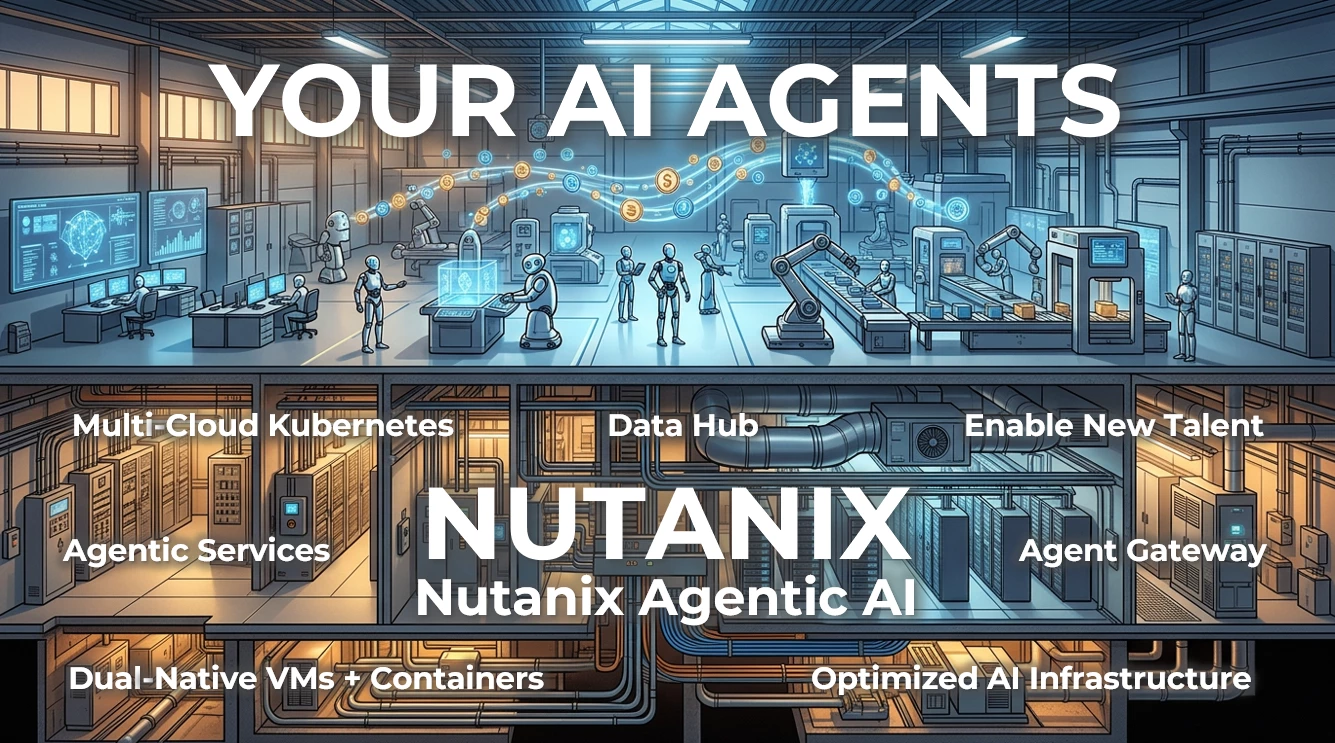
Visual showing a concept where working robots on a main floor are building AI systems in a lab, with a cutaway of the floor below showing the infrastructure supporting them, with ‘Nutanix’ overlaid. This portrays where Nutanix Agentic AI sits in relation to agentic factories.
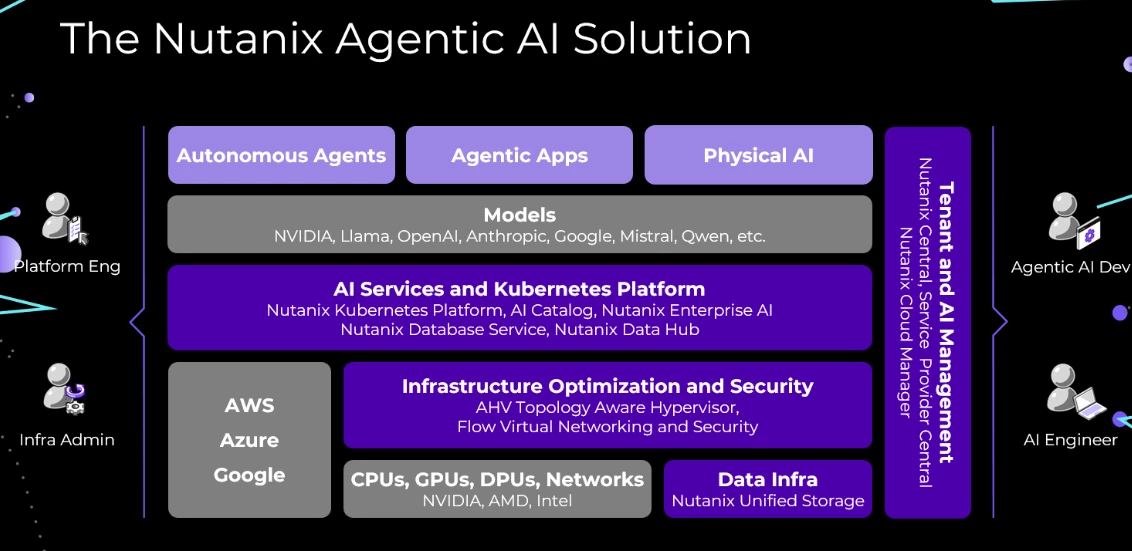
Visual diagram showing the Nutanix Agentic AI solution with a complete mapping of Nutanix products to key AI needs.