Solved

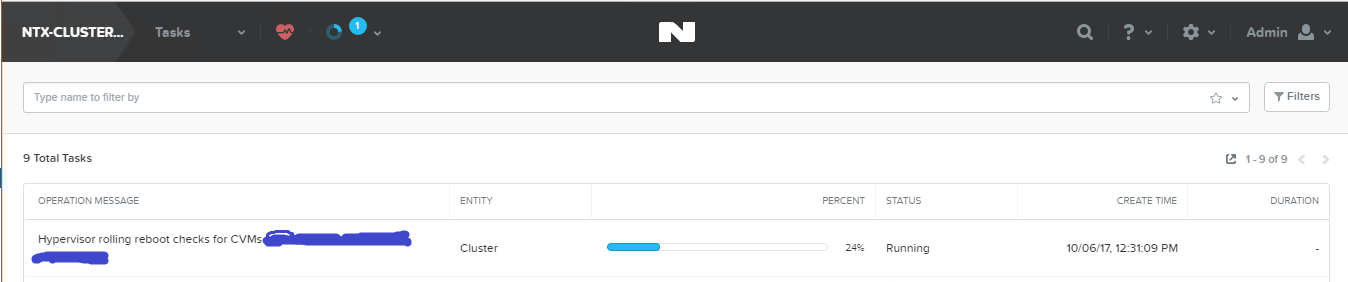
Request Reboot: stuck at 24%

  • Oct 6, 2017 6:25 AM UTC
  • 9 replies
  • 3630 views

Forum|alt.badge.img+4
Hi everyone

I tried to reboot hosts using "Request Reboot" in the gear icon.
But its progress completely stucked at 24%.
How can I resolve this situation?

AOS 5.1.2
ESXi 6.0
Best answer by manfred

The "request reboot" is an option which is actually only supported for Xenserver environments.
the button has been removed with AOS 5.5.
To get rid of this task it is highly recommended to open a support case and let the support do this.
View original
This topic has been closed for replies.

9 replies

sandeepmp
Nutanix Employee
Forum|alt.badge.img+19
  • Nutanix Employee
  • Oct 24, 2017 12:23 PM UTC
tamura

Can u open a support case on this?

Forum|alt.badge.img+4
  • Author
  • Voyager
  • Oct 24, 2017 11:49 PM UTC
I'm using Dell Nutanix so I can't open case at Nutanix support.

I'm going to ask Dell, Thanks sandeepmp

Forum|alt.badge.img
  • Voyager
  • Dec 1, 2017 12:17 AM UTC
I've got the same thing going on now - stuck at 24%. Did you find a solution?

Forum|alt.badge.img+4
  • Author
  • Voyager
  • Dec 1, 2017 1:41 AM UTC
thomasdox

No, not yet unfortunately.

mccabejr_52
  • Adventurer
  • Aug 1, 2018 1:42 PM UTC
One of my clusters is in this same situation. Has anyone figured out a non-apocalyptic approach to resolve this (i.e. without restarting the cluster)?

mccabejr_52
  • Adventurer
  • Aug 1, 2018 2:05 PM UTC
One of my clusters is in this same situation. Has anyone figured out a non-apocalyptic approach to resolve this (i.e. without restarting the cluster)?

I should have included that we have checked:

code:
acli task.list operation_type_list=kRunning


However, nothing returns. We can run the following:

code:
acli tasklist limit=2500 | grep -i running


This will actually result in the task (hypervisor rolling reboot checks) GUID being returned with a status of kRunning.

When I use the Task UUID and query for details, I see the following:

code:
acli task.get 


In the details returned, most of it looks as you would expect. However, I noted two details specifically:

code:
{
"canceled": true,
...
"deleted": false,
"disable_auto_progress_update": true,
"percentage_complete": 24,
"requested_state_transition": 4,
"start_time_usecs": "2018-07-30T..."
"status": "kRunning",
...
}


In the past, I've been able to leverage the following to reset this stale issue, similar to the following:

code:
acli task.update task_list= status=kAborted


However, that seems to have been removed from acli? When I check my options, I see the following:

code:
 help task
Commands:
cancel
get
list
poll


Checking the ACLI reference, it looks like it has been removed?

If I try to poll the task that's cancelled but kRunning, I get the following response:

code:
task.poll 
{
"timedout": true
}


Any help would be appreciated. 😑

Forum|alt.badge.img+16
  • Vanguard
  • Aug 21, 2018 6:10 AM UTC
Another way to set the task to succeeded:

code:
/bin/ergon_update_task --task_uuid=TASK_ID_HERE --task_status=succeeded

manfred
Forum|alt.badge.img+8
  • Trailblazer
  • Answer
  • Aug 21, 2018 8:02 AM UTC
The "request reboot" is an option which is actually only supported for Xenserver environments.
the button has been removed with AOS 5.5.
To get rid of this task it is highly recommended to open a support case and let the support do this.

mccabejr_52
  • Adventurer
  • Aug 21, 2018 9:30 AM UTC
That's what we winded up doing, @manfred. The I wish we had known the "request reboot" wasn't an option for our environment before initiating it, but we know how to recover from it in the future - in a worst case scenario.

Just an annoyance we had to work through.