Question

No “Size and Scale” options after unregistering previous Prism Central and redeploying

  • May 6, 2026
  • 15 replies
  • 67 views

anhpc

I'm trying to deploy Prism Central (PC) from Prism Element (PE). Previously, I had registered a PC to the cluster and then unregistered it to redeploy a new one.

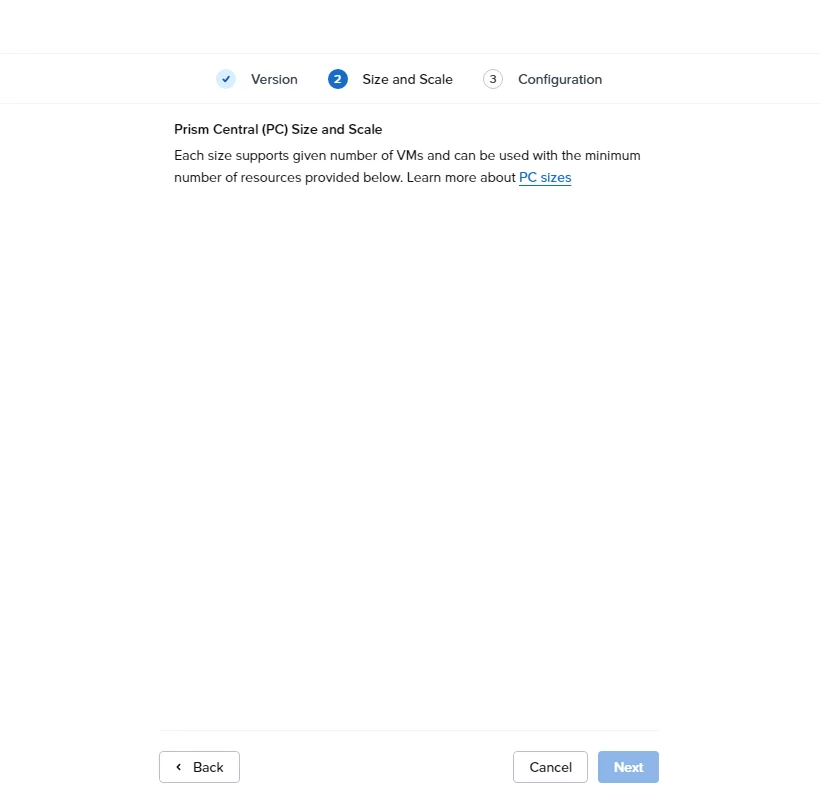
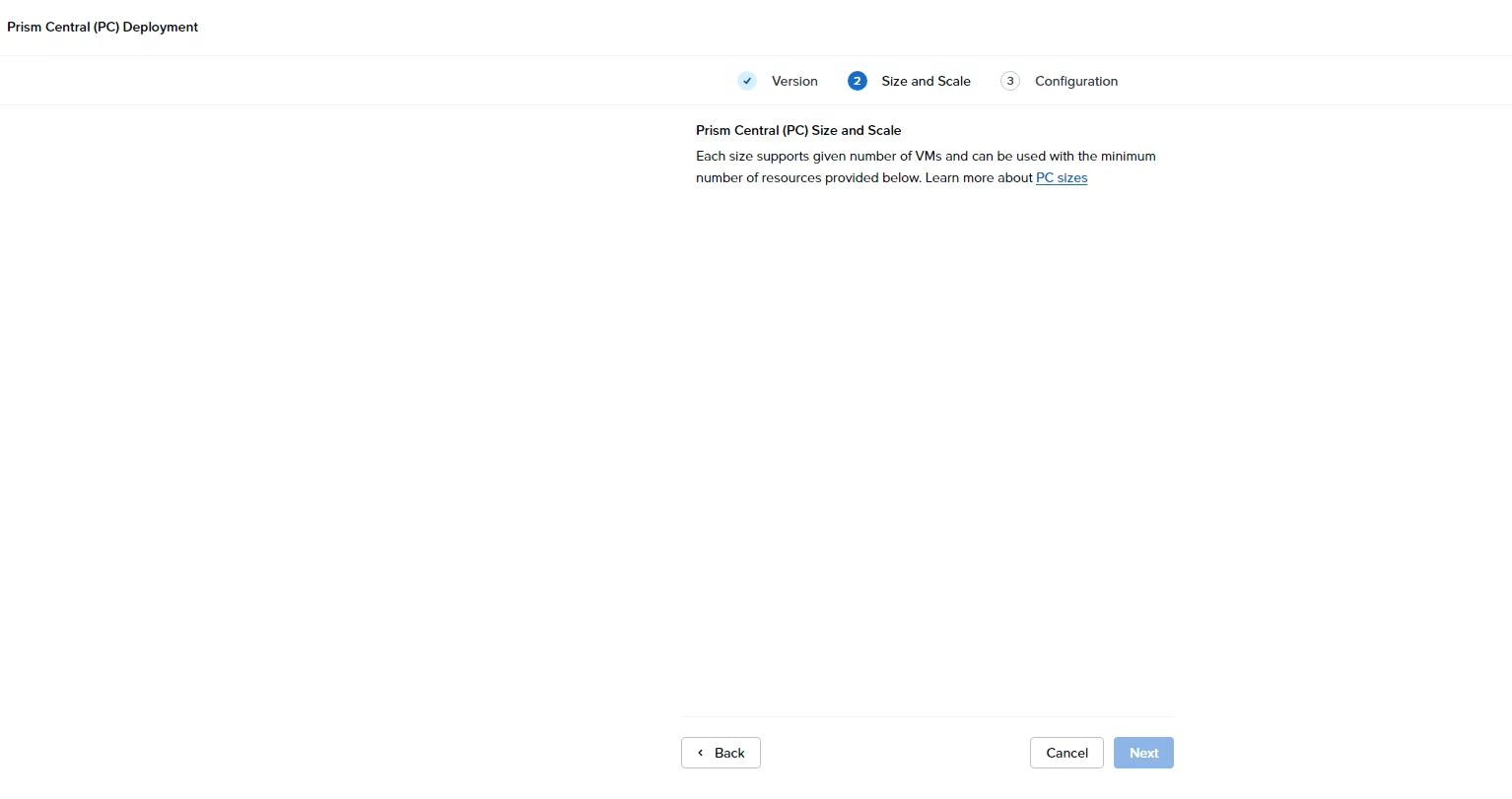
However, during the new deployment, at the “Size and Scale” step, no selectable options (Small/Medium/Large) are shown — only the description text appears.

Current situation:

  • No dropdown or selectable options available
  • No explicit error message
  • Cluster is running normally

I'm not sure if this issue is related to the previous register/unregister of PC, or due to resource constraints, version mismatch, or a UI issue.

Has anyone experienced this after unregistering PC? Is there any cleanup required on the cluster before redeploying Prism Central?

15 replies

jarrodl
Forum|alt.badge.img+2
  • Vanguard
  • May 6, 2026

I'm trying to deploy Prism Central (PC) from Prism Element (PE). Previously, I had registered a PC to the cluster and then unregistered it to redeploy a new one.

However, during the new deployment, at the “Size and Scale” step, no selectable options (Small/Medium/Large) are shown — only the description text appears.

Current situation:

  • No dropdown or selectable options available
  • No explicit error message
  • Cluster is running normally

I'm not sure if this issue is related to the previous register/unregister of PC, or due to resource constraints, version mismatch, or a UI issue.

Has anyone experienced this after unregistering PC? Is there any cleanup required on the cluster before redeploying Prism Central?

There are some issues that can come from unregistered a PE cluster from a PC.
Additional information can be found here: https://portal.nutanix.com/page/documents/details?targetId=Web-Console-Guide-Prism-v7_5:mul-unregister-wc-t.html


That documentation also includes some steps on how to resolve some common issues that come from unregistration actions.


Forum|alt.badge.img+3

to add to above comment, in Nutanix, you remove a cluster from PC if you want to decommission the cluster,thats why you might face an issue if you like to add the same cluster again to a PC (black listed), but again that can be sorted out via CLI as well,just let us know if you faced it. :)


anhpc
  • Author
  • Adventurer
  • May 7, 2026

to add to above comment, in Nutanix, you remove a cluster from PC if you want to decommission the cluster,thats why you might face an issue if you like to add the same cluster again to a PC (black listed), but again that can be sorted out via CLI as well,just let us know if you faced it. :)

Yes, that is exactly the issue I am facing.


Previously, I registered a Prism Central 7.5.1.1 instance to the cluster and later unregistered/decommissioned it.


Could you please share the CLI steps or the proper procedure to clear the old Prism Central registration/trust information so I can deploy/register the new PC successfully?


Thank you.


Forum|alt.badge.img+3

login to CVM and try zkcat /appliance/physical/blacklisted | strings

if you got Zookpper error:no node, that means there is no entry in black list if anything else, that means there is an entry and you need to run the below command.
but before that , you need to ensure that PE is not connected to any PC :

#ncli multicluster get-cluster-state   

it should give you 0 .
then run below command one more time 
 

zkrm /appliance/physical/blacklisted
and one more time to confirm there is no entry.

zkcat /appliance/physical/blacklisted | strings


for production environment , always involve support team!


anhpc
  • Author
  • Adventurer
  • May 7, 2026

login to CVM and try zcat /appliance/physical/blacklisted | strings

if you got Zookpper error:no node, that means there is no entry in black list if anything else, that means there is an entry and you need to run the below command.
but before that , you need to ensure that PE is not connected to any PC :

#ncli multicluster get-cluster-state   

it should give you 0 .
then run below command one more time 
 

zkrm /appliance/physical/blacklisted
and one more time to confirm there is no entry.

zcat /appliance/physical/blacklisted | strings


for production environment , always involve support team!

nutanix@NTNX-SN-D-CVM:xx.xx.xx.xx:~$ clear
nutanix@NTNX-SN-D-CVM:xx.xx.xx.xx:~$ zcat /appliance/physical/blacklisted | strings
gzip: /appliance/physical/blacklisted.gz: No such file or directory
nutanix@NTNX-SN-D-CVM:xx.xx.xx.xx:~$ ncli multicluster get-cluster-state
Registered Cluster Count: 0
    [None]
nutanix@NTNX-SN-D-CVM:xx.xx.xx.xx:~$ zkrm /appliance/physical/blacklisted
Zookeeper error: no node.
nutanix@NTNX-SN-D-CVM:xx.xx.xx.xx:~$ zcat /appliance/physical/blacklisted | strings
gzip: /appliance/physical/blacklisted.gz: No such file or directory
nutanix@NTNX-SN-D-CVM:xx.xx.xx.xx:~$


Forum|alt.badge.img+3

Hi,

I am sorry there was a typo in my comment and I have fixed it (zcat should be zkcat).

would you try again with PC registration and let us know if you face the same issue


anhpc
  • Author
  • Adventurer
  • May 7, 2026

Still displaying: Zookeeper error: no node.


Forum|alt.badge.img+3

Zookeeper error: no node means that PE is not blacklisted anymore.


anhpc
  • Author
  • Adventurer
  • May 7, 2026

at the “Size and Scale” step, no selectable options (Small/Medium/Large) are shown


LMohammed
Forum|alt.badge.img+1
  • Trailblazer
  • May 7, 2026

Hi ​@anhpc 

Sorry I nee to start with the basics,

I’m assuming that you have followed the proper way to unregister the PC :
https://portal.nutanix.com/page/documents/details?targetId=Web-Console-Guide-Prism-v7_5:mul-unregister-wc-t.html
 

1- Verify from any cvm

ncli multicluster get-cluster-state ==> the output should be Registered Cluster Count: 0
 

2- Verify from Prism Central

ncli multicluster get-cluster-state ==> The output should NOT contain:

The cluster name
The cluster UUID

3- Confirm Cleanup Script Completed?

Otherwise, Please try to redeploy another version of PC and check if you will face the same error again!


Forum|alt.badge.img+3

can you do one more thing
is it possible to download the same version and upload the binaries (if you did not do that already), and if possible download a different version.


JeroenTielen
Forum|alt.badge.img+8

The blacklisted thing should not be posted here :( And that is not the cause of this issue. 


This is more a caching thing or something else. Can you try deploying PC with api calls or via this powershell script ;) 


Function Install-NtnxPrismCentral {
<#
.SYNOPSIS
Installs Nutanix Prism Central, single node or scaled out cluster.

If no storage container name is given, the SelfServiceContainer will be used.
If no PC version is given, the latest available version will be used.

Note: The subnet given must already exist in the cluster.
Note: The storage container given must already exist in the cluster.
Note: This command will wait until the installation is completed. This can take a while. (approx. 30-60 minutes)
.DESCRIPTION
Connects to a Nutanix cluster PE with the given credentials and installs Prism Central.
.PARAMETER ClusterAddress
The address of the Nutanix cluster. Can be FQDN or IP.
.PARAMETER UserName
The username to connect to the Nutanix cluster.
.PARAMETER Password
The password to connect to the Nutanix cluster.
.PARAMETER PCVersion
The version of Prism Central to install. If not given, the latest available version will be used.
.PARAMETER PCSize
The size of the Prism Central VM(s). Can be tiny (xsmall), small, large or xlarge.
.PARAMETER ScaledOut
Boolean to indicate if a scaled out cluster should be installed. $true or $false.
.PARAMETER SubnetName
The name of the subnet to use for the Prism Central VM(s).
.PARAMETER PCSubnetMask
The subnet mask to use for the Prism Central VM(s).
.PARAMETER PCGateway
The default gateway to use for the Prism Central VM(s).
.PARAMETER PCDNS
The DNS server to use for the Prism Central VM(s).
Note: Use only one DNS server. Later you can use the Set-NtnxClusterDNS command to add more.
.PARAMETER PCNTP
The NTP server to use for the Prism Central VM(s).
Note: Use only one NTP server. Later you can use the Set-NtnxClusterNTP command to add more.
.PARAMETER StorageContainerName
The name of the storage container to use for the Prism Central VM(s). If not given, the SelfServiceContainer will be used.
.PARAMETER PCVMNames
An array of names to use for the Prism Central VM(s). For single node, provide 1 name. For scaled out, provide 3 names.
NOTE: Dont use quotes in the names. Just separate them with a comma. See example.
.PARAMETER PCVMIPs
An array of IP addresses to use for the Prism Central VM(s). For single node, provide 1 IP. For scaled out, provide 3 IPs.
NOTE: Dont use quotes in the IPs. Just separate them with a comma. See example.
.PARAMETER PCVIP
The Virtual IP address to use for the Prism Central cluster.
.EXAMPLE
Install-NtnxPrismCentral -ClusterAddress "10.0.0.1" -UserName "admin" -Password "nutanix/4u" -PCVersion "pc.2024.2.0.6" -PCSize "tiny" -ScaledOut $true -SubnetName "MySubnet" -PCSubnetMask "255.255.255.0" -PCGateway "10.0.0.1" -PCDNS "10.0.0.2" -PCNTP "10.0.0.3" -StorageContainerName "SelfServiceContainer" -PCVMNames PCVM1,PCVM2,PCVM3 -PCVMIPs 10.0.0.4,10.0.0.5,10.0.0.6 -PCVIP "10.0.0.7"

#>
param (
[Parameter(Mandatory)]
[string]$ClusterAddress,
[Parameter(Mandatory)]
[string]$Password,
[Parameter(Mandatory)]
[string]$UserName,
[Parameter(Mandatory=$false)]
[string]$PCVersion,
[Parameter(Mandatory)]
[string]$PCSize, # tiny (xsmall), small, large, xlarge
[Parameter(Mandatory)]
[string]$ScaledOut, # $true or $false
[Parameter(Mandatory)]
[string]$SubnetName,
[Parameter(Mandatory)]
[string]$PCSubnetMask,
[Parameter(Mandatory)]
[string]$PCGateway,
[Parameter(Mandatory)]
[string]$PCDNS,
[Parameter(Mandatory)]
[string]$PCNTP,
[Parameter(Mandatory=$false)]
[string]$StorageContainerName,
[Parameter(Mandatory)]
[array]$PCVMNames,
[Parameter(Mandatory)]
[array]$PCVMIPs,
[Parameter(Mandatory)]
[string]$PCVIP
)
$Credentials = New-Object System.Management.Automation.PSCredential ($UserName, (ConvertTo-SecureString $Password -AsPlainText -Force))
# Get Storage Container UUID
$Uri = "https://${ClusterAddress}:9440/PrismGateway/services/rest/v2.0/storage_containers"
$StorageContainers = Invoke-WebRequest -Method GET -Uri $Uri -Headers $Header -Authentication Basic -Credential $Credentials -SkipCertificateCheck | ConvertFrom-Json
If (-not $StorageContainerName) {
$StorageContainerUUID = ($StorageContainers.entities | Where-Object {$_.name -like "SelfServiceContainer"}).storage_container_uuid
} Else {
$StorageContainerUUID = ($StorageContainers.entities | Where-Object {$_.name -like $StorageContainerName}).storage_container_uuid
}
If (-not $StorageContainerUUID) {
Write-Host "Storage Container $StorageContainerName not found. Exiting."
Return
}
# Get Network UUID
$Uri = "https://${ClusterAddress}:9440/api/nutanix/v2.0/networks/?includeOverlaySubnets=false"
$Networks = Invoke-WebRequest -Method GET -Uri $Uri -Headers $Header -Authentication Basic -Credential $Credentials -SkipCertificateCheck | ConvertFrom-Json
$NetworkUUID = ($Networks.entities | Where-Object {$_.name -like $SubnetName}).uuid
If (-not $NetworkUUID) {
Write-Host "Network $SubnetName not found. Exiting."
Return
}
# Get PC Versions and their sizes
$Uri = "https://${ClusterAddress}:9440/PrismGateway/services/rest/v1/upgrade/prism_central_deploy/softwares"
$PCVersions = Invoke-WebRequest -Method GET -Uri $Uri -Headers $Header -Authentication Basic -Credential $Credentials -SkipCertificateCheck | ConvertFrom-Json
If ($PCVersion -eq "") {
$PCInstallVersion = ($PCVersions.entities | Sort-Object {$_.version} -Descending)[0]
} Else {
$PCInstallVersion = $PCVersions.entities | Where-Object {$_.version -eq $PCVersion}
}
If (-not $PCInstallVersion) {
Write-Host "PC Version $PCVersion not found. Exiting. Please manually upload PC binary version."
Return
}
$PCInstallSize = $PCInstallVersion.prismCentralSizes | Where-Object {$_.pcVmFormFactor -eq $PCSize}
If (-not $PCInstallSize) {
Write-Host "PC Size $PCSize not found. Exiting. Available sizes are tiny (xsmall), small, large, xlarge."
Return
}
$PCDiskSize = $PCInstallSize.diskSizeInGib * 1024 * 1024 * 1024
$PCMemorySize = $PCInstallSize.memorySizeInGib * 1024 * 1024 * 1024
$PCvCPUCount = $PCInstallSize.vcpus
# Create Header and Body for API call. Yes this could be created nicer ;) But this works as well :P
$Header = @{
"Accept" = "application/json"
"Content-Type" = "application/json;charset=UTF-8"
}
If ($ScaledOut -eq $true) {
$Body = @{
"resources" = @{
"pc_vm_list" = @(
@{
"vm_name" = $PCVMNames[0]
"container_uuid" = "$StorageContainerUUID"
"num_sockets" = $PCvCPUCount
"data_disk_size_bytes" = [Int64]$PCDiskSize
"memory_size_bytes" = [Int64]$PCMemorySize
"nic_list" = @(
@{
"ip_list" = @(
$PCVMIPs[0]
)
"network_configuration" = @{
"network_uuid" = "$NetworkUUID"
"subnet_mask" = "$PCSubnetMask"
"default_gateway" = "$PCGateway"
}
}
)
"dns_server_ip_list" = @(
"$PCDNS"
)
"ntp_server_list" = @(
"$PCNTP"
)
},
@{
"vm_name" = $PCVMNames[1]
"container_uuid" = "$StorageContainerUUID"
"num_sockets" = $PCvCPUCount
"data_disk_size_bytes" = [Int64]$PCDiskSize
"memory_size_bytes" = [Int64]$PCMemorySize
"nic_list" = @(
@{
"ip_list" = @(
$PCVMIPs[1]
)
"network_configuration" = @{
"network_uuid" = "$NetworkUUID"
"subnet_mask" = "$PCSubnetMask"
"default_gateway" = "$PCGateway"
}
}
)
"dns_server_ip_list" = @(
"$PCDNS"
)
"ntp_server_list" = @(
"$PCNTP"
)
},
@{
"vm_name" = $PCVMNames[2]
"container_uuid" = "$StorageContainerUUID"
"num_sockets" = $PCvCPUCount
"data_disk_size_bytes" = [Int64]$PCDiskSize
"memory_size_bytes" = [Int64]$PCMemorySize
"nic_list" = @(
@{
"ip_list" = @(
$PCVMIPs[2]
)
"network_configuration" = @{
"network_uuid" = "$NetworkUUID"
"subnet_mask" = "$PCSubnetMask"
"default_gateway" = "$PCGateway"
}
}
)
"dns_server_ip_list" = @(
"$PCDNS"
)
"ntp_server_list" = @(
"$PCNTP"
)
}
)
"cmsp_config" = @{
"platform_network_configuration" = @{
"subnet_mask" = "255.255.255.0"
"type" = "kPrivateNetwork"
"default_gateway" = "192.168.5.1"
}
"pc_domain_name" = "prism-central.cluster.local"
"platform_ip_block_list" = @(
"192.168.5.2 192.168.5.64"
)
}
"version" = $PCInstallVersion.version
"should_auto_register" = $false
"virtual_ip" = "$PCVIP"
}
} | ConvertTo-Json -Depth 10
} ElseIf ($ScaledOut -eq $false) {
$Body = @{
"resources" = @{
"pc_vm_list" = @(
@{
"vm_name" = $PCVMNames[0]
"container_uuid" = "$StorageContainerUUID"
"num_sockets" = $PCvCPUCount
"data_disk_size_bytes" = [Int64]$PCDiskSize
"memory_size_bytes" = [Int64]$PCMemorySize
"nic_list" = @(
@{
"ip_list" = @(
$PCVMIPs[0]
)
"network_configuration" = @{
"network_uuid" = "$NetworkUUID"
"subnet_mask" = "$PCSubnetMask"
"default_gateway" = "$PCGateway"
}
}
)
"dns_server_ip_list" = @(
"$PCDNS"
)
"ntp_server_list" = @(
"$PCNTP"
)
}
)
"cmsp_config" = @{
"platform_network_configuration" = @{
"subnet_mask" = "255.255.255.0"
"type" = "kPrivateNetwork"
"default_gateway" = "192.168.5.1"
}
"pc_domain_name" = "prism-central.cluster.local"
"platform_ip_block_list" = @(
"192.168.5.2 192.168.5.64"
)
}
"version" = $PCInstallVersion.version
"should_auto_register" = $false
"virtual_ip" = "$PCVIP"
}
} | ConvertTo-Json -Depth 10
}
$Uri = "https://${ClusterAddress}:9440/api/nutanix/v3/prism_central"
$Response = Invoke-WebRequest -Method POST -Uri $Uri -Headers $Header -Body $Body -Authentication Basic -Credential $Credentials -SkipCertificateCheck
Write-Host $Response.Content
$uri = "https://${ClusterAddress}:9440/PrismGateway/services/rest/v1/progress_monitors"
Do {
$Poll = (Invoke-WebRequest -Method GET -Uri $Uri -Headers $Header -Authentication Basic -Credential $Credentials -SkipCertificateCheck) | ConvertFrom-Json
$Status = ($poll.entities | where-object {$_.operation -eq "PrismCentralDeploymentRequest"}).status | Select-Object -First 1
$Percentage = ($Poll.entities | where-object {$_.operation -eq "PrismCentralDeploymentRequest"}).percentageCompleted | Select-Object -First 1
Write-Host "Current Status Installing Prism Central $PCVIP : $Status" -ForegroundColor Yellow
Write-Host "Current Percentage Installing Prism Central : $Percentage" -ForegroundColor Yellow
Write-Host "Polling again in 30 seconds..." -ForegroundColor Yellow
Write-Host "---------------------------------------------------------------" -ForegroundColor White
Start-Sleep 30
} Until ($Status -ne "running")
}


anhpc
  • Author
  • Adventurer
  • May 8, 2026

Hi all, 

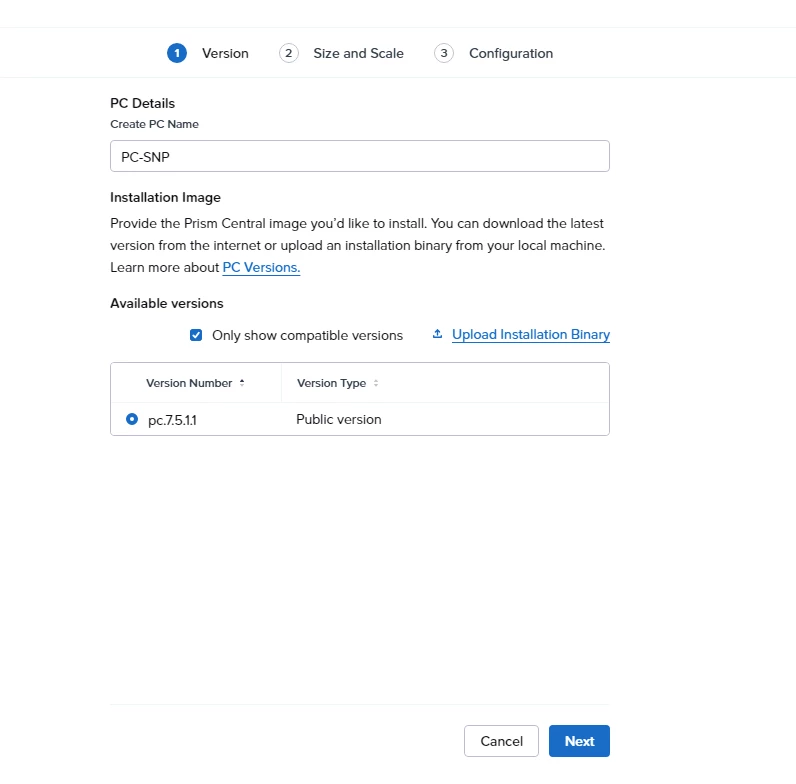
Delete the downloaded pc7.5.1.1 version in the CVM and re-upload it in step1; everything worked fine.


JeroenTielen
Forum|alt.badge.img+8

Lol. So easy. 😅


LMohammed
Forum|alt.badge.img+1
  • Trailblazer
  • May 8, 2026

@anhpc glad it helps :)