


When I hear the words clean room, my mind goes straight to Dexter — the TV show about a forensic blood spatter analyst who moonlights as a vigilante. His clean room is meticulous: sealed in plastic, no trace evidence, no contamination, nothing gets in or out. In some ways, it makes perfect sense as a metaphor. Dexter was in the business of containing and eliminating threats — and in the IT world, so are we. We are just going after ransomware actors instead of murderers. The plastic sheeting is a little different, but the principle is the same: isolate the threat completely before you do the work.
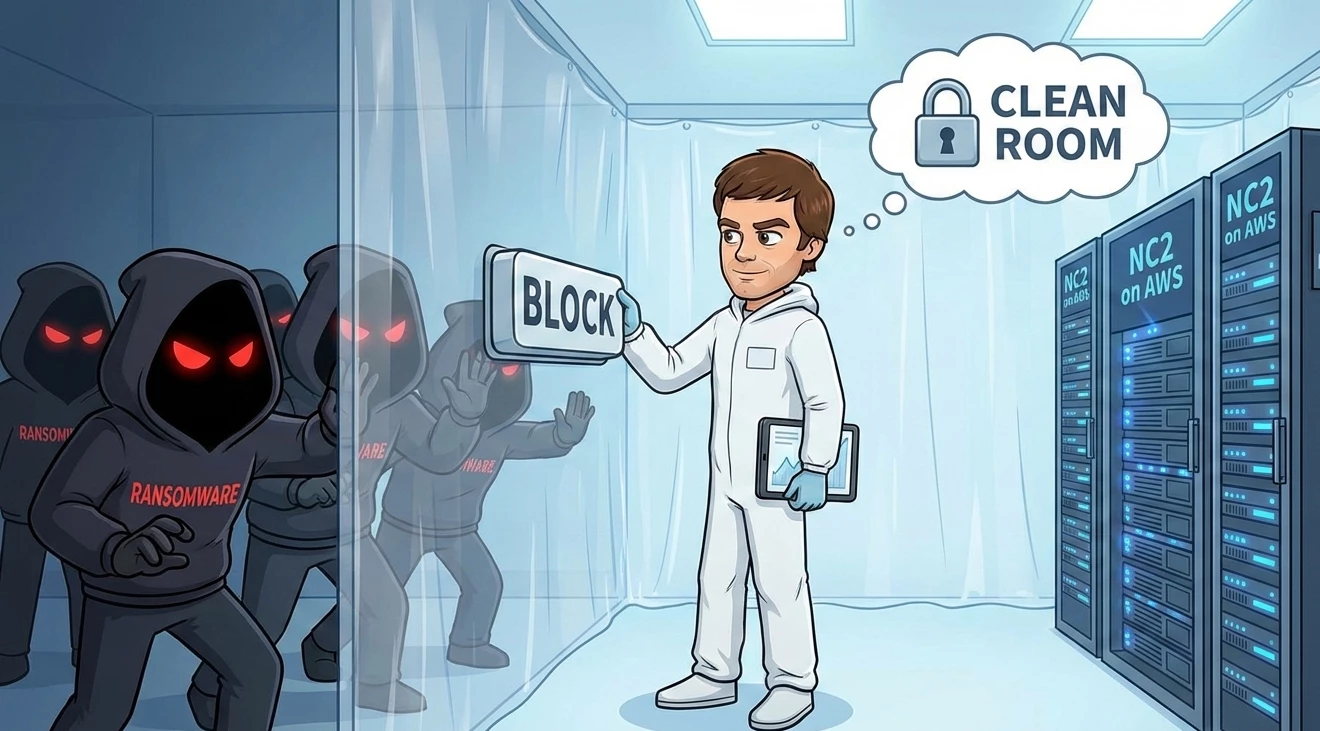
Ransomware recovery used to mean one thing: restore from backup and hope for the best. That approach has a serious flaw — if your recovery environment connects to the same infected infrastructure you are restoring from, you risk reinfecting your clean data before you ever flip a switch. The answer is not faster backups. It is a clean room: an isolated, air-gapped environment where you can validate, inspect, and confidently restore workloads without exposing them to a compromised network.
With Nutanix Cloud Clusters (NC2) on AWS, you can build exactly that — and keep the cost near zero until you actually need it.
What Is a Ransomware Clean Room?
A clean room in the context of ransomware recovery is a logically isolated environment — completely disconnected from your production network — where recovered workloads can be brought online, scanned, validated, and tested before being returned to production. Think of it as a quarantine ward for your data: nothing goes back into the hospital until it has been cleared.
The challenge for most organizations is that maintaining a dedicated clean room means paying for infrastructure that sits idle 99% of the time. NC2 on AWS solves this with two DR deployment models that keep your costs near zero until an incident occurs.
The Architecture: Pilot Light and Zero Compute DR with MST
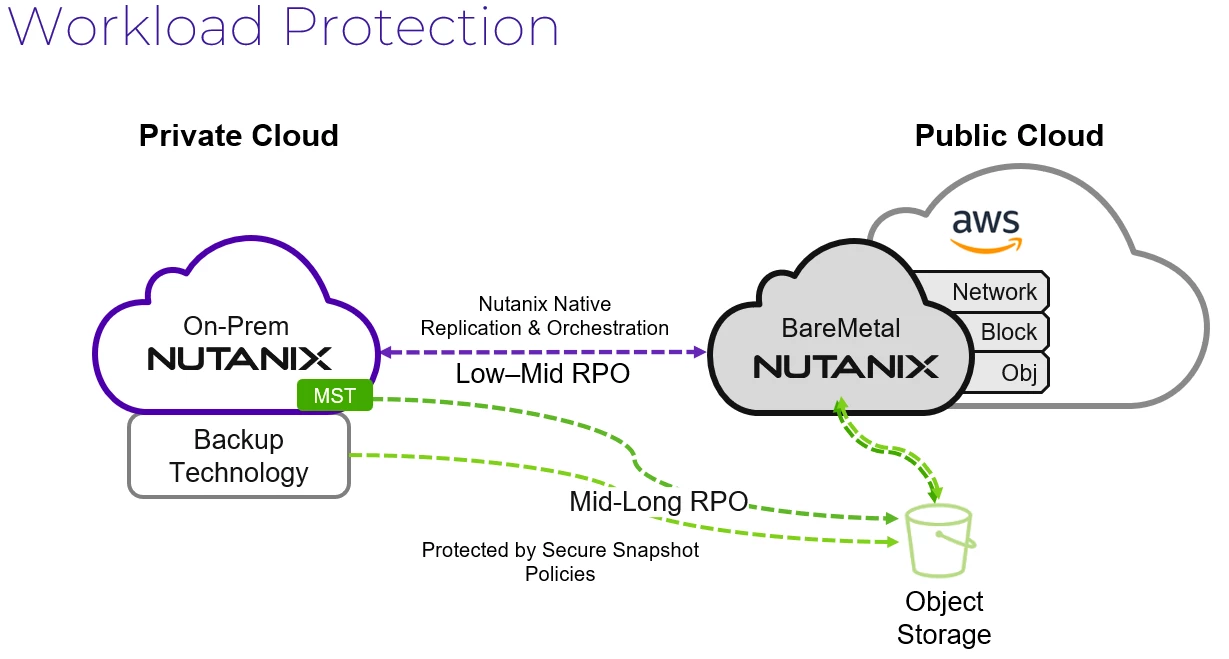
Nutanix Multi-Cloud Snapshot Technology (MST) is the engine that makes on-demand clean room recovery practical. MST replicates immutable snapshots of your on-premises Nutanix workloads directly to AWS S3 — no destination cluster required to receive and store them. Your data is already in S3, waiting. The compute comes later, only when you need it.
Pilot Light DR
Pilot Light DR keeps a minimal NC2 cluster running in AWS — just enough to stay warm. Think of it as the pilot light on a furnace: the flame is small, the cost is low, but the system can scale to full heat in minutes. When a ransomware incident is declared, you spin up additional compute capacity in your existing NC2 cluster, mount your MST snapshots, and your clean room is live. The key is that this environment is brought up inside a Nutanix VPC that has zero outbound connectivity to your production environment or the internet.
Zero Compute DR
Zero Compute DR takes cost optimization further. There is no standing cluster at all. MST snapshots live in S3 — you are only paying for storage until an incident occurs. When you need to recover, you deploy NC2 on AWS from scratch, point it at those S3 snapshots, and build your clean room on demand. Recovery time is longer than pilot light, but for organizations who need a ransomware-validated restore environment rather than a hot standby, it is an exceptionally cost-effective approach. You pay EC2 rates only during the incident.
Both models leverage the same clean room isolation principles — the difference is simply how quickly you can be operational.
Layer 1: Protecting Your Snapshots with Secure Approval Policies
A clean room is only as trustworthy as the data inside it. Ransomware actors increasingly target backup infrastructure precisely because organizations assume their backups are safe. Nutanix DR Secure Snapshots with Approval Policies adds a human-in-the-loop control gate that prevents anyone — including administrators — from deleting or expiring a snapshot without explicit multi-party approval.
When you configure an Approval Policy on a protection policy, any destructive action against those snapshots (deletion, expiration, modification of retention) triggers an approval workflow. A designated approver — or multiple approvers — must authorize the change before it takes effect. This means that even if a ransomware actor compromises admin credentials, they cannot silently destroy your recovery points.
This is the foundation of the clean room: knowing that when you go to recover, the snapshot you are restoring from has not been quietly poisoned or deleted.
Documentation: Secure Snapshots and Approval Policies
Layer 2: Finding the Blast Radius with Nutanix Data Lens On-Premises
Before you restore anything, you need to know what you are restoring from. Choosing the right recovery point is not as simple as grabbing the most recent snapshot — ransomware often dwells in an environment for days or weeks before it detonates. Restore from a snapshot taken during dwell time and you restore the attacker's foothold.
Nutanix Data Lens On-Premises gives you the visibility to identify the blast radius and pinpoint a clean recovery point. Data Lens continuously monitors file access patterns across your Nutanix Files environment, flagging anomalous activity like mass file renames (a classic encryption indicator), unusual access volumes, and permission changes. During incident response, you can use Data Lens audit trails to establish a timeline: when did abnormal behavior begin, which shares were affected, and — critically — which snapshots predate the initial compromise.
Why This Matters Beyond Traditional File Servers
Many organizations run Nutanix Files as the shared storage backend for VDI environments, where user profile shares and persistent desktop data are high-value ransomware targets — and exactly the kind of sprawling, high-churn environment where encrypted files can hide in the noise. Data Lens cuts through that noise with behavioral analytics rather than static rules.
Teams running Nutanix Kubernetes Platform (NKP) increasingly rely on Nutanix Files for persistent volume storage behind containerized workloads. A ransomware event that touches those file shares can corrupt application data across multiple Kubernetes namespaces simultaneously — Data Lens gives you the forensic visibility to understand the scope of that impact before you start recovering pods and services into a potentially dirty environment.
Data Lens gives you the forensic evidence to confidently select a recovery point you can trust, before you ever mount it in your clean room.
Documentation: Nutanix Data Lens On-Premises
Layer 3: Building the Isolated Environment with Flow Virtual Networking
Your clean room in NC2 on AWS needs to be genuinely air-gapped from both your on-premises production environment and the public internet. Flow Virtual Networking makes this straightforward.
When you deploy NC2 on AWS for your clean room, you create a Nutanix VPC — a software-defined overlay network that operates independently of the underlying AWS VPC routing. Within this Nutanix VPC, you configure your recovered workloads with no external connectivity: no routes to your corporate network, no internet gateway, no peering to your production environment. The workloads can see each other so application stacks can be tested end-to-end, but nothing gets in or out.
This isolation is critical for two reasons. First, it prevents a recovered workload that still carries malware from calling home or propagating laterally. Second, it prevents your production environment from being accidentally reinfected during the validation phase. The clean room is truly clean — by design.
Layer 4: Enforcing Isolation with Flow Network Security Next-Gen
Flow Virtual Networking defines the network boundary. Flow Network Security Next-Generation enforces what happens inside it — and ensures nothing escapes.
During a ransomware incident, Flow Network Security's quarantine and isolation policies let you rapidly lock down specific VMs the moment suspicious behavior is detected or reported. Quarantine policies can be applied to individual workloads in the clean room if scanning tools flag them as still-infected, preventing them from communicating with any other workload while the investigation continues — without taking the entire environment offline.
For the clean room specifically, you can define microsegmentation policies that explicitly deny all east-west traffic that has not been whitelisted, and deny all north-south traffic by default. This zero-trust posture inside the recovery environment means even if a recovered workload is still compromised, it cannot move laterally or exfiltrate data. When a workload is cleared, you explicitly open only the communications it legitimately needs.
Documentation: Flow Network Security Next-Gen Guide
Layer 5: Orchestrating Recovery with Nutanix DR Recovery Plans
Once your clean room environment is isolated and your recovery point is identified, you need a repeatable, tested process for actually standing up workloads in the right order. Nutanix DR Recovery Plans handle this orchestration. With or without MST, the great part it’s the same software UI with Nutanix DR. You may decide you want smaller RTO and Nutanix DR can give you this with near-sync.
Recovery Plans define the sequence in which VMs are recovered — database servers before application servers, application servers before web tiers — along with boot delays, startup scripts, and network mapping. For clean room scenarios, the network mapping step is especially powerful: Recovery Plans let you map production networks to test networks, which are isolated, disconnected networks that have no external connectivity.
This means you can use the same Recovery Plan you would use in a real failover, but redirect traffic to your clean room network rather than your production network. No modifications required, no risk of accidentally connecting recovered workloads to live systems. You can also run Recovery Plan tests on a schedule, validating that your clean room process actually works — before an incident forces you to find out.
Putting It Together: The Clean Room Workflow
Here is what the end-to-end process looks like when ransomware hits:
1. Detect and scope — Data Lens identifies the timeline of the attack and pinpoints affected shares and VMs. Incident response teams establish which snapshot generation predates the compromise.
2. Declare and isolate — Flow Network Security quarantine policies lock down affected on-premises workloads to contain spread while recovery planning begins.
3. Spin up the clean room — For Pilot Light DR, scale out the existing NC2 cluster. For Zero Compute DR, deploy NC2 on AWS from scratch. Either way, the cluster comes up inside a Nutanix VPC with no external routing.
4. Mount and recover — MST snapshots from S3 are attached to the NC2 cluster. Nutanix DR Recovery Plans orchestrate the workload recovery in sequence, mapping production networks to isolated test networks.
5. Validate and scan — Recovered workloads are scanned inside the clean room. Flow Network Security microsegmentation ensures any still-infected workload cannot communicate laterally. Data Lens monitors for anomalous file activity during the validation period.
6. Approve and protect — Validated snapshots are confirmed clean. Secure Approval Policies ensure no one can tamper with confirmed-clean recovery points during the cutover process.
7. Return to production — Cleared workloads are migrated back to production infrastructure through a controlled, sequenced cutover — not the other way around.
Veeam and the Clean Room
If Veeam is part of your backup and data protection stack, it layers well into this architecture. A few capabilities worth knowing:
- Veeam DataLabs Isolated Recovery Environments — Veeam has a native clean room concept (Secure Restore / DataLabs) that can scan recovered VMs against antivirus and YARA rules before they are brought fully online. Today it’s SureBackup Lite. You can read more here.
- Staged Restore — Veeam's Staged Restore feature runs a script against a recovered VM in an isolated environment before committing to production, giving you a scripted validation gate.
- Secure Restore with Antivirus Scanning — Veeam can trigger AV scans on restore points before mounting them, adding another layer of pre-validation before workloads ever hit the clean room.
- Immutable Backups to S3 — Veeam supports Object Lock for immutable backup storage on AWS S3, complementing Nutanix Approval Policy controls to ensure backup data cannot be deleted or modified.
- Instant VM Recovery to NC2 — Veeam can spin up recovered VMs directly to NC2 on AWS, making it a natural complement to the Pilot Light or Zero Compute DR model for organizations running Veeam alongside native Nutanix DR.
Clean Rooms Should Not Be an Afterthought
Ransomware recovery planning that does not account for a clean validation environment is not really a recovery plan — it is a hope-and-pray strategy. The combination of NC2 on AWS, MST snapshots, Flow Virtual Networking, Flow Network Security, Data Lens, and Nutanix DR gives you every layer of the clean room stack: immutable snapshots you can trust, forensic tools to find a clean recovery point, isolation that holds even if a recovered workload is still infected, and orchestration to bring it all back in the right order.
And with Pilot Light or Zero Compute DR, you get all of that without paying for idle infrastructure — so the clean room is there when you need it, not burning budget when you do not.
