Solved

LCM inventory error encountered in PC

  • Jan 30, 2023 8:52 AM UTC
  • 4 replies
  • 553 views

Forum|alt.badge.img+2

When I want to do inventory in LCM using PC, the error showed as shown below:
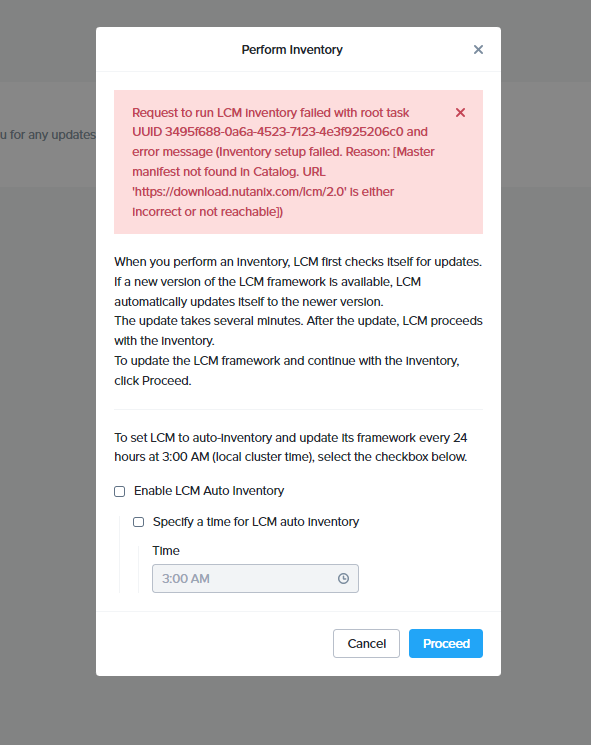


Anyone know how to fix it?

Best answer by Kcmount

Yes, dark site is possible - you’d need to download all the bits for this. Depending upon what version you’re using currently, you might be able to direct upload the latest LCM bits through the UI and then only use file uploads for now instead of the internet. If the Internet isn’t available/wanted, then yeah, dark site is a good way to go!

View original
This topic has been closed for replies.

4 replies

Kcmount
Forum|alt.badge.img+7
  • Vanguard
  • Jan 30, 2023 9:23 AM UTC

Looks like you might have a connectivity issue from the cluster to the internet. Do you have working DNS, and allowing internet access from your environment?


Forum|alt.badge.img+2
  • Author
  • Trendsetter
  • Jan 30, 2023 10:18 AM UTC

If I used dark site, is that means I need config dark site config?


Kcmount
Forum|alt.badge.img+7
  • Vanguard
  • Answer
  • Jan 30, 2023 10:20 AM UTC

Yes, dark site is possible - you’d need to download all the bits for this. Depending upon what version you’re using currently, you might be able to direct upload the latest LCM bits through the UI and then only use file uploads for now instead of the internet. If the Internet isn’t available/wanted, then yeah, dark site is a good way to go!


Peter Seidl

I had this in a cluster. In my case it was no connectivity issue since we could to some curl commands to download the manifest file manually from the PCVM. We had to involve support to do a catalog cleanup via script. The LCM inventory was working again after that.