Question

A lot of VM off

  • July 29, 2026
  • 3 replies
  • 60 views

Hi, I have a nutanix cluster with a lot of VM’s in state Off i want to know if exist a safety way to “depure/eliminated”, or exist a way to know how much time a specific vm is this status (shutdown)?

3 replies

jarrodl
Forum|alt.badge.img+2
  • Vanguard
  • July 30, 2026

Using v4 of the API, the updateTime could be a measure of when a VM was last updated since that was most likely the last action done against the VM.


The one edge case for this would be if someone updates the VM config after powering it off.

VMM API Endpoint: https://{host}:{port}/api/vmm/v4.2/ahv/config/vms/{extId}

"name": "Test VM",
"description": "Description for your VM",
"createTime": "2009-09-23T14:30:00-07:00",
"updateTime": "2009-09-23T14:30:00-07:00",


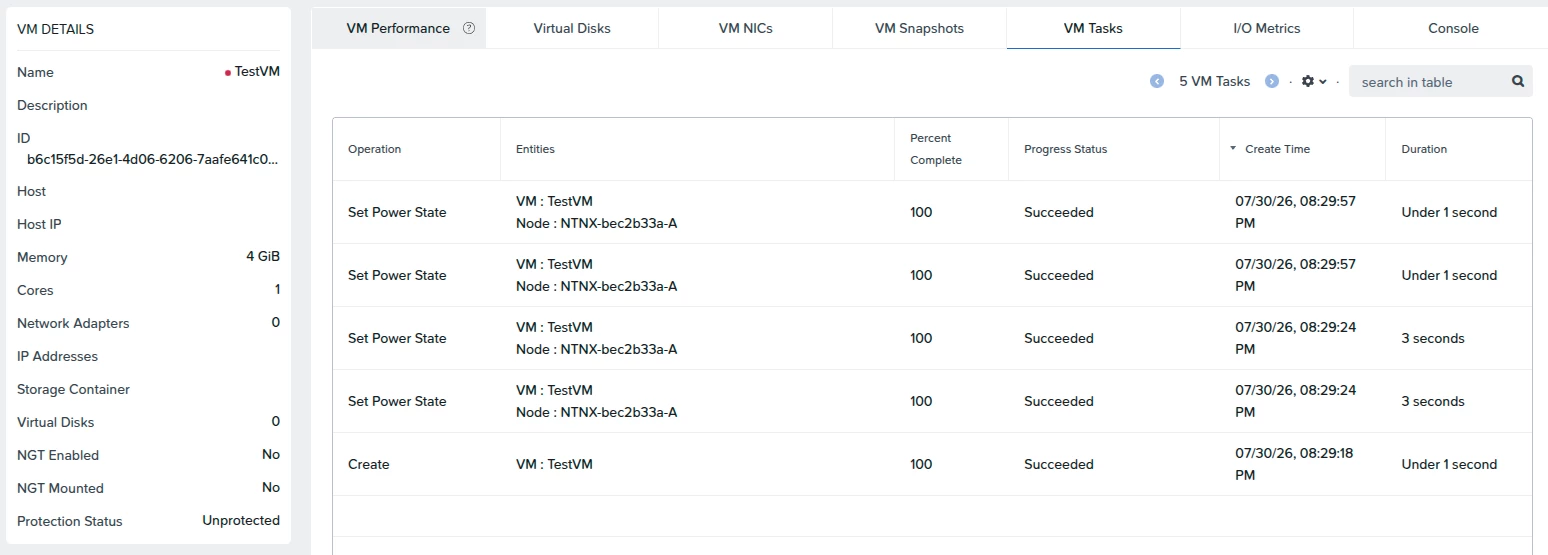
If you wanted something that is a more accurate reflection, you can review the task history to fetch when the VM was powered off, either via Prism Central or Prism Element:


To script this you will need to refer to the tasks API endpoint

Task API endpoint: https://{host}:{port}/api/prism/v4.3/config/tasks


Allan Solomon Mejia
Forum|alt.badge.img+1

Hello ​@Genaro Morales 

I agree with Jarrodl. The task history is the safer source if you need to determine when a VM was actually powered off, since updateTime can also change when someone modifies the VM configuration.

For cleanup, I wouldn't automatically delete a VM simply because it has been OFF for a long time. A safer process would be:

Identify OFF VMs > Check last power-off task > Verify owner/dependencies > Check snapshots/backups > Approve > Delete

You could use the Nutanix v4 APIs to automate the first two steps and generate a report of VMs that have been powered off longer than your retention threshold (for example, 30/60/90 days).

Also remember that powered-off VMs don't consume active CPU or memory, but their virtual disks and snapshots can still consume storage capacity.

I would recommend generating a cleanup candidate report first rather than automatically deleting them.


JeroenTielen
Forum|alt.badge.img+8
  • Vanguard
  • August 12, 2026

Hi ​@Genaro Morales you can use api calls for that. And if you are not affraid to use some AI here a read at this: https://www.nutanix.dev/2026/08/09/introducing-the-nutanix-mcp-server-part-1-getting-started-introduction/