

This post was written by Jacob John Andathethu, Senior Product Manager Nutanix
As many IT teams chart their course away from VMware, those migrating face a unique challenge: replacing their active-active resilience without compromising on performance. You shouldn't have to choose between the operational elegance of hyperconverged infrastructure (HCI) and the robust, enterprise-grade capabilities of external storage.
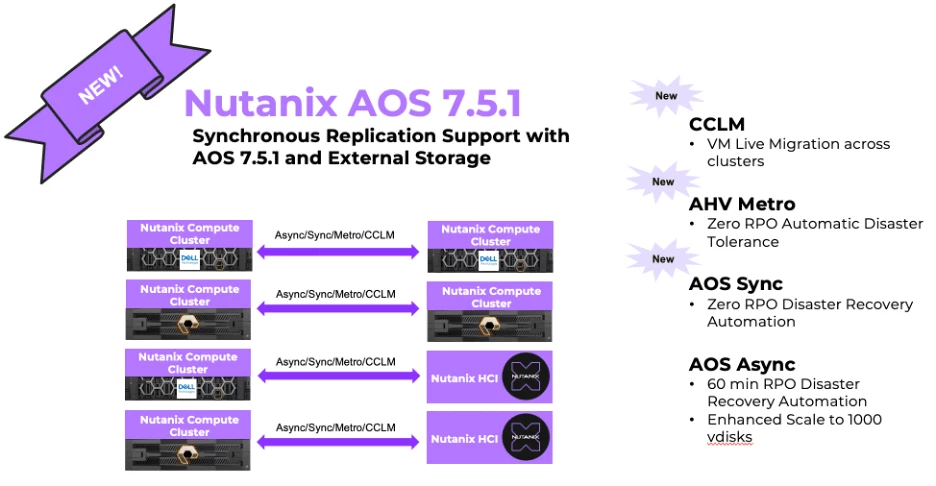
With the release of AOS 7.5.1, the wait is finally over. This milestone delivers a significant advantage for customers running Nutanix AHV with external storage platforms such as Everpure FlashArray and Dell PowerFlex, thanks to the newly introduced support for Nutanix DR Synchronous Replication.
In this blog, we’ll unpack how this integration works with Everpure and Dell PowerFlex Storage Array to illustrate how Nutanix is redefining Disaster Recovery (DR) for mission‑critical workloads.
Seamless Resilience: Sync RPO=0 and Metro Availability
With AOS 7.5.1, Nutanix brings the gold standard of zero data loss and seamless failover to external storage environments. You can now achieve Synchronous Replication with an RPO of 0 for protection of your mission-critical data. If your primary site experiences an outage, you can effortlessly execute a failover to your recovery site and bring your VMs up in the secondary cluster.
By utilising this integration, you not only get robust disaster recovery but also the core benefits of the Nutanix architecture:
- Operational Simplicity: Manage your compute, storage, and complex DR workflows from a single, unified interface through Nutanix Prism.
- Inherent Resilience: Rely on a distributed, self-healing web-scale foundation that is designed to eliminate single points of failure.
- Non-Disruptive Operations: Keep your environment secure and up-to-date with one-click, rolling upgrades that don't require planned downtime.
This update delivers the ultimate peace of mind of Metro Availability, elevated by the operational simplicity and power of the Nutanix Cloud Platform.
The Integration Story: The Best of Both Worlds
Imagine pairing the beloved, one-click operational experience of Nutanix HCI with the raw, robust performance of enterprise block storage platforms like Everpure Storage and Dell PowerFlex. That's the story of Nutanix's external storage integration.
Traditionally, HCI combines compute and storage into the same nodes. But here, we introduce a brilliant "disaggregated-like" model. A compute cluster runs Nutanix AHV, retaining all core enterprise capabilities like Flow Virtual Networking and built-in BC/DR capabilities. This compute layer communicates with the external storage arrays over protocols like TCP and NVMe over TCP.
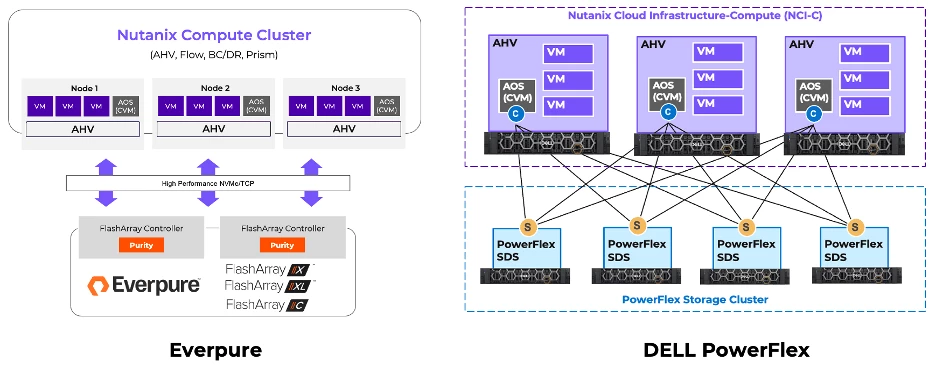
At the heart of this streamlined architecture is the leveraging of native array constructs—such as Pods in Everpure Storage or equivalent storage management entities in Dell PowerFlex—for secure multi-tenancy. A Nutanix Compute Cluster maps directly to these storage constructs, allowing the Nutanix Controller VM (CVM) to efficiently manage storage paths while offloading data persistence to the high-performance external array. You manage everything—from provisioning volumes to assigning them to VMs—directly from the familiar Prism interface.
Dell PowerFlex
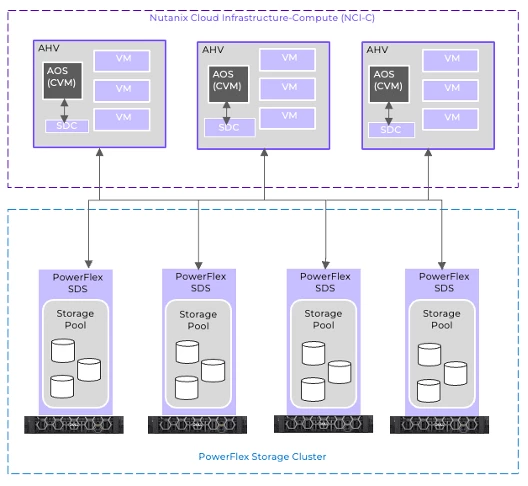
- The Compute Tier (Nutanix): Your User VMs live here on the Nutanix AHV nodes. These servers have no local data drives. Instead, the Nutanix Controller VM (CVM) uses a special Dell plug-in (the SDC module) to talk to the storage layer over the network.
- The Storage Tier (Dell): The Dell PowerFlex nodes contain all the actual physical drives (SSDs/NVMe). The Dell SDS software (includes PowerFlex 4.5.4 & 4.5.6) takes all these individual drives across multiple servers and aggregates them into a giant, shared Storage Pool.
- The Connection: A single Nutanix compute cluster connects to a specific PowerFlex Storage Pool
- . When a User VM needs to read or write data:
- The VM sends the request to the Nutanix CVM.
- The CVM translates the request and sends it over the IP network directly to the PowerFlex Storage Pool.
- PowerFlex handles writing the data across its drives, ensuring it is replicated and protected against hardware failures
In short, Nutanix is responsible for making sure the virtual machines run smoothly and stay highly available, while Dell PowerFlex handles the heavy lifting of storing the data, taking snapshots, and keeping the disks healthy.
Everpure
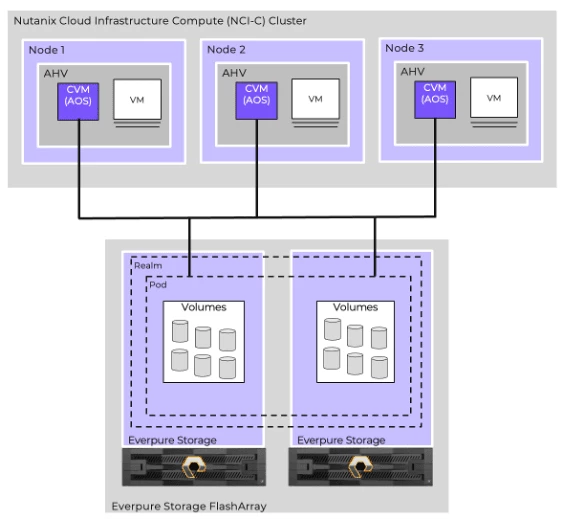
- The Compute Tier (Nutanix): Your User VMs run on Nutanix AHV nodes that have no local data drives. The core Nutanix storage service (called Stargate) lives inside the CVM and acts as the "Initiator" to talk to the external storage.
- The Storage Tier (Everpure): Everpure storage array (includes Everpure FlashArray X series, XL series and C Series) organises its all-flash capacity using logical groupings. A Realm acts as the top-level boundary (setting network and QoS rules), and inside that is a Pod. A single Nutanix compute cluster connects directly to exactly one Realm and Pod combination.
- The Connection (NVMe/TCP): When a User VM reads or writes data:
- The VM sends the I/O request to the Nutanix CVM.
- Stargate intercepts this and instantly passes the data over the network using the lightning-fast NVMe/TCP protocol directly to the Everpure Storage Array.
- Unlike traditional shared datastores, Nutanix provisions two dedicated, thin-provisioned Everpure Storage Volumes for every single virtual disk you create. Everpure Storage natively handles the data reduction (deduplication /compression), encryption, and high-availability persistence of those volumes.
In short: Nutanix maintains control over the VMs, security, and snapshot schedules via Prism, but it strictly offloads the actual data placement and heavy lifting to the Everpure Storage FlashArray over a high-speed NVMe connection.
Under the Hood: Nutanix DR with External Storage
The integration of Nutanix Cloud Platform with external storage arrays brings the operational simplicity of Nutanix's Business Continuity and Disaster Recovery (BC/DR) to enterprise-grade external block storage. While the initial 7.5.0 release delivered foundational support for Asynchronous Replication, the AOS 7.5.1 release significantly expands these capabilities for mission-critical environments.
AOS 7.5.1 introduces:
- Synchronous Replication (SyncRep) for zero-data-loss protection.
- Metro Availability for automated, seamless failover across metro-distance sites using a Witness deployed at a third site.
- Cross-Cluster Live Migration (CCLM), which allows for non-disruptive workload mobility across external storage-backed clusters to simplify maintenance and workload balancing.
How Disaster Recovery Integration Works
In the Nutanix implementation for external storage, every individual AHV vDisk is mapped directly to corresponding volumes on the external array, creating a direct correspondence between the hypervisor’s virtual disk and the physical array's storage volume. This connection utilises protocols like NVMe/TCP, allowing Nutanix compute nodes to access these external volumes with high performance while the Nutanix Stargate service mediates the I/O operations.
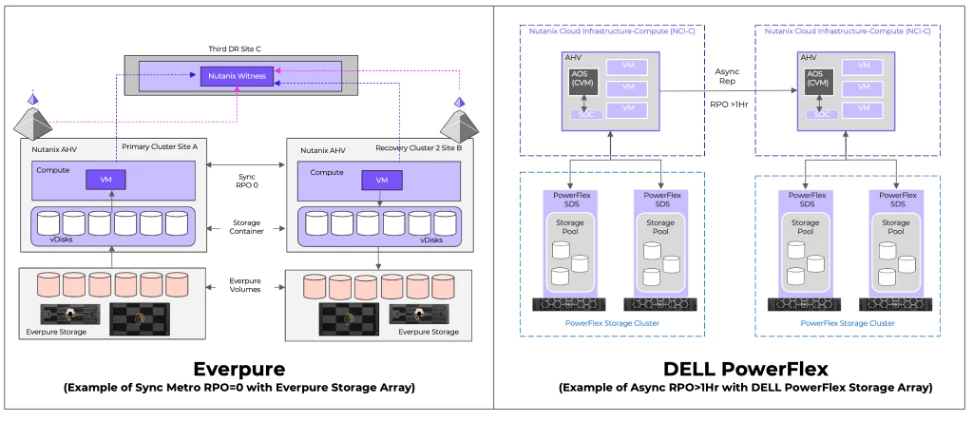
- Asynchronous Replication:
- The Nutanix replication service orchestrates the workflow natively, leveraging the external array's native Change Block Tracking (CBT) or snapshot APIs to identify exactly what changed.
- The service then reads and transmits these changed blocks across the WAN.
- You retain full control over snapshots, schedules, and recovery points right within Prism.
- Synchronous Replication (Metro Availability) & CCLM:
- For zero-data-loss protection, Nutanix intercepts every write I/O on a VM or VG and replicates it to the secondary site in real-time.
- The write is only acknowledged to the VM or VG once it's committed locally and remotely.
- This essentially treats your remote storage as a mirrored capacity tier, ready for automatic failover arbitrated by a Nutanix Witness if disaster strikes.
Crafting Your Safety Net: The Setup Journey
Setting up this robust DR strategy is as streamlined as reading a book. Here is how your journey unfolds:
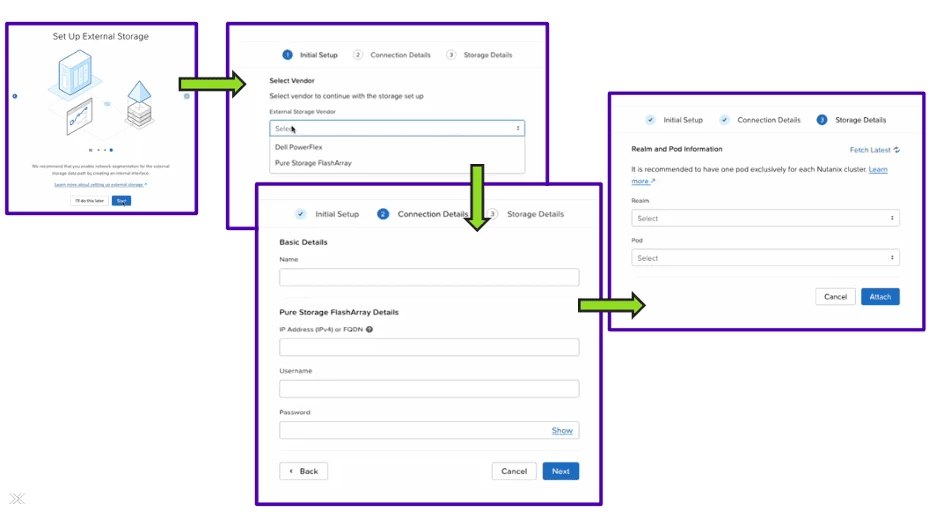
- Introduce the Storage: Within Prism Central, you launch the wizard to add External Storage. Simply select the Vendor, and provide the connection details and the credentials of the respective storage, select the appropriate storage details (for Everpure: choose the realm and pods, for Dell Powerflex: choose PowerFlex protection domain and storagepool), and attach it to your Nutanix environment.
- Organise Your Workloads: Create your VMs and assign them Categories (tags). This makes management a breeze.
- Create the Protection Policy: In Prism Central, define your policy. Select your Source and Target locations, set your RPO and retention schedules, and simply add your previously created Categories. Any VM with that tag automatically inherits the protection.
- Draft the Recovery Plan: This is your playbook. You map out the power-on sequence (e.g., Database boots in Stage 1, App in Stage 2 with a delay). You map source networks to target networks, ensuring that when VMs wake up at the recovery site, they know exactly where they are.
When the Unexpected Happens: Supported DR Workflows
AOS 7.5.1 supports a comprehensive suite of workflows tailored to any scenario:
- Planned Failover (Async/Sync): Perfect for site maintenance. VMs gracefully shut down, Stargate performs a final delta sync to provide 100% identical data, and VMs are powered on at the recovery site with Zero Data Loss.
- Unplanned Failover (No Witness): If the primary site suffers a hard-down, an admin manually clicks "Failover" on the secondary Prism Central. The recovery site promotes local storage to Active and restarts VMs from the last valid replication point.
- Unplanned Failover with Metro Witness (Sync): The holy grail of high availability. If the primary site fails, the Nutanix Witness (in a 3rd fault domain) detects the heartbeat loss, grants "Ownership Lock" to Site B, and VMs automatically restart. Zero RPO, near-zero RTO, and completely automated.
Taking Action: How to Initiate a Failover
When it's time to execute, the process is incredibly straightforward:
Testing Your Setup
- Preparation & Validation: We highly encourage users to test their configurations beforehand to check if everything is lined up. Navigate to your Recovery Plans in Prism Central, select your plan, and click Validate. The system performs pre-flight checks to confirm all requirements are met, and your plan is ready for action.
- Initiate: Click Failover, select your type (e.g., Planned), verify the locations, type FAILOVER to confirm, and start the process.
- Monitor & Verify: Watch the Tasks view as the system gracefully shuts down VMs, syncs the final data, powers VMs on in sequence, and maps networks. Once succeeded, simply log into the Recovery Site to verify your applications are up and running perfectly.
Seamless Mobility: Cross-Cluster Live Migration (CCLM)
What if you just need to balance workloads or perform maintenance without any downtime? CCLM allows you to experience seamless workload mobility across external storage-backed clusters. Simply select a running VM and choose "Migrate." Sync replication provides the storage matches, VM memory is copied over the network, and an instant "Switchover" occurs. The outcome? Your workload moves with zero downtime to the application.
The Bottom Line
For organisations transitioning away from traditional architectures, Nutanix AOS 7.5.1 offers more than just a landing pad—it provides a launchpad. By marrying the simplicity of Nutanix AHV with the raw power of enterprise external storage like Everpure Storage and Dell PowerFlex, and layering on bulletproof DR capabilities like SyncRep, Metro Availability, and CCLM, your infrastructure is more resilient and agile than ever before.
We invite you to try out these powerful new features in AOS 7.5.1 and experience the future of enterprise disaster recovery for yourself!
©2026 Nutanix, Inc. All rights reserved. Nutanix, the Nutanix logo and all Nutanix product and service names mentioned are registered trademarks or trademarks of Nutanix, Inc. in the United States and other countries. Nutanix, Inc. is not affiliated with VMware by Broadcom or Broadcom. VMware and the VMware product names recited herein are registered or unregistered trademarks of Broadcom in the United States and/or other countries. All other brand names mentioned are for identification purposes only and may be the trademarks of their respective holder(s).