


It’s your friendly neighborhood Technical Marketing Engineer again, with another exciting new feature from Nutanix. Grab a healthy snack, maybe some carrots, and let’s dive in! Are you thinking…did he say carrots? What? Hold that thought, we’re about to connect those carrots to cluster security, just stick with me.
Security is a lot like eating your vegetables. You know they are good for you, but the potato chips calling your name are so tempting and within reach. Compared to finding ways to make vegetables taste good is a struggle, the chips are much easier at least that’s what 7yr old me would say. Regardless, both are good for you, the chips are debatable, maybe it's better to say both can be delicious! Hardening your infrastructure is a vital step in maintaining a robust and resilient environment, but it can be a bit daunting (like finding ways to make vegetables as good as potato chips). We believe that security management should be simple, efficient and empowering for IT teams.
This is why we are focused on moving away from manual, fragmented adjustments toward a streamlined, high-level approach. By prioritizing simplicity and clarity, we are making it easier for you to achieve your security goals without needing to manage complex, individual toggles. If you misconfigured just one of those settings, you risked tanking your system performance or, worse, thinking you set everything you wanted but learn later you missed one. It can be fragmented and frankly, a massive time sink for IT teams.
Now in our AOS 7.6 and AHV 11.2 release, we are changing the game. We are taking that massive wall of guesswork and shrinking it down into an elegant solution: Nutanix Security Profiles. Now to be fair, this won’t set all of the settings but it will get you real close. There will still be settings you need to configure manually.
Settings such as syslog servers, or setting up AOS Network Segmentation, or your LDAP server. Basically things that require additional information beyond a simple on/off switch, those will not be controlled by the new Security Profile. And for those, we have the fantastic Nutanix Security Guide with the additional hardening details that you can find on the Nutanix Portal. But hey, if these profiles get you most of the way there, as a saying from my younger days says, that's half the battle or in this case more than half the battle!
What are Security Profiles?
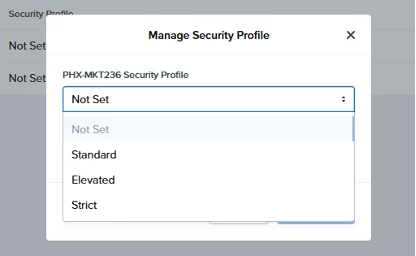
I know what you are thinking, so glad he led with vegetables earlier. Me too, I do love some crispy brussels with bacon and a good balsamic glaze, but is it still healthy at that point…moving on! Look, we realized that customers shouldn't need a PhD in kernel architecture just to harden their clusters. Instead of making you navigate the varied fine-grained knobs and CLI commands, we are consolidating a good number of the settings found in the hardening guide for Nutanix into three pre-configured profiles. You just pick the posture that fits your business, and Prism Central handles the heavy lifting across both AOS and AHV.
Here is how the lineup looks:
- Standard: This is your recommended out-of-the-box default. It balances critical security hardening with peak system performance.
- Elevated: Stepping things up a bit. This tier turns on key CPU vulnerability mitigations and enforces high-strength password policies.
- Strict: This is built for highly regulated environments, adding strict file integrity monitoring (AIDE) and a few others as outlined in the tables below.
By moving to this model, we are minimizing the configuration guesswork. You get tools to help support your compliance goals without the operational headache. Below are a few tables with more details on the settings that will be enabled based on the chosen profile setting:
| AOS | |||
| Security Profile Setting | Standard | Elevated | Strict |
| cluster-scma-schedule | Weekly | Daily | Daily |
| high-strength-password | off | on | on |
| aide | off | off | on |
| min-password-length | 8 | 16 | 16 |
| max-login-attempt | 5 | 3 | 3 |
| lockout-sec | 900 | 900 | 0 |
| Userspace core | on | on | off |
| banner | off | off | on |
| Performance Impact | Minimal | High | High |
| kernel-core/logcore | on | on | off |
| slub-debug | off | off | on |
| page-poison | off | off | on |
| kernel-mitigations | off | on | on |
| processor-mitigations | off | on | on |
| AHV | |||
| Security Profile Setting | Standard | Elevated | Strict |
| high-strength-password | off | on | on |
| auto-unlock | on | off | off |
| fapolicy | off | off | on |
| aide | off | off | on |
| banner | off | off | on |
| Userspace core | log | log | off |
| kernel-core | on | on | off |
| gdsmiitgation | on | on | on |
| srsomitigation | off | on | on |
| memorypoison | off | off | on |
| slub_debug | off | off | on |
| retbleedmitigation | off | on | on |
| itlbmultihitmitigation | off | on | on |
All of the above can now simply be set in the Prism Central UI. As a reminder, this won’t cover all the settings and our Nutanix Security Hardening Guide will detail the other configuration details that would still need to be evaluated. As mentioned earlier you can find that guide on the Nutanix Portal.
Under the Hood: How it Works
So, how does this actually work when you click "Apply"? That’s a fantastic question reader, I am so glad you asked. Let's dive into technical plumbing.
When a user with the proper permissions within Prism Central selects a profile via the Prism Central Security Dashboard an orchestrated workflow kicks off.
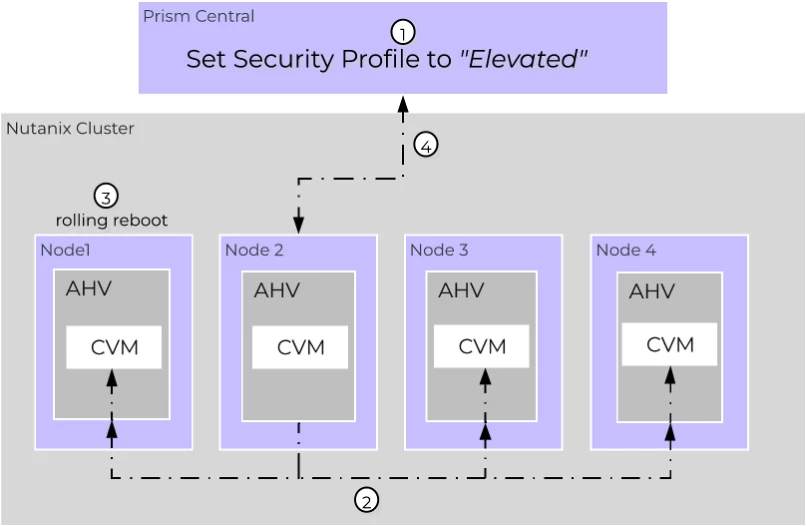
- Intent and Validation: The request is routed to a single cluster node acting as the orchestrator, in the above image its node 2. It will run pre-checks to validate the cluster's health before making any changes.
- Cluster-Wide Sync: Once validated, the intent is stored in zookeeper. A dedicated watcher triggers across all nodes, pushing the corresponding configurations down using Salt states and the AHV Gateway.
- The Rolling Reboot: When making changes to security at the kernel level it requires the node to be rebooted. The orchestrator automatically triggers a rolling reboot of the hosts using a ClusterManager RPC. The workloads are safely evacuated, reboots one node at a time, and validates completion before moving to the next. The system is designed to handle this in the background to help maintain application availability.
- Setting Profile complete: The orchestrator monitors for the rolling reboots to complete and will mark the task of setting the profile as complete.
Guarding Against Configuration Drift
What happens if someone tries to go rogue and manually change a backdoor setting? That’s another fantastic question reader, thanks for asking! The system is already one step ahead. Once a profile is active, the old legacy mechanisms are prevented from modifying individual settings while a profile is active. Furthermore, a built-in 2 hour security cron job runs in the background to automatically fix any configuration drift it detects. Once a security profile has been applied, the system is designed to self heal and auto-remediate drifts to the configuration wherever possible. For security configuration changes that would result in a host reboot, like kernel changes, the cluster will generate an NCC alert for the administrator to review and resolve.
Moving Forward Smoothly
We want to make sure your transition to this new framework is as smooth as possible. Here are a few deployment details to keep in mind:
- Version Requirements: To unlock this capability, you will need to be running AOS 7.6, Prism Central 7.6, and AHV 11.2. If you are running a non-AHV hypervisor the profiles will gracefully apply to the AOS layer only.
- Upgrade Behavior: When you upgrade from an older Nutanix version, your security profile will initially show as "not set". We do this intentionally because forcing a profile could disrupt your existing settings. You will want to review your posture and explicitly select your desired profile post-upgrade.
Less time spent hardening means more time building. Let us help simplify much of the hardening process with just a few clicks, you close out the last few settings so you can focus on driving your business forward. If this piques your interest and you are already a customer, take the new software for a spin. Heck, with our work to improve the time it takes to upgrade, another enhancement that arrived with NCI 7.6, you could be trying this out sooner than you think.
If you are still looking to bring Nutanix onboard into your environment, dial up your local Nutanix account team to chat about this and all the other amazing things we can do. And remember, out there in the datacenter protect your clusters, protect your data, and may the security be with you, always.
©2026 Nutanix, Inc. All rights reserved. Nutanix, the Nutanix logo and all Nutanix product and service names mentioned are registered trademarks or trademarks of Nutanix, Inc. in the United States and other countries. All other brand names mentioned are for identification purposes only and may be the trademarks of their respective holder(s).