
Question

Incorrect example in v4 SDK for storage policy delete, how to report?

  • January 14, 2026
  • 1 reply
  • 79 views

Hi,

I decided to write my own Terraform provider/resource for managing a StoragePolicy as the Nutanix provider does not include this capability yet. When writing the delete/destroy function, I followed the Golang example in the API page: https://developers.nutanix.com/api-reference?namespace=datapolicies&version=v4.2#tag/StoragePolicies/operation/deleteStoragePolicyById


However, I found it failed with 500 using the example. After debugging I found that the client expects a map with string and pointers to string for its values, not actual strings (https://github.com/nutanix/ntnx-api-golang-clients/blob/datapolicies-go-client/v4.2.1/datapolicies-go-client/api/storage_policies_api.go#L64)
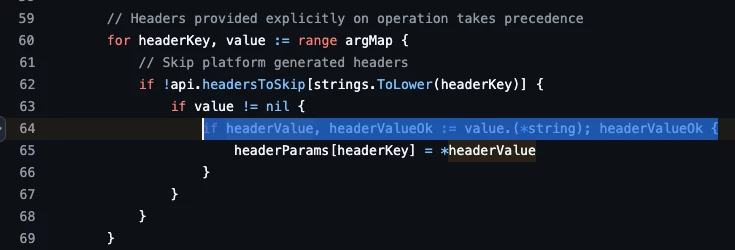


However, the example provided suggests to use an actual var, not the address:
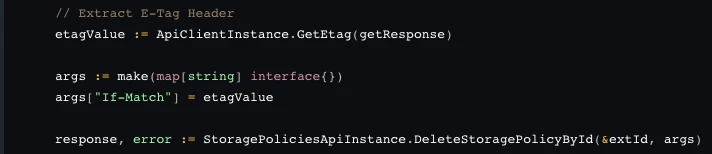
Adding the address to the map will allow the value to correctly be extracted and the delete will work:

notice the “&”

I can’t see where to contact for updating the example, but perhaps someone can pass it on. 

1 reply

Forum|alt.badge.img+2
  • Trailblazer
  • January 14, 2026

Hi,

I decided to write my own Terraform provider/resource for managing a StoragePolicy as the Nutanix provider does not include this capability yet. When writing the delete/destroy function, I followed the Golang example in the API page: https://developers.nutanix.com/api-reference?namespace=datapolicies&version=v4.2#tag/StoragePolicies/operation/deleteStoragePolicyById


However, I found it failed with 500 using the example. After debugging I found that the client expects a map with string and pointers to string for its values, not actual strings (https://github.com/nutanix/ntnx-api-golang-clients/blob/datapolicies-go-client/v4.2.1/datapolicies-go-client/api/storage_policies_api.go#L64)


However, the example provided suggests to use an actual var, not the address:

Adding the address to the map will allow the value to correctly be extracted and the delete will work:

notice the “&”

I can’t see where to contact for updating the example, but perhaps someone can pass it on. 

You will need to raise a ticket with support and they will pass the information back to the product team to get fixed up in a future version.