Question

CPU Resource Constraints & Overprovisioned VM's Reduce below 2 vCPU


Forum|alt.badge.img+1

Hi,

Since upgrading to PC 7.6 / AOS 11.2 we’ve tipped over the edge on available CPU resources and are experiencing some performance issues (Spikes in CPU Wait, application failures) we’ve engaged with support who identified ADS/Solver being unable to move VM’s to reduce hotspots, because all hosts are hotspots, and we’re basically oversubscribed.  I won’t deny this, but we weren’t experiencing so many issues before the update. 

Support advice is to reduce vCPU allocation on vm’s that don’t need them. We’ve got a lot of VM’s reporting as over provisioned, the majority of these are windows VM’s with 2 vCPU’s our testing has shown that with only a single vCPU windows really doesn’t work well. 

So i have some questions:

  1. Has anyone else noticed an increase in consumed CPU resources following update to PC/AOS 7.6
  2. Do others experience the same with windows server VM’s, or is it a feature of our environment that 2 vCPU’s is the minimum
  3. If you do experience the same, do you just live with a large number of over provisioned VM’s, does it make the report less useful?

Thanks in advance for any advice/pointers

Giles

 

14 replies

LMohammed
Forum|alt.badge.img+2
  • Vanguard
  • September 22, 2026

Hi ​@GilesB 

https://download.nutanix.com/documentation/v11202/Release-Notes-AHV-v11_2_0_2.pdf
https://download.nutanix.com/documentation/v7606/Release-Notes-AOS-v7_6_0_6.pdf

Nothing significant related to cpu and ram peeks is mentioned in the known issues for the new versions.


LMohammed
Forum|alt.badge.img+2
  • Vanguard
  • September 22, 2026

What is the state of the cpu and ram of your cvms and nodes ?


Forum|alt.badge.img+1
  • Author
  • Trailblazer
  • October 15, 2026

Sorry for delay replying.

We’ve still been struggling.  Have moved about 50 workloads to a different cluster, and changed our protection policies to spread our the processor impact of VSS snapshots across a large number of workloads.

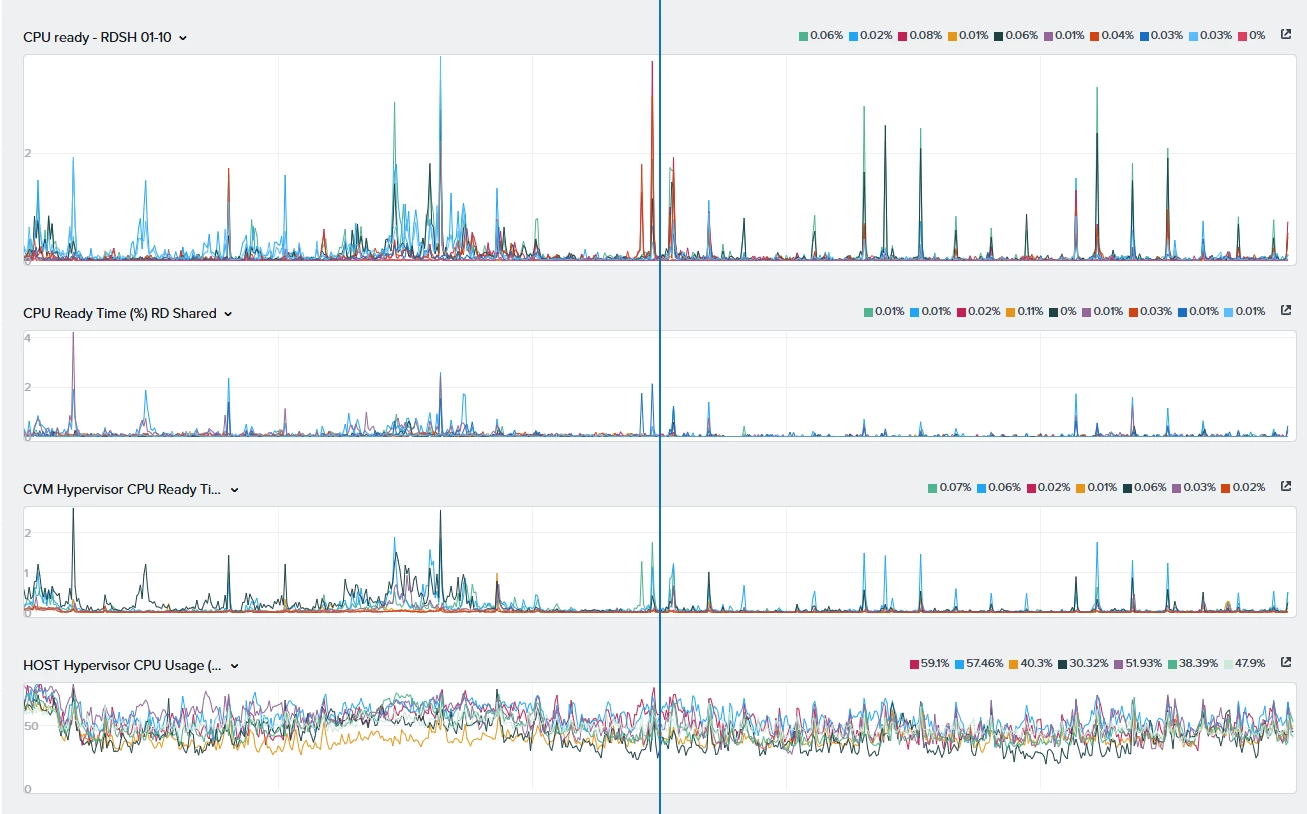
We have stabilsed and brough peak CPU ready times down from 20+% to <4% but from working with support it does appear to be related to changes in 7.6.  1) updtaed micro-services need more resources 2) updated scheduling means near millisecond syncronisity on tasks across large numbers of VM’s 

There’s some other optimisations we will look at moving forwards, but they need more business decisions and longer projects to re-arrange storage containers etc.

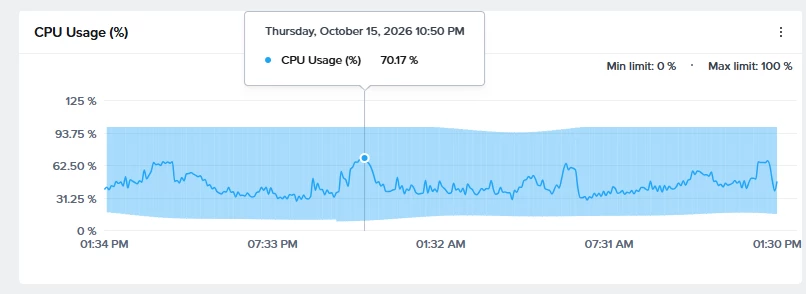
Graph attahced showing 3 hours from today, not CPU usage at bottom, and other graphs showing CPU ready across CVM’s and some groups of machines.  Patterns repeated across all machines groups on the cluster.


JeroenTielen
Forum|alt.badge.img+8

What security profiles are configured? Elevated and Strict can reduce cluster performance. 


  • Voyager
  • October 15, 2026

Hello,

I have encountered a similar issue in my environment and would like to share the details to find out whether other administrators are experiencing the same behavior.

I have a Nutanix cluster consisting of 10 NX-8170-G9 nodes. After upgrading the environment to AHV 11.2 and AOS 7.6, I started the firmware upgrade process for some components. Unfortunately, during this process, one of the servers experienced a hardware failure and is currently undergoing an RMA replacement.

On the next business day, we noticed that the VMs were not being properly balanced across the cluster nodes. One node was hosting almost half of the cluster's VMs, with a load of approximately 300%, while the remaining nodes were operating at around 30% load.

We contacted Nutanix Support, which is still investigating the issue. During the troubleshooting process, the engineers placed the overloaded node into maintenance mode and rebooted it. However, after this procedure, the overload shifted to another node in the cluster.

As a temporary workaround to mitigate the impact, we created anti-affinity rules to prevent certain VMs from running on the overloaded node, allowing them to be distributed across the remaining nodes.

Support advised that a service responsible for VM metrics needs to be restarted. However, they cannot proceed with this action until the faulty hardware has been replaced, as the cluster is currently operating with only one node of fault tolerance.

At this point, we do not know whether restarting this service will resolve the issue, whether this is a potential bug in this AOS/AHV release, or whether another underlying problem is responsible. The investigation is still ongoing.

In the meantime, managing the environment under these conditions has become quite challenging, particularly due to the uneven VM distribution and the high load concentrated on individual nodes.

Is anyone experiencing similar behavior after upgrading to AOS 7.6 and AHV 11.2? The Acropolis Dynamic Scheduler (ADS) is expected to balance VM placement across the cluster nodes. Are there any known configuration requirements, limitations, or issues in this release that could explain this behavior?

I would appreciate any insights or experiences that could help clarify the issue.


jarrodl
Forum|alt.badge.img+3
  • Vanguard
  • October 16, 2026

Hello,

I have encountered a similar issue in my environment and would like to share the details to find out whether other administrators are experiencing the same behavior.

I have a Nutanix cluster consisting of 10 NX-8170-G9 nodes. After upgrading the environment to AHV 11.2 and AOS 7.6, I started the firmware upgrade process for some components. Unfortunately, during this process, one of the servers experienced a hardware failure and is currently undergoing an RMA replacement.

On the next business day, we noticed that the VMs were not being properly balanced across the cluster nodes. One node was hosting almost half of the cluster's VMs, with a load of approximately 300%, while the remaining nodes were operating at around 30% load.

We contacted Nutanix Support, which is still investigating the issue. During the troubleshooting process, the engineers placed the overloaded node into maintenance mode and rebooted it. However, after this procedure, the overload shifted to another node in the cluster.

As a temporary workaround to mitigate the impact, we created anti-affinity rules to prevent certain VMs from running on the overloaded node, allowing them to be distributed across the remaining nodes.

Support advised that a service responsible for VM metrics needs to be restarted. However, they cannot proceed with this action until the faulty hardware has been replaced, as the cluster is currently operating with only one node of fault tolerance.

At this point, we do not know whether restarting this service will resolve the issue, whether this is a potential bug in this AOS/AHV release, or whether another underlying problem is responsible. The investigation is still ongoing.

In the meantime, managing the environment under these conditions has become quite challenging, particularly due to the uneven VM distribution and the high load concentrated on individual nodes.

Is anyone experiencing similar behavior after upgrading to AOS 7.6 and AHV 11.2? The Acropolis Dynamic Scheduler (ADS) is expected to balance VM placement across the cluster nodes. Are there any known configuration requirements, limitations, or issues in this release that could explain this behavior?

I would appreciate any insights or experiences that could help clarify the issue.

What does your overall CPU utilisation look like on the cluster.
We are observing a similar issue and Nutanix is telling us it’s due to not having enough CPU capacity.

We have more hardware on the way to address this but now I see others talking about it, I wonder if there is an issue?


Our ADS is all over the place, I am manually moving workloads around pretty much every 30 minutes during peak hours so our applications that the business use don’t take a hit

EDIT: We are running 7.5.0.6 (AOS) and 11.0.0.2 AHV


Forum|alt.badge.img+1
  • Author
  • Trailblazer
  • October 16, 2026

Hello,

I have encountered a similar issue in my environment and would like to share the details to find out whether other administrators are experiencing the same behavior.

I have a Nutanix cluster consisting of 10 NX-8170-G9 nodes. After upgrading the environment to AHV 11.2 and AOS 7.6, I started the firmware upgrade process for some components. Unfortunately, during this process, one of the servers experienced a hardware failure and is currently undergoing an RMA replacement.

On the next business day, we noticed that the VMs were not being properly balanced across the cluster nodes. One node was hosting almost half of the cluster's VMs, with a load of approximately 300%, while the remaining nodes were operating at around 30% load.

We contacted Nutanix Support, which is still investigating the issue. During the troubleshooting process, the engineers placed the overloaded node into maintenance mode and rebooted it. However, after this procedure, the overload shifted to another node in the cluster.

As a temporary workaround to mitigate the impact, we created anti-affinity rules to prevent certain VMs from running on the overloaded node, allowing them to be distributed across the remaining nodes.

Support advised that a service responsible for VM metrics needs to be restarted. However, they cannot proceed with this action until the faulty hardware has been replaced, as the cluster is currently operating with only one node of fault tolerance.

At this point, we do not know whether restarting this service will resolve the issue, whether this is a potential bug in this AOS/AHV release, or whether another underlying problem is responsible. The investigation is still ongoing.

In the meantime, managing the environment under these conditions has become quite challenging, particularly due to the uneven VM distribution and the high load concentrated on individual nodes.

Is anyone experiencing similar behavior after upgrading to AOS 7.6 and AHV 11.2? The Acropolis Dynamic Scheduler (ADS) is expected to balance VM placement across the cluster nodes. Are there any known configuration requirements, limitations, or issues in this release that could explain this behavior?

I would appreciate any insights or experiences that could help clarify the issue.


Interesting you had a node fail during the upgrade, we had one drop out too, but luckily it was recovered following a support call.

We have definitely had issues with the ADS, but not in the same way, we’ve had a lot of solver unable to find solution, because there weren’t sufficient resources available anywhere on the cluster.

we have 7 Nodes (5x G8/2xG9) and have had to move approx. 50 vm’s to another cluster and break-up our near sync policies to get to a position where CPU Ready doesn’t go over 5% on a regular basis.
 

It’s been an interesting time, we’ve also had to drill down into what is going on in the windows estate, identify what software causes regular CPU spikes just to keep it all operating within acceptable parameters.


Forum|alt.badge.img+1
  • Author
  • Trailblazer
  • October 16, 2026

Hello,

I have encountered a similar issue in my environment and would like to share the details to find out whether other administrators are experiencing the same behavior.

I have a Nutanix cluster consisting of 10 NX-8170-G9 nodes. After upgrading the environment to AHV 11.2 and AOS 7.6, I started the firmware upgrade process for some components. Unfortunately, during this process, one of the servers experienced a hardware failure and is currently undergoing an RMA replacement.

On the next business day, we noticed that the VMs were not being properly balanced across the cluster nodes. One node was hosting almost half of the cluster's VMs, with a load of approximately 300%, while the remaining nodes were operating at around 30% load.

We contacted Nutanix Support, which is still investigating the issue. During the troubleshooting process, the engineers placed the overloaded node into maintenance mode and rebooted it. However, after this procedure, the overload shifted to another node in the cluster.

As a temporary workaround to mitigate the impact, we created anti-affinity rules to prevent certain VMs from running on the overloaded node, allowing them to be distributed across the remaining nodes.

Support advised that a service responsible for VM metrics needs to be restarted. However, they cannot proceed with this action until the faulty hardware has been replaced, as the cluster is currently operating with only one node of fault tolerance.

At this point, we do not know whether restarting this service will resolve the issue, whether this is a potential bug in this AOS/AHV release, or whether another underlying problem is responsible. The investigation is still ongoing.

In the meantime, managing the environment under these conditions has become quite challenging, particularly due to the uneven VM distribution and the high load concentrated on individual nodes.

Is anyone experiencing similar behavior after upgrading to AOS 7.6 and AHV 11.2? The Acropolis Dynamic Scheduler (ADS) is expected to balance VM placement across the cluster nodes. Are there any known configuration requirements, limitations, or issues in this release that could explain this behavior?

I would appreciate any insights or experiences that could help clarify the issue.

What does your overall CPU utilisation look like on the cluster.
We are observing a similar issue and Nutanix is telling us it’s due to not having enough CPU capacity.

We have more hardware on the way to address this but now I see others talking about it, I wonder if there is an issue?


Our ADS is all over the place, I am manually moving workloads around pretty much every 30 minutes during peak hours so our applications that the business use don’t take a hit

EDIT: We are running 7.5.0.6 (AOS) and 11.0.0.2 AHV


Overall we are now down to overall below 70% on CPU usage according to the cluster graphs in PE, (even lower in PC) but know that we are on the edges of performance with CPU ready at spike times, and we’ve on lt just got to a position where those aren’t causing impact to the server OS/Applications.

responses I've had from support indicate that there is a known increase in requirements for 7.6/AOS 11.0.0.2, we weren’t seeing the same level of problem previously.  Also has been basically confirmed that there are definitely more changes, including how efficiently tasks are scheduled.  Which in my experience causes them to consume more CPU at single point’s instead of that requirement being staggered or rate limited.


  • Voyager
  • October 16, 2026

Hello,

I have encountered a similar issue in my environment and would like to share the details to find out whether other administrators are experiencing the same behavior.

I have a Nutanix cluster consisting of 10 NX-8170-G9 nodes. After upgrading the environment to AHV 11.2 and AOS 7.6, I started the firmware upgrade process for some components. Unfortunately, during this process, one of the servers experienced a hardware failure and is currently undergoing an RMA replacement.

On the next business day, we noticed that the VMs were not being properly balanced across the cluster nodes. One node was hosting almost half of the cluster's VMs, with a load of approximately 300%, while the remaining nodes were operating at around 30% load.

We contacted Nutanix Support, which is still investigating the issue. During the troubleshooting process, the engineers placed the overloaded node into maintenance mode and rebooted it. However, after this procedure, the overload shifted to another node in the cluster.

As a temporary workaround to mitigate the impact, we created anti-affinity rules to prevent certain VMs from running on the overloaded node, allowing them to be distributed across the remaining nodes.

Support advised that a service responsible for VM metrics needs to be restarted. However, they cannot proceed with this action until the faulty hardware has been replaced, as the cluster is currently operating with only one node of fault tolerance.

At this point, we do not know whether restarting this service will resolve the issue, whether this is a potential bug in this AOS/AHV release, or whether another underlying problem is responsible. The investigation is still ongoing.

In the meantime, managing the environment under these conditions has become quite challenging, particularly due to the uneven VM distribution and the high load concentrated on individual nodes.

Is anyone experiencing similar behavior after upgrading to AOS 7.6 and AHV 11.2? The Acropolis Dynamic Scheduler (ADS) is expected to balance VM placement across the cluster nodes. Are there any known configuration requirements, limitations, or issues in this release that could explain this behavior?

I would appreciate any insights or experiences that could help clarify the issue.

What does your overall CPU utilisation look like on the cluster.
We are observing a similar issue and Nutanix is telling us it’s due to not having enough CPU capacity.

We have more hardware on the way to address this but now I see others talking about it, I wonder if there is an issue?


Our ADS is all over the place, I am manually moving workloads around pretty much every 30 minutes during peak hours so our applications that the business use don’t take a hit

EDIT: We are running 7.5.0.6 (AOS) and 11.0.0.2 AHV


Our cluster typically operates at approximately 60% utilization during production hours and 40% outside that period.

  1. Have you recently upgraded your environment to AOS 7.6 and AHV 11.2?

  2. Were you already experiencing this high CPU utilization with the previous versions (AOS 7.5 and AHV 11.1.x)? If so, was ADS exhibiting the same behavior in those versions?

Since we are not experiencing this level of CPU utilization in our environment, I expect ADS behavior to return to normal once the hardware issue is resolved through the RMA process, which is expected to be completed today.


Forum|alt.badge.img+1
  • Author
  • Trailblazer
  • October 16, 2026

What security profiles are configured? Elevated and Strict can reduce cluster performance. 

We haven’t got security profiles enabled, we’re still running with the previous configuration.  it wasn’t fully hardened.


LMohammed
Forum|alt.badge.img+2
  • Vanguard
  • October 16, 2026

​@FIESC 

In Prism Element, review CPU utilization for every host, for every CVM, and the cluster in total. Compare the metrics during production and non-production hours.

Identify whether one host is genuinely overloaded or whether the entire cluster is running out of CPU capacity.


LMohammed
Forum|alt.badge.img+2
  • Vanguard
  • October 16, 2026

​@GilesB 
No worries :)
Do you still experiencing the cpu utilization issue? 

In some cases of my customers they were having overheating issues or bad cooling system ?


LMohammed
Forum|alt.badge.img+2
  • Vanguard
  • October 16, 2026

​@GilesB 

Sorry, have you tried upgrading to the following versions?

AOS :  7.6.0.8
AHV : 11.2.0.4

This would help us determine whether the issue is software related or caused by something else.

One more question, Are the CPU spikes associated with a particular VM or application, or do they occur randomly across the cluster?


Forum|alt.badge.img+1
  • Author
  • Trailblazer
  • October 16, 2026


Our cluster typically operates at approximately 60% utilization during production hours and 40% outside that period.

  1. Have you recently upgraded your environment to AOS 7.6 and AHV 11.2?

  2. Were you already experiencing this high CPU utilization with the previous versions (AOS 7.5 and AHV 11.1.x)? If so, was ADS exhibiting the same behavior in those versions?

Since we are not experiencing this level of CPU utilization in our environment, I expect ADS behavior to return to normal once the hardware issue is resolved through the RMA process, which is expected to be completed today.

​@FIESC where are you seeing that CPU level?  We’ve found that on PC Dashboard ours only shows about 50%, if you click into  but when you look in depth using Analysis in Prism Element, you find that averaging is doing a lot of work, smoothing out the graphs and taking off the peaks.  Monitoring CPU ready against the CVM’s can be interesting, and if you start seeing CPU ready on the CVM of more than 2 is % you’ll most likely have noticeable impact to workloads.