Communication error on calm deployment


Forum|alt.badge.img

Hi,


I was successful on setting up prism central on the community edition all working good.

Further i extended the cluster capability by enabling Calm. I am able to access the calm UI and see all the functions available. As a next step i tried to deploy hycu blueprint from market place also tried to deploy one VM from my on disk image. Both get failed with below error. Please help.


HTTPConnectionPool(host='172.16.xx.xx', port=4120): Max retries exceeded with url: /api/1/entities/get_by_name?name=Application-hycu--74b677a5-5cd9-4c49-9cb4-196e2d5e3be4 (Caused by ProtocolError('Connection aborted.', BadStatusLine("''",))) 


Regards,

Aravind

This topic has been closed for replies.

18 replies

Hey Arvind, 

Looks like containers are not up on the PC.

  1. SSH into PC
  2. Run command - docker ps
  3.  epsilon container must be up and healthy
  4. If epsilon is not running, check the logs /home/nutanix/data/logs/epsilon.out


Regards,

Charan teja


Forum|alt.badge.img
  • Author
  • Trailblazer
  • December 3, 2019

Hi Charan,


Thanks for the reply!!!

I see the epsilon service up and running.

aa6214b712a2        epsilon:latest       "/bin/sh -c /home/..."   42 minutes ago      Up 39 minutes (healthy)                       epsilon


Regards,

Aravind


Forum|alt.badge.img
  • Author
  • Trailblazer
  • December 3, 2019

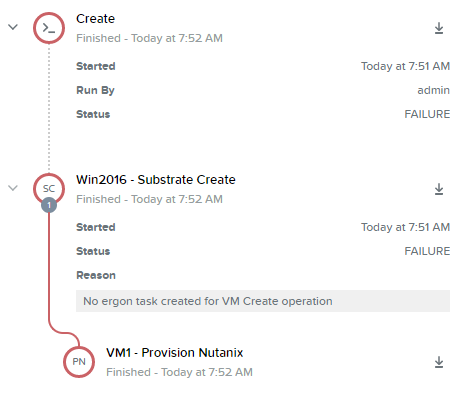
This time i am getting some different error.

Creating VM with name: EgAgentVM

ERROR: VM Creation failed at the AHV due to the following reasons: 
ERROR MESSAGE: 48c5230a-25cd-46ea-8b6b-7ea19e31c56f does not exist.
REASON: INVALID_REQUEST
ERROR DETAILS: <nil>

ERROR: No ergon task created for VM Create operation


Hey,


Ok the request reached epsilon. I guess epsilon was down for some time. The new error is because you did not select image when running the Eg VM.  There is a market place guide on portal.nutanix.com that explains.


Regards,

Charan teja


Forum|alt.badge.img
  • Author
  • Trailblazer
  • December 3, 2019

Hi Charan,


Even after selecting the image(win2016) end up with same error.


-Aravind


Hey Arvind,


Can you attach screen shots ? I would recommend raising a SFDC case so that a SRE can check and fix the issue


Forum|alt.badge.img
  • Author
  • Trailblazer
  • December 10, 2019

Still the same issue. Should i check any configurations or log files for details?


Hey,


From the PC tasks, it will show why VM creation failed. Also /home/nutanix/data/logs/aplos.out and /home/nutanix/data/logs/aplos_engine.out will show the Error logs why provisioning failed.


Forum|alt.badge.img
  • Author
  • Trailblazer
  • December 11, 2019

Got these error logs.


2019-12-10 14:45:53 UWSGI 127.0.0.1 [POST]:/v3/vms issued by: admin took 11863 msecs, response status: 422
2019-12-10 14:46:07 INFO remote_requests.py:805 Remote call [POST]:https://172.16.140.67:9440/api/nutanix/v3/remote_rpc_request?service_name=nutanix.insights.uploader.InsightsReceiverRpcSvc&port=2028&base_url=/rpc&timeout_ms=60000 , 0.03, 403
2019-12-10 14:46:07 WARNING remote_requests.py:303 Retry with all IPs failed. Passing up the error message from the remote cluster: [(u'172.16.140.67', 9440), (u'172.16.140.65', 9440)]
2019-12-10 14:46:07 WARNING remote_requests.py:247 Remote request call returned not OK with 127c7a4c-5f96-52fb-ad17-64d2958dd32d POST https://172.16.140.67:9440/api/nutanix/v3/remote_rpc_request?service_name=nutanix.insights.uploader.InsightsReceiverRpcSvc&port=2028&base_url=/rpc&timeout_ms=60000 403 {"state": "ERROR", "code": 403, "message_list": [{"reason": "ACCESS_DENIED", "message": "No permission to access the resource."}], "api_version": "3.1"}
2019-12-10 14:46:07 INFO remote_requests.py:805 Remote call [POST]:https://172.16.140.71:9440/api/nutanix/v3/remote_rpc_request?service_name=nutanix.insights.uploader.InsightsReceiverRpcSvc&port=2028&base_url=/rpc&timeout_ms=60000 , 0.04, 200
2019-12-10 14:46:07 ERROR fanout_proxy_api.py:66  Fanout proxy api returns: 403


Hey Aravind,


Looks like PC-PE communication is having issue. 


Forum|alt.badge.img
  • Author
  • Trailblazer
  • December 11, 2019

I am able to ping succefully from PC to PE. 


admin@NTNX-172-16-140-70-A-CVM:~$ ping 172.16.140.69 -- Prism Element
PING 172.16.140.69 (172.16.140.69) 56(84) bytes of data.
64 bytes from 172.16.140.69: icmp_seq=1 ttl=64 time=0.511 ms
64 bytes from 172.16.140.69: icmp_seq=2 ttl=64 time=0.375 ms
64 bytes from 172.16.140.69: icmp_seq=3 ttl=64 time=0.334 ms

admin@NTNX-172-16-140-70-A-CVM:~$ ping 172.16.140.71 -- Prism Cluster IP
PING 172.16.140.71 (172.16.140.71) 56(84) bytes of data.
64 bytes from 172.16.140.71: icmp_seq=1 ttl=64 time=0.868 ms
64 bytes from 172.16.140.71: icmp_seq=2 ttl=64 time=0.377 ms


Forum|alt.badge.img

Hi Aravind,

Can you perform the following from the PC VM:

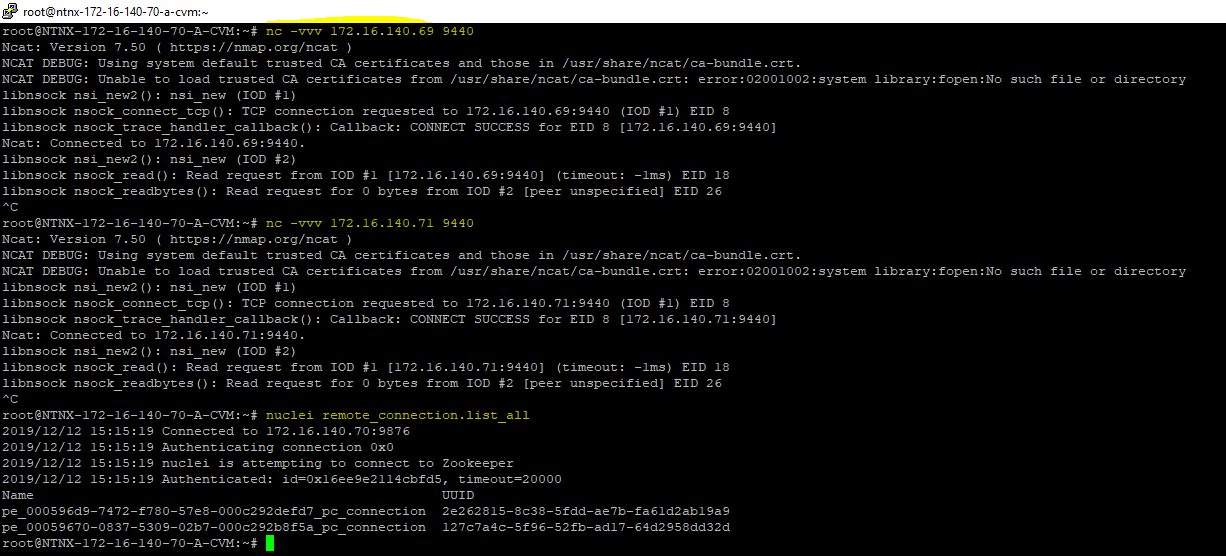
# nc -vvv 172.16.140.67 9440
# nc -vvv 172.16.140.65 9440
# nuclei remote_connection.list_all

On the PE cluster, run the below command and share it with us:

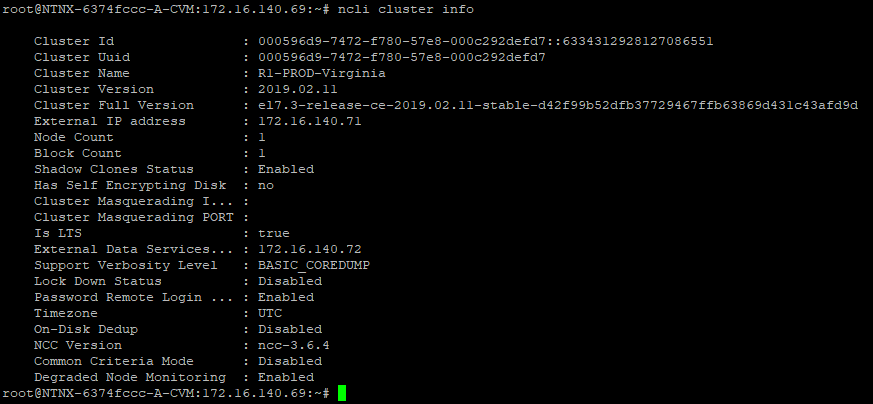
# ncli cluster info


Forum|alt.badge.img
  • Author
  • Trailblazer
  • December 13, 2019

Hi 

Note: I am running the community edition on VMware VM.

I confirmed the PE and PC IP's in my env as below:

172.16.140.69 -- Prism Element(CVM)
172.16.140.71 -- Cluster Virtual IP address
172.16.140.70 -- Prism Central

I ran the commands as you suggested. The screenshots are below:


On PC:-


On PE:-


172.16.140.67(PE, CVM) and  172.16.140.65(ClusterIP) are another clusters IP’s which was previously registered with this PC. I had to reinstall this cluster for some reason. Hence currently this Cluster is not registered with PC.


​​​​​​​-Aravind


Forum|alt.badge.img
  • Author
  • Trailblazer
  • December 13, 2019

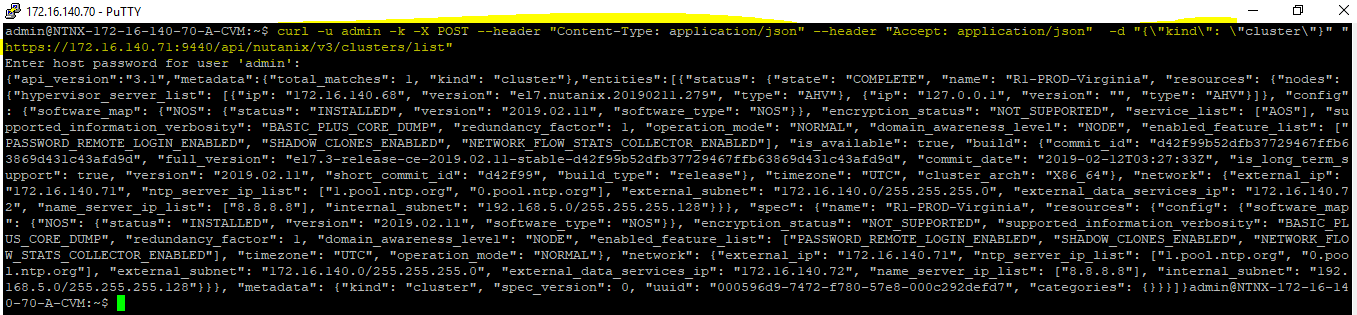
I checked the API access from PC to PE as well by listing the cluster details.


Forum|alt.badge.img
  • Author
  • Trailblazer
  • December 16, 2019

Hi Stalin/Charan,


Can you guys please help me here with some leads to troubleshoot.


-Aravind


Hi,


I was successful on setting up prism central on the community edition all working good.

Further i extended the cluster capability by enabling Calm. I am able to access the calm UI and see all the functions available. As a next step i tried to deploy hycu blueprint from market place also tried to deploy one VM from my on disk image. Both get failed with below error. Please help.


HTTPConnectionPool(host='172.16.xx.xx', port=4120): Max retries exceeded with url: /api/1/entities/get_by_name?name=Application-hycu--74b677a5-5cd9-4c49-9cb4-196e2d5e3be4 (Caused by ProtocolError('Connection aborted.', BadStatusLine("''",))) 


Regards,

Aravind

Hi ,

can you please help how to deploy prism central on the community edition.


sandeepmp
Nutanix Employee
Forum|alt.badge.img+19
  • Nutanix Employee
  • December 21, 2019

@Aravindcs Are you able to deploy new vms using this image from Prism Central? [directly from prism central and not from calm]


Forum|alt.badge.img
  • Author
  • Trailblazer
  • December 30, 2019

Hi,


I was successful on setting up prism central on the community edition all working good.

Further i extended the cluster capability by enabling Calm. I am able to access the calm UI and see all the functions available. As a next step i tried to deploy hycu blueprint from market place also tried to deploy one VM from my on disk image. Both get failed with below error. Please help.


HTTPConnectionPool(host='172.16.xx.xx', port=4120): Max retries exceeded with url: /api/1/entities/get_by_name?name=Application-hycu--74b677a5-5cd9-4c49-9cb4-196e2d5e3be4 (Caused by ProtocolError('Connection aborted.', BadStatusLine("''",))) 


Regards,

Aravind

Hi ,

can you please help how to deploy prism central on the community edition.


I followed multiple docs. The below url’s helped me lot. There is one youtube video available as well.

https://next.nutanix.com/discussion-forum-14/prism-central-not-booting-27300

https://next.nutanix.com/discussion-forum-14/prism-central-nested-esxi-6-7-31972