Solved

Synchronous DR Test Failover --> Fails – “Replicated recovery point(s) could not be found on the target”

  • February 25, 2026
  • 9 replies
  • 46 views

Daniel Martinez
Forum|alt.badge.img+2

Hi,

I’m currently configuring synchronous replication (manual failover, no Witness VM yet) between two AHV clusters managed by Prism Central 7.5.0.5 (each cluster has it’s own PC).

Since there is no Witness deployed, this is not Metro Availability, but a synchronous Protection Policy with manual failover. As soon as I have the Witness VM I will test the Metro Availability feature.

Current setup

  • Created a container named Metro_CPD1 on both clusters.

  • Created 3 test VMs on Cluster1 and placed them in the Metro_CPD1 container.

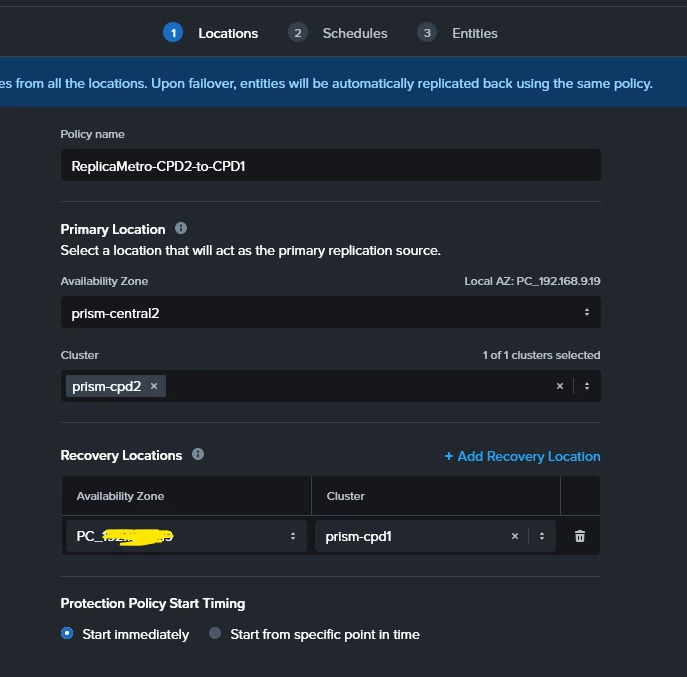
  • From PC1 I’ve created a Synchronous Protection Policy (ReplicaMetro-CPD1-to-CPD2) with manual failover.

  • From PC1 I’ve created a Recovery Plan (Recovery-metro-replica1) :

    • Primary location: Cluster1

    • Recovery location: Cluster2

    • Execution mode: Manual

  • Added the 3 VMs to the Recovery Sequence.

  • Configured Network Mappings (Prod LAN and Test LAN with IP pools).

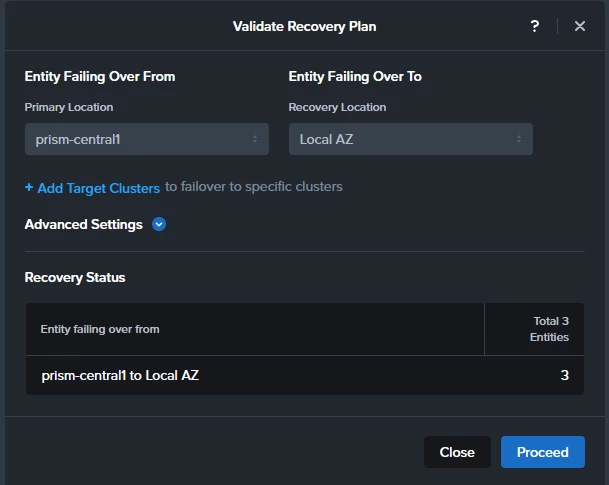
  • After creating the Recovery plan I do a “Validate” and it completes successfully on both sites
 

After some time (hours) on both PCs, under Recovery Points, I can see the Test VMs and their corresponding recovery points. So this suggests me that synchronous replication is working and checkpoints exist on both sides.



Problem

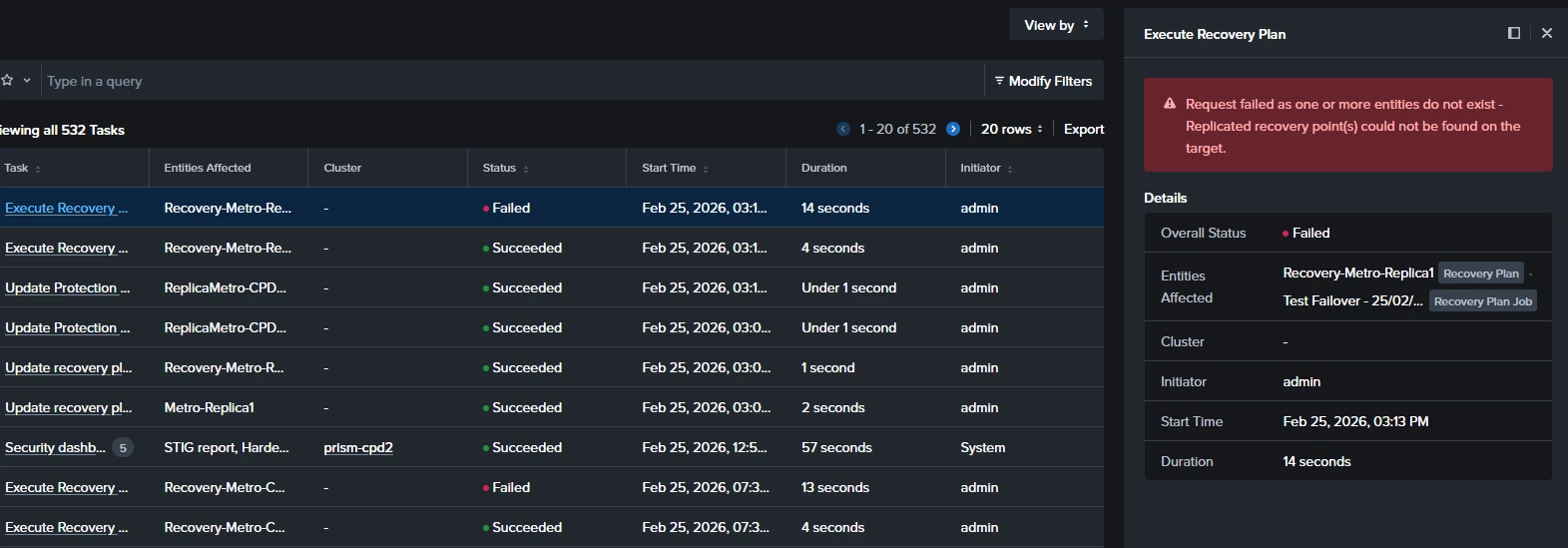
When I run a Test Failover from the secondary site, the execution starts but fails around the starting point with the following error:

"Request failed as one or more entities do not exist - Replicated recovery point(s) could not be found on the target."

Since recovery points are visible on both sides, I’m unsure why the Recovery Plan cannot locate them during the test execution.
 

Questions

  • A part of creating two containers with the same name on both clusters, do I have to “pair” them in some way? 

  • Is there any specific requirement for Recovery Plans when using synchronous Protection Policies (without Metro container)?

  • Is there any known delay or additional step required before recovery points become usable for test failover?

Any guidance would be appreciated.

Thanks!!!

Best answer by selvamani

Hi ​@Daniel Martinez 

If you are using Prism Central 7.5, you will not see an explicit container mapping field in the Protection Policy UI.

For synchronous replication (non-Metro), container pairing is derived automatically from the storage container of the protected VMs. There is no manual container-mapping screen like in older DR workflows.

So in this model, you don’t manually map containers.Mapping is implicit through the replication relationship and container lineage created by the Protection Policy.

Recommended steps to refresh the pairing:

1,Remove VMs from the current protection policy

2,Delete the synchronous protection policy

3,Ensure the target container exists on Cluster2 (empty is fine)

4,Recreate the synchronous policy from Cluster1 --> Cluster2 

5,Wait for first sync checkpoint   --->  Recreate or refresh the Recovery Plan

After this, Prism will internally pair the containers and the Test Failover should work.

Thanks 

9 replies

selvamani
Forum|alt.badge.img+2
  • Trailblazer
  • February 26, 2026

Hi ​@Daniel Martinez 

Can you please check 
1. Container mapping On PC, open the protection policy --> confirm target container shows the correct cluster and container ,I hope not missing 

2. Edit policy -->reselect target container -->Save .Container UUID mapping 

3.Open Recovery Plan --> Edit -->remove VMs--> re-add them →  Save. recovary plan resync 

4.Wait 1–2 sync cycles so a fresh recovery point. Check it  exists under the updated mapping.

Retry the Test Failover.
==
My Answers  for your Questions .
A part of creating two containers with the same name on both clusters, do I have to “pair” them in some way?   
Same container name alone is not enough --> policy pairing defines mapping

Is there any specific requirement for Recovery Plans when using synchronous Protection Policies (without Metro container)? No extra delay is normally required once checkpoints appear
 

Is there any known delay or additional step required before recovery points become usable for test failover? Recovery Plans work with synchronous policies without Metro, but mappings must stay consistent

Thanks 


Daniel Martinez
Forum|alt.badge.img+2

Hi Selvamani

Thanks for the reply. After reading your answer I’ve realized that during the process I’ve never “mapped” any container, so I think that’s the problem!

However I followed your indications and I can’t find any place to perform the container mapping on the protection policy. I can just pair the Prism Centrals and clusters… that’s all I can do:


In the previous screen, where am I suposed to find the container mapping?

thanks again!


selvamani
Forum|alt.badge.img+2
  • Trailblazer
  • Answer
  • February 26, 2026

Hi ​@Daniel Martinez 

If you are using Prism Central 7.5, you will not see an explicit container mapping field in the Protection Policy UI.

For synchronous replication (non-Metro), container pairing is derived automatically from the storage container of the protected VMs. There is no manual container-mapping screen like in older DR workflows.

So in this model, you don’t manually map containers.Mapping is implicit through the replication relationship and container lineage created by the Protection Policy.

Recommended steps to refresh the pairing:

1,Remove VMs from the current protection policy

2,Delete the synchronous protection policy

3,Ensure the target container exists on Cluster2 (empty is fine)

4,Recreate the synchronous policy from Cluster1 --> Cluster2 

5,Wait for first sync checkpoint   --->  Recreate or refresh the Recovery Plan

After this, Prism will internally pair the containers and the Test Failover should work.

Thanks 


Daniel Martinez
Forum|alt.badge.img+2

Hi!

Thanks for the advises! I works! I’ve moved the test VMs to another container that has the same name on both clusters.

Then I’ve created a new Protection policy (syncronous) and then I’ve created a new migration plan. 

I’ve waited about a pair of hours to be sure they VMs where syncronized between clusters and finally I successfuly did the failover test from the other PC. I also tested the manual failover and it worked too!

So I will do more test but at least by the moment it is working fine…

Now I have some questions regarding the best practices about how to manage a scenario with two AHV clusters with metro-availability (active-active) 

For example:


PC Site1
Container-metro1 (production → replicating against PC2): 

  • VM1
  • VM2
  • VM3

Container-metro2 (replica from PC2)


PC Site2
Container-metro2 (production → replicating against PC1):

  • VM4
  • VM5
  • VM6

Container-metro1 (replica from PC1)


Now I create a pair of Protection policies to protect the VMs from site1 to replicate them on site2 and viceversa. In summary VMs on container-metro1 from PC1 will replicate on container-metro1 from PC2, while VMs from PC2 will replicate on container-metro2 from PC1.

As far as I understand that will work without problem, in case I need to migrate a VM between clusters I can just do an on-demand live migration cross clusters and move it or just do a failover between sites (assuming a cutover).

Are the previous statements correct?

Instead of having two containers on each site (each one dedicated to its own VMs) can I just have a single “container-metro” on both sites and put all the VMs on that cluster (some on site 1 and some on site2) then replicate them between sites to the same container on the other site? I’m not sure if this will work...
 

PC Site1
Container-metro (production → replicating against PC2): 

  • VM1
  • VM2
  • VM3


PC Site2
Container-metro (production → replicating against PC1):

  • VM4
  • VM5
  • VM6


selvamani
Forum|alt.badge.img+2
  • Trailblazer
  • February 27, 2026

Hi ​@Daniel Martinez 

Great to hear it’s working.
Your understanding is mostly correct, and your proposed Metro design is valid.
Below are clarifications and best-practice guidance for an active-active (Metro-style) two-cluster setup.


1) Your current design with two containers per site:

PC Site1

container-metro1 → production VMs (VM1-3) → sync to Site2

container-metro2 → replicas from Site2

PC Site2

container-metro2 → production VMs (VM4-6) → sync to Site1

container-metro1 → replicas from Site1

This is a valid and commonly used bidirectional synchronous DR layout.
 

Your statements are correct:

VMs in container-metro1 on Site1 replicate to container-metro1 on Site2 

VMs in container-metro2 on Site2 replicate to container-metro2 on Site1 
 

Cross-site migration can be done via failover or planned migration .So yes,your understanding here is correct.


About live migration between clusters : 

Important :

True live migration (no downtime) between clusters requires Metro Availability + Witness

Without Metro (standard sync DR), migration = planned failover (short downtime)

So your assumption is correct if Metro is enabled later, otherwise it’s a cutover.

2) Single shared container on both sites .You asked if this would work:

PC Site1

container-metro --> VM1-3

PC Site2

container-metro --> VM4-6

Then replicate both directions into the same container name.

Short answer:

Yes,this works and is actually the recommended Metro design.

Why Nutanix prefers single Metro container

In Metro Availability architecture:

One logical datastore stretched across clusters

Same container name and lineage on both sides

Active-active placement of VMs

Automatic ownership per VM

So both sites hosting VMs in the same Metro container is normal.


For Metro Availability (active-active):

Preferred design

Both sites: container-metro (same container lineage) ,VMs can run on either site.

This enables: seamless ownership switching, Metro HA ,zero-RPO mobility and  clean failover orchestration

Your current dual-container layout works, but single Metro container is simpler and aligns with Nutanix architecture.


Your Questions :

Your statement is Correct.Your bidirectional two-container design works and migration assumptions are correct (planned failover unless Metro).

Yes .Use a single container-metro on both sites. That is the recommended Metro Availability design.
VMs from both sites can reside in the same Metro container and replicate bidirectionally without issue.

Thanks
Selvamani S 


selvamani
Forum|alt.badge.img+2
  • Trailblazer
  • February 27, 2026

Hi ​@Daniel Martinez 

Please refer : 

Nutanix AHV Metro Availability : https://vmscrub.com/configuring-nutanix-ahv-metro-availability/


Asynchronous, Synchronous and Near-Synchronous Replications with Nutanix : https://www.nutanix.com/en_au/blog/nutanix-dr-multi-site-recovery

Replication and Disaster Recovery : https://www.nutanix.dev/2022/09/08/nutanix-benefit-5-enterprise-grade-replication-and-disaster-recovery/

Nutanix DR: Planned vs. Unplanned Failovers  : https://mikedent.io/post/2025/10/nutanix-dr-planned-vs-unplanned-failover/

Thanks 
Selvamani S 


Daniel Martinez
Forum|alt.badge.img+2

Thanks a lot for your explanations!


Daniel Martinez
Forum|alt.badge.img+2

Hi again!

I’ve created a new container with the same name on both sites and I’ve moved the test VMs to that container. Some of the test VMs are on site1 and the others on site2.

Then I’ve created a syncronous protection policy (bidirectional) to replicate the VMs from that container between sites.

Finaly on site1 I’ve created a new Recovery Plan to manualy recover VMs from site1 on site2 and another new Recovery plan to recover VMs from site2 on site1.

After waiting some time I’ve executed a failover test from the VMs from site1 → site2 but it failed. I did the test with other recovery plan from site2 → site1  and it works.

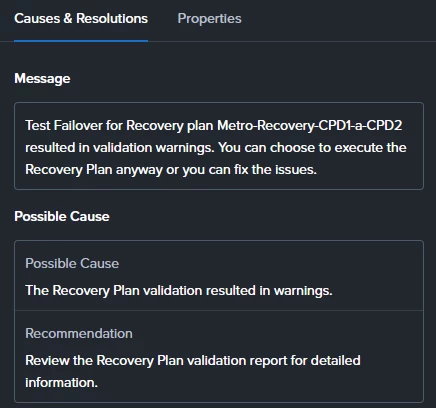
When checking the validation from the recovery plan that was failing I see this warning:


But I can’t finde the “Recovery Plan validation report” to get more detailed information about the issue. Where can I find it?

Thanks


selvamani
Forum|alt.badge.img+2
  • Trailblazer
  • February 28, 2026

Hi ​@Daniel Martinez 
Super cool . 

In Prism Central 7.x, the “Recovery Plan validation report” is not a separate document. 

It’s visible at  Recovery Plan ==> Validate ==> View Details / Task Details
OR 
Prism Central ==> Tasks ==>Filter = Recovery Plan / Validate

Open the Validate task ==> expand subtasks ==> you’ll see the specific warning item.

So the UI message is misleading — it refers to the validation task details.

Your Metro-style layout is correct.

One direction failover working and the other failing usually means:
VM ownership direction mismatch, stale checkpoint on one side,protection policy direction metadata lag

So your design is fine this is a (Possibly) validation visibility issue.

Thanks 
Selvamani S