Question

Licence warning during (planned) failover

  • February 5, 2026
  • 7 replies
  • 40 views

Hi, 

We have two cluster, Prod and DR. We have protection policies all set up, as well as recovery plans. 


However, when performing a planned failover (for testing) ​​​​​​, the execution of the recovery fails. But it also succeeds… with warnings. The warnings say as follow:

------

VMs/Recovery Points detected on Prism Element(s) with unsupported license

IMPACT

Some VMs might not be recovered.

CAUSE

Some of the VMs/Recovery Points are located on Prism Element(s) with unsupported license.

RESOLUTION

Make sure that the Prism Element(s) have supported license. Supported License includes Ultimate License or Pro license with add-on advanced replication.
-----

The (planned) failover is also successful - so why the warnings? 
We have Pro licence. 
As far as I understand it, we need Ultimate licence for Test failover, but not for the planned failover (as long as we don’t do staging in bringing VMs back up). Are these warnings a red herring? 
Also, what about unplanned failover? Will we also just get the warning but it will work? 

Thanks!
Sandgirl

7 replies

swischer
Forum|alt.badge.img+1
  • Trailblazer
  • February 5, 2026

Hi,

I think you need advanced replication license add-on:

https://www.nutanix.com/products/cloud-platform/software-options


In the note below the table on the page you find:

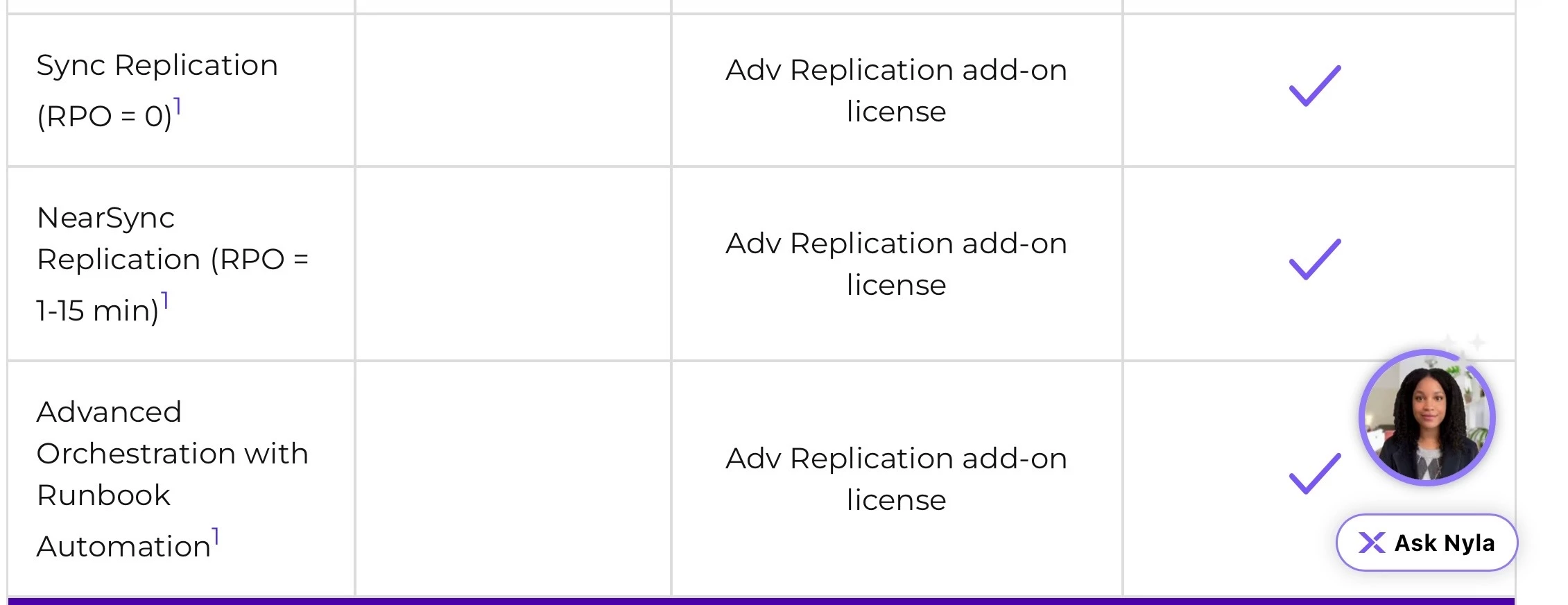
“This add-on license is applicable to Advanced Orchestration (Multiple Boot Stages, Script Execution, Re-IP, Test Failover), Metro Availability, Sync or NearSync Replication (RPO = or RPO = 1-15 min.).“


  • Author
  • Adventurer
  • February 6, 2026

Hi,

We do not use near sync or sync replication, we only use async replication. We don’t use metro availability either. 
We don’t plan any of the Advanced Orchestration and none of our recovery plans have any of the Advanced Orchestration in the settings. 
So, as far as I can tell, for just async replication and simple failover (no advanced orchestration), we should be good. And we seem to be (during the planned failover). So why the warning? 


swischer
Forum|alt.badge.img+1
  • Trailblazer
  • February 6, 2026

HI,

I understand the confusion but when a customer wants to use recovery plans I have always included Advanced Replication license. This I had again discussed 2 weeks ago with a Nutanix SE and he agreed that in that case Advanced Replication is needed. 

If you want to have an answer from Nutanix open a case and request there why you are getting an error or at least reach out to your Nutanix Partner SE / Nutanix SE.

Would be great if you get an official answer to post it here - thanks.


JeroenTielen
Forum|alt.badge.img+8
  • Vanguard
  • February 6, 2026

Yes advanced replication addon is needed for this. 


  • Author
  • Adventurer
  • February 6, 2026

So, to add to this, I have multiple recovery plans (all set up by my colleague previously). 5 out of 6 plans were failing validation, one was not. 
I have switched categories for a couple of VMs, so they would be linked  to the successful plan, and the plan kept on being successful. 
However, when I added another category to this successful recovery plan, it started showing warnings as well. This has also continued after I have removed the newly added categories. 

So - how can some plans be failing, and another be successful… and then not being successful, when the only thing that changes was adding another category (linked to another protection policy)? 


  • Author
  • Adventurer
  • February 11, 2026

Right, so I logged a ticket with Nutanix. 

They have confirmed we have Nutanix Pro, but don’t have the Advanced Replication licence.

However, they advised that this will not affect planned failovers. According to them:

‘It’s just a licence violation, it’s not a hardlock’. 


JeroenTielen
Forum|alt.badge.img+8
  • Vanguard
  • February 13, 2026

But when the hardlock kicks in you don’t have a valid license. I dont think that answer was a correct answer from support and that you should purchase the correct licensing. 


I think you hit this requirement: Advanced Orchestration with Runbook Automation.

Advanced Orchestration with Runbook Automation1   Adv Replication add-on license