Question

Unable to install Prism on top of AHV due to resource (memory ) utilization

  • January 16, 2026
  • 5 replies
  • 50 views

Forum|alt.badge.img

Hello Team,

Need assistance.

I have installed AHV cluster of a 2 nodes on the Dell-PowerEdge R640 hardware. 
Hardware specifications -
Memory - 128 GB on each host

I have installed AHV on 2 nodes and formed a cluster using the foundation vm. The AHV and cluster were installed successfully and all the services are up and running. (able to access the UI And login too)
When the clusters are installed I tried to install the Prism element on top of the AHV cluster but that fails.
when tried to troubleshoot found out that the host is utilizing maximum memory (almost 126gb out of 128 gb)
Due to this unable to install the prism element.

Below are the details of the packages - ( all are in whitelist)
AHV v.10.3.0.2, 10.3.1.1
AOS Version - 7.3.0.6, 7.3.1.1
Prism Version pc.7.3.0.6

5 replies

Forum|alt.badge.img

uhm, not sure how you approached this, but normally you foundation a cluster using foundation (app or VM) and that will install AHV and CVM and create the cluster.

You're providing IPs for the host, CVM and IPMI during the foundation process so not sure what has been done.


Forum|alt.badge.img
  • Author
  • Adventurer
  • January 16, 2026

uhm, not sure how you approached this, but normally you foundation a cluster using foundation (app or VM) and that will install AHV and CVM and create the cluster.

You're providing IPs for the host, CVM and IPMI during the foundation process so not sure what has been done.

yes using the foundation vm, the IPMI, host and CVM IP’s are given. the clusters are created successfully keeping both the nodes.
sharing the screenshot below from the foundation installation wizard - 

anything else required ?


JeroenTielen
Forum|alt.badge.img+8
  • Vanguard
  • January 21, 2026

Looks like you are mixing names here. Prism Element is the default Prism always present in the cluster (it is running in each CVM). Prism Central is the multicluster Prism with additional advanced features and licensing. Prism Central is installed as VM (or VM's) on a cluster. 


I assume you want to install Prism Central and that is failing. What installation type did you choose in the Prism Central deployment wizard? 1 VM or scaled out (3VMs)? And what size? (xsmall small large or xlarge)??


Forum|alt.badge.img
  • Author
  • Adventurer
  • January 21, 2026

Looks like you are mixing names here. Prism Element is the default Prism always present in the cluster (it is running in each CVM). Prism Central is the multicluster Prism with additional advanced features and licensing. Prism Central is installed as VM (or VM's) on a cluster. 


I assume you want to install Prism Central and that is failing. What installation type did you choose in the Prism Central deployment wizard? 1 VM or scaled out (3VMs)? And what size? (xsmall small large or xlarge)??


Thanks for getting back.
This was regarding the Prism element, I was able to resolve the issue. Restarted the zookeeper service and let the system to cool down. Eventually the services came up and was able to see the dashboard as per the expectations.


However proceeded ahead with the Prism Central installation and encountered an issue for the installation where the installation fails at 100%.

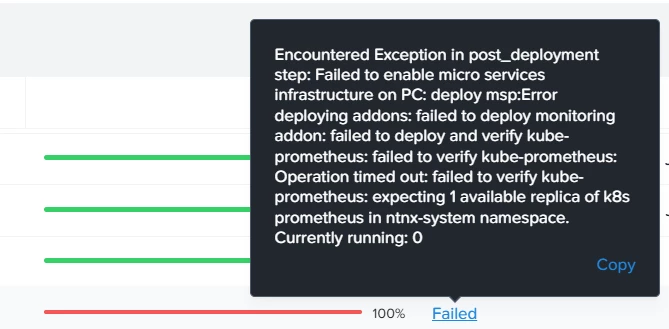
Here is the error snip -


Encountered Exception in post_deployment step: Failed to enable micro services infrastructure on PC: deploy msp:Error deploying addons: failed to deploy monitoring addon: failed to deploy and verify kube-prometheus: failed to verify kube-prometheus: Operation timed out: failed to verify kube-prometheus: expecting 1 available replica of k8s prometheus in ntnx-system namespace. Currently running: 0

Checked using the below command on the prism central vm-
nutanix@NTNX-172-30-30-41-A-PCVM:~$ kubectl get pods -n ntnx-system NAME READY STATUS RESTARTS AGE alertmanager-main-0 2/2 Running 0 8h fluent-bit-jflnz 1/1 Running 0 8h kube-state-metrics-7f75b9d79-shgg8 3/3 Running 0 8h mutator-webhook-dep-6bd5f8f4dc-7b864 1/1 Running 0 8h node-exporter-qw8vw 2/2 Running 0 8h ntnx-cluster-maintainer-597dd9b499-t2gnx 1/1 Running 0 8h ntnx-k8s-cluster-maintainer-operator-55f8b5fc4d-js9gp 1/1 Running 0 8h nutanix-csi-controller-775989485b-74nhm 6/6 Running 0 8h nutanix-csi-node-5qcd8 3/3 Running 0 8h prometheus-k8s-0 0/2 Pending 0 8h prometheus-operator-774fb648bd-cvl4m 2/2 Running 0 8h
nutanix@NTNX-172-30-30-41-A-PCVM:~$ kubectl get pod -n ntnx-system | grep prometheus prometheus-k8s-0 0/2 Pending 0 8h prometheus-operator-774fb648bd-cvl4m 2/2 Running 0 8h

Can anyone assist ?


JeroenTielen
Forum|alt.badge.img+8
  • Vanguard
  • January 21, 2026

Did you changed the default microservices ip-adresses, asked during installation wizard? 

Are you already using one of these subnets? 

Subnet Purpose
10.100.0.0/16 Reserved for K8s pod network
10.200.32.0/24 K8s Services (Flow Virtual Networking, IAM, etc)
10.200.0.0/16 Reserved for K8s Services network
10.100.0.0/24 K8s pod - PC1
10.100.1.0/24 K8s pod - PC2
10.100.2.0/24 K8s pod - PC3


I would really encourage you to create a support ticket. They are to help you with these errors.