
Question

Problems installing CE on Workstation 25.0.0.24995812

  • February 14, 2026
  • 2 replies
  • 0 views

JohnHutch71

Trying to deploy the latest CE image (phoenix.x86_64-fnd_5.6.1_patch-aos_6.8.1_ga) on a VMware Workstation 25 machine, the VM is being deployed with the recommended hardware (8 cores, 32Gb, 3 drives (64, 200 and 500). The machine I’m deploying on is a minipc with i9 16 cores, 64Gb Ram and plenty of free NVMe space so its not a resource issue. 


I see some other similar posts asking the same question but they looked to be using machines that didnt have sufficient ram to support the VM running with 32GB. 


I’ve tried turning the compatibility down to workstation 17.x but that’s made no difference.

I’m getting the following error, I’ve looked through the log file but there doesnt appear to be anything obvious that is causing the issue. 
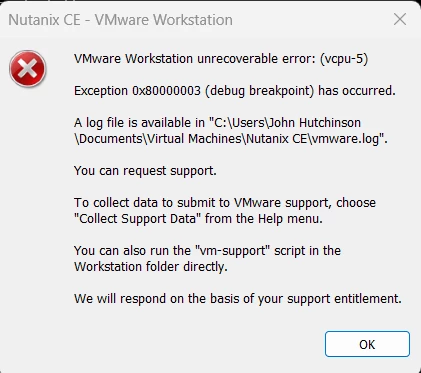
Thanks in advance

John

 

2 replies

selvamani
Forum|alt.badge.img+1
  • Trailblazer
  • February 16, 2026

Hi ​@JohnHutch71 

On modern Windows 11 systems, Hyper-V and related security features can take control of CPU virtualization. When this happens, VMware runs in compatibility mode, and heavy VMs like Nutanix CE may crash with vCPU errors. Even if Hyper-V appears disabled, some parts may still be active.

Steps to fix:

  • Disable the Windows hypervisor

Open Command Prompt as Administrator and run:
bcdedit /set hypervisorlaunchtype off

  • Turn off Windows virtualization features

Go to: Control Panel → Programs → Turn Windows features on or off

Disable:

Hyper-V

Windows Hypervisor Platform

Virtual Machine Platform

Windows Sandbox

Windows Subsystem for Linux (if enabled)

Reboot.

  • Disable Core Isolation

Go to: Windows Security → Device Security → Core Isolation

Turn off Memory Integrity

Reboot again.

This resolves most VMware vCPU crashes.
 

VMware VM settings (recommended):

Processors: 2

Cores per processor: 4

Enable:

Virtualize Intel VT-x/EPT or AMD-V/RVI

Virtualize CPU performance counters

Optional (.vmx tweaks for nested virtualization):

monitor.virtual_exec = "hardware"
monitor.virtual_mmu = "hardware"
ulm.disableMitigations = "TRUE"


BIOS checks:

Intel VT-x enabled

Intel VT-d enabled

No legacy virtualization restrictions

Thanks 
Selvamani.S


JohnHutch71
  • Author
  • Voyager
  • February 16, 2026

@selvamani great point re the Hyper-V service, will admit that hadnt crossed my mine, TBH I’ve not really used Windows in a few years. My testing has been put on hold for the time being as the newly purchased home lab PC was having some significant boot issues and with the current cost of hardware I’ve decided to return and delay investing although it could be a while before the prices come down, £700 for 64Gb DDR5 is insane! 


Thanks again, 

John