Solved

Creating multiple LACP on AHV

  • April 20, 2026
  • 4 replies
  • 50 views

Forum|alt.badge.img

Hi Folks,

I have NX-8170-G10 configured with 1x 2port 10G copper, 2x 2port 25G Fibre NICs. I need to make the following configurations.

1x 2 port Copper : Active-Backup e.g. br0-up

1x 2 port Fibre : Active-Active (balanced-tcp) in LACP 1 e.g. br0-up1

1x 2 port Fibre : Active-Active (balanced-tcp) in LACP 2 e.g. br0-up2

I have the followig questions.

  1. Do I need seperate Bridge for each uplink
  2. I used the following commands on AHV for creating the uplink, but I am getting warnings on Prism Element
  3. ovs-vsctl add-bond br0 br0-up2 eth4 eth5
    ovs-vsctl set port br0-up2 other_config:lacp-fallback-ab=true
    ovs-vsctl set port br0-up2 other_config:lacp-time=fast
    ovs-vsctl set port br0-up2 bond_mode=balance-tcp
    ovs-vsctl set port br0-up2 lacp=active
  4. and the same commands for br0-up1

Best answer by AffanAhmad

Hi Affan,

Looking at what you are trying to achieve, you want to create 3x virtual switchs (or bridges), one for each of these lines:

1x 2 port Copper : Active-Backup e.g. br0-up

1x 2 port Fibre : Active-Active (balanced-tcp) in LACP 1 e.g. br0-up1

1x 2 port Fibre : Active-Active (balanced-tcp) in LACP 2 e.g. br0-up2

I personally prefer to set this up via GUI, On Prism Element → Settings → Network Configurations → Virtual Switch, you can easily a new VS, define it’s mtu and active-active state and select the ports you want to use for all hosts.

My recommendation would be to avoid assigning a Bridge/VS to an entire dual-port NIC, example (unless you are using RDMA, in that case you have to dedicated the whole NIC to the bridge/vs):
Instead of doing:

  • fiber adapter 1 port1 and port2 → br1 (or vs1)
  • fiber adapter 2 port1 and port2 → br2 (or vs2)

Do like this:

  • fiber adapter 1 port1 and  fiber adapter 2 port1 → br1 (or vs1)
  • fiber adapter 1 port2 and fiber adapter 2 port2 → br2 (or vs2)

This way if you have a NIC failure you won’t loose any of your VS entirely, you will have at least 1x active port on the remaining NIC/Adaptor. Also ensure they are cabled to different network switchs (nic1 port1 → sw1 and nic2 port1 → sw2).

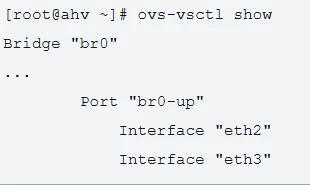
Regarding your code on step#3 you need multiple bridges, br0, br1 and br2. Each bridge will have 2x uplinks. something like this:


This is a good suggestion to create the LACP between the NICs. I am glad you pointed it out.

But can you confirm that if I create an additional bond in LACP for CVM Management traffic on Fibre ports, the Active-Backup bond i=on copper ports will also support CVM Management traffic or not?

4 replies

NBorba
Forum|alt.badge.img+1
  • Trailblazer
  • April 20, 2026

Hi Affan,

Looking at what you are trying to achieve, you want to create 3x virtual switchs (or bridges), one for each of these lines:

1x 2 port Copper : Active-Backup e.g. br0-up

1x 2 port Fibre : Active-Active (balanced-tcp) in LACP 1 e.g. br0-up1

1x 2 port Fibre : Active-Active (balanced-tcp) in LACP 2 e.g. br0-up2

I personally prefer to set this up via GUI, On Prism Element → Settings → Network Configurations → Virtual Switch, you can easily a new VS, define it’s mtu and active-active state and select the ports you want to use for all hosts.

My recommendation would be to avoid assigning a Bridge/VS to an entire dual-port NIC, example (unless you are using RDMA, in that case you have to dedicated the whole NIC to the bridge/vs):
Instead of doing:

  • fiber adapter 1 port1 and port2 → br1 (or vs1)
  • fiber adapter 2 port1 and port2 → br2 (or vs2)

Do like this:

  • fiber adapter 1 port1 and  fiber adapter 2 port1 → br1 (or vs1)
  • fiber adapter 1 port2 and fiber adapter 2 port2 → br2 (or vs2)

This way if you have a NIC failure you won’t loose any of your VS entirely, you will have at least 1x active port on the remaining NIC/Adaptor. Also ensure they are cabled to different network switchs (nic1 port1 → sw1 and nic2 port1 → sw2).

Regarding your code on step#3 you need multiple bridges, br0, br1 and br2. Each bridge will have 2x uplinks. something like this:


Forum|alt.badge.img
  • Author
  • Adventurer
  • Answer
  • April 21, 2026

Hi Affan,

Looking at what you are trying to achieve, you want to create 3x virtual switchs (or bridges), one for each of these lines:

1x 2 port Copper : Active-Backup e.g. br0-up

1x 2 port Fibre : Active-Active (balanced-tcp) in LACP 1 e.g. br0-up1

1x 2 port Fibre : Active-Active (balanced-tcp) in LACP 2 e.g. br0-up2

I personally prefer to set this up via GUI, On Prism Element → Settings → Network Configurations → Virtual Switch, you can easily a new VS, define it’s mtu and active-active state and select the ports you want to use for all hosts.

My recommendation would be to avoid assigning a Bridge/VS to an entire dual-port NIC, example (unless you are using RDMA, in that case you have to dedicated the whole NIC to the bridge/vs):
Instead of doing:

  • fiber adapter 1 port1 and port2 → br1 (or vs1)
  • fiber adapter 2 port1 and port2 → br2 (or vs2)

Do like this:

  • fiber adapter 1 port1 and  fiber adapter 2 port1 → br1 (or vs1)
  • fiber adapter 1 port2 and fiber adapter 2 port2 → br2 (or vs2)

This way if you have a NIC failure you won’t loose any of your VS entirely, you will have at least 1x active port on the remaining NIC/Adaptor. Also ensure they are cabled to different network switchs (nic1 port1 → sw1 and nic2 port1 → sw2).

Regarding your code on step#3 you need multiple bridges, br0, br1 and br2. Each bridge will have 2x uplinks. something like this:


This is a good suggestion to create the LACP between the NICs. I am glad you pointed it out.

But can you confirm that if I create an additional bond in LACP for CVM Management traffic on Fibre ports, the Active-Backup bond i=on copper ports will also support CVM Management traffic or not?


NBorba
Forum|alt.badge.img+1
  • Trailblazer
  • April 21, 2026

I believe (not 100% certain, you need to test it) you can split CVM management traffic and Storage/cluster traffic to different VS/Bonds by enabling CVM Network segmentation. This splits your management traffic to one vlan that can be assigned to vs0 (ethernet ports) and cluster/storage services to another vlan that can be assign to vs1 (fiber ports) for example.
Keep in mind that your Storage/Cluster traffic runs on the CVM Backplane services, therefore this services should be place on reliable links, preferebly fiber uplinks.


My personal experience is that a dual-25gbps VS/Bond is more than enough to run all CVM traffic. for security and isolation you can manage it with different vlans by enabling CVM Network Segmentation, this way you can keep your cluster/storage traffic on a isolated vlan (within the SW stack) and your management traffic on a routed vlan. 

Most likely your 2x fiber dual-nics will be more than enough to handle all traffic for a high performance cluster. My suggestion for most cases is:
Example:

  •  VS0/br0 (using a bond of 2x 10/25gbps fiber interfaces) for CVM traffic with network segmentation enabled:
    • vlan 10 for cluster/storage services. this would be an isolated vlan that doesn’t leave the switch stack.
    • vlan 20 for management services. this would be a routable vlan so you can hit those IPs from your laptop, jump servers, git runners, etc… for management.
  • VS1/br1 (using a bond of 2x 10/25gbps fiber interfaces) for all VM Data, this would be your default virtual switch where you are going to create all the subnets that are going to be assigned to your virtual machines.
  • VS2/br2 (using the bond of 2x 10gbps ethernet ports) can be reserved for dedicated iSCSI or DR services connectivity.

You can find more documentation here: https://portal.nutanix.com/page/documents/details?targetId=AHV-Admin-Guide-v11_0:ahv-acr-nw-best-practices-c.html


Forum|alt.badge.img
  • Author
  • Adventurer
  • April 22, 2026

Thanks a lot ​@NBorba .