Question

Creating multiple LACP on AHV

  • April 20, 2026
  • 1 reply
  • 28 views

Forum|alt.badge.img

Hi Folks,

I have NX-8170-G10 configured with 1x 2port 10G copper, 2x 2port 25G Fibre NICs. I need to make the following configurations.

1x 2 port Copper : Active-Backup e.g. br0-up

1x 2 port Fibre : Active-Active (balanced-tcp) in LACP 1 e.g. br0-up1

1x 2 port Fibre : Active-Active (balanced-tcp) in LACP 2 e.g. br0-up2

I have the followig questions.

  1. Do I need seperate Bridge for each uplink
  2. I used the following commands on AHV for creating the uplink, but I am getting warnings on Prism Element
  3. ovs-vsctl add-bond br0 br0-up2 eth4 eth5
    ovs-vsctl set port br0-up2 other_config:lacp-fallback-ab=true
    ovs-vsctl set port br0-up2 other_config:lacp-time=fast
    ovs-vsctl set port br0-up2 bond_mode=balance-tcp
    ovs-vsctl set port br0-up2 lacp=active
  4. and the same commands for br0-up1

1 reply

NBorba
Forum|alt.badge.img+1
  • Trailblazer
  • April 20, 2026

Hi Affan,

Looking at what you are trying to achieve, you want to create 3x virtual switchs (or bridges), one for each of these lines:

1x 2 port Copper : Active-Backup e.g. br0-up

1x 2 port Fibre : Active-Active (balanced-tcp) in LACP 1 e.g. br0-up1

1x 2 port Fibre : Active-Active (balanced-tcp) in LACP 2 e.g. br0-up2

I personally prefer to set this up via GUI, On Prism Element → Settings → Network Configurations → Virtual Switch, you can easily a new VS, define it’s mtu and active-active state and select the ports you want to use for all hosts.

My recommendation would be to avoid assigning a Bridge/VS to an entire dual-port NIC, example (unless you are using RDMA, in that case you have to dedicated the whole NIC to the bridge/vs):
Instead of doing:

  • fiber adapter 1 port1 and port2 → br1 (or vs1)
  • fiber adapter 2 port1 and port2 → br2 (or vs2)

Do like this:

  • fiber adapter 1 port1 and  fiber adapter 2 port1 → br1 (or vs1)
  • fiber adapter 1 port2 and fiber adapter 2 port2 → br2 (or vs2)

This way if you have a NIC failure you won’t loose any of your VS entirely, you will have at least 1x active port on the remaining NIC/Adaptor. Also ensure they are cabled to different network switchs (nic1 port1 → sw1 and nic2 port1 → sw2).

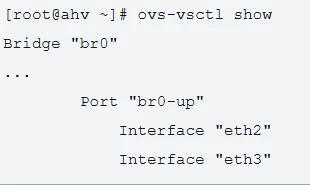
Regarding your code on step#3 you need multiple bridges, br0, br1 and br2. Each bridge will have 2x uplinks. something like this: