
Question

Community Edition Installation error instsvcdrv.service failed Exit Code 155

  • March 31, 2026
  • 3 replies
  • 18 views

I am installing the latest Nutanix CE from USB onto an HP DL380 G9 with 160GB Ram & 3 new 1TB SATA drives.

CE Loads and runs incompletely.  instsvcdrv.service: Control Process exited, status=155. 
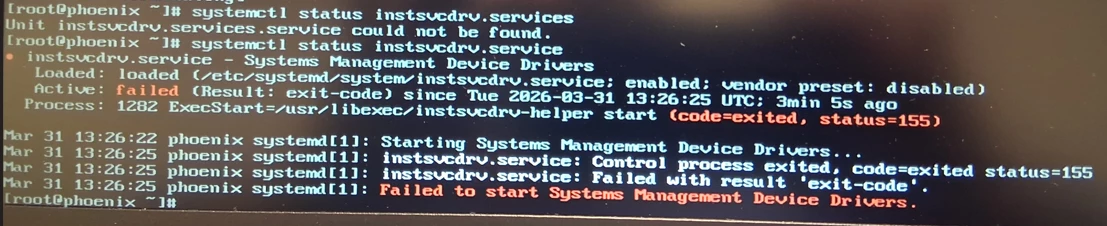
 

Please point me to what the actual issue is. TIA.

3 replies

selvamani
Forum|alt.badge.img+3
  • Trendsetter
  • April 1, 2026

Hi ​@jjc1138 

The most likely reasons , your smart Array RAID controller hiding drives from CE, or UEFI boot mode blocking the install. 

check the disks 
lsblk

Check the BIOS

Boot Mode   Legacy bios 
VT-d  and HT  enabled 

for Disk check the SATA  controller as AHCI mode 

Check  NIC compatibility check
lspci | grep -i ethernet
 

Boot media Check 
Verify the MD5 checksum of downloaded ISO
Write the ISO using Rufus 4.4+ DD enabled mode 
 

Also Refer to 
DL380 Gen9 — exact hardware, Nutanix employee answered:
https://next.nutanix.com/installation-configuration-23/failed-installing-ahv-nutanix-ce-on-proliant-dl380-gen9-42811

CE official system requirements (v2.1):
https://portal.nutanix.com/page/documents/details?targetId=Nutanix-Community-Edition-Getting-Started-v2_1:top-sysreqs-ce-r.html


Thanks 
Selvamani S


JeroenTielen
Forum|alt.badge.img+8

Do you have an exact screenshot for when the installer stopped/crashed?


  • Author
  • Voyager
  • April 1, 2026

I fixed this. I started from scratch with two brand new USB’s and got to the load screen. Now I get it.