
I was looking for a solution in Nutanix Playbooks to send all critical alerts to a Microsoft Teams channel or chat. I could not find a good solution online, but after about a week of testing and research, I found a way to send the alerts to Teams by using a REST API call from the playbook. To make this work in Microsoft Teams, you need to install the Workflows app and generate a webhook URL.
There is good Microsoft documentation explaining how to add and use Workflows in Teams:
I also found that some alerts contain double quotation marks in the alert text, and this caused the JSON payload to fail. Because of that, the alert name had to be cleaned before it could be sent successfully in the REST API request.
Step by step:
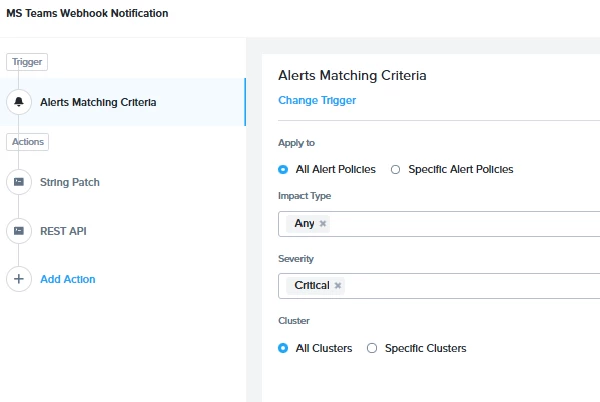
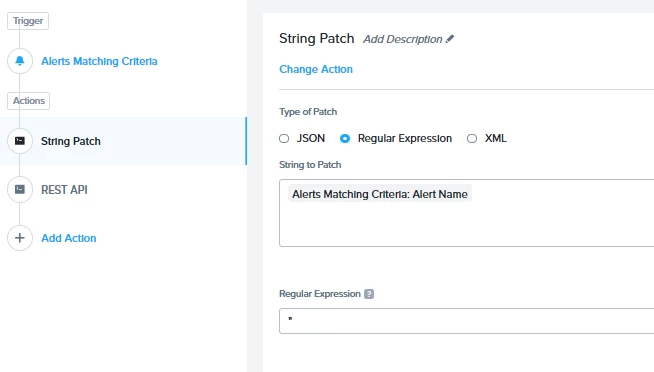
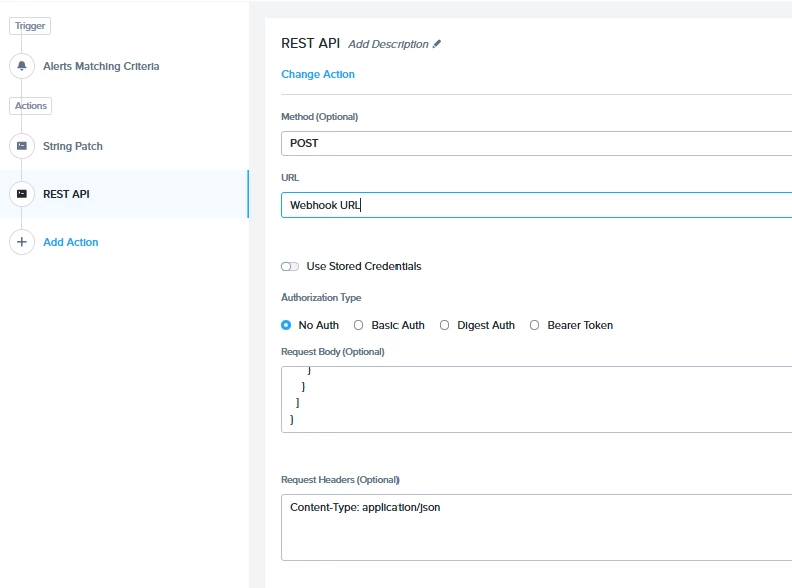
REST API Code in JSON
{
"type": "message",
"attachments": [
{
"contentType": "application/vnd.microsoft.card.adaptive",
"contentUrl": null,
"content": {
"$schema": "http://adaptivecards.io/schemas/adaptive-card.json",
"type": "AdaptiveCard",
"version": "1.4",
"body": [
{
"type": "TextBlock",
"text": "⚠️ Prism Central Alert",
"weight": "Bolder",
"size": "Large",
"color": "Attention",
"wrap": true
},
{
"type": "FactSet",
"facts": [
{
"title": "Severity",
"value": "{{trigger[0].severity}}"
},
{
"title": "Alert",
"value": "{{actionid[872d3805-a2a3-4308-bd5b-ef1316].output_value}}"
},
{
"title": "Matrix",
"value": "{{trigger[0].formatted_metric_value}}"
},
{
"title": "Entity",
"value": "{{trigger[0].source_entity_info.name}}"
},
{
"title": "Cluster",
"value": "{{trigger[0].cluster_entity_info.name}}"
},
{
"title": "Time",
"value": "{{trigger[0].creation_time}}"
}
]
},
{
"type": "TextBlock",
"text": "For more details, click below.",
"wrap": true,
"spacing": "Medium"
}
],
"actions": [
{
"type": "Action.OpenUrl",
"title": "Open Prism Central",
"url": "https://<Prism Central URL>:9440/dm/infrastructure/page/explore/s/alerts/"
}
],
"msteams": {
"width": "Full"
}
}
}
]
}
I hope that helps you all. thanks

