


This post was authored by Catalogic/CloudCasa - Teck Siang Wong - Solutions Architect, Nutanix - Vishnu Prasad - Nutanix Ready Engineer, Nutanix - Jose Gomez - Director, Technical Marketing Engineering, NKP and Cloud Native
The Nutanix Kubernetes Platform (NKP) offers a production-grade Kubernetes distribution designed for enterprises that need scalability, reliability, and simplicity in hybrid or on-prem environments.
While NKP streamlines cluster management and lifecycle operations, data protection remains a critical responsibility — especially when you’re running stateful workloads such as databases or business-critical services.
CloudCasa by Catalogic, a Kubernetes-native, SaaS or self-hosted data protection solution, is now certified to work seamlessly with NKP.
This certification ensures you can confidently deploy CloudCasa to safeguard every layer of your NKP environment — from application configurations to persistent data.
Why CloudCasa for NKP
CloudCasa brings agentless, policy-driven protection to NKP clusters.
Here’s what that means in practice:
- Automated Discovery – Detects and maps your NKP workloads automatically.
- App-Consistent Snapshots – Captures Kubernetes resources and persistent volumes as a single recoverable unit.
- Immutable Storage – Uses secure object storage with versioning and object lock for ransomware protection.
- Granular Restores – Recover entire clusters, single namespaces, or even individual files from VM backups.
- Cross-Platform Mobility – Migrate workloads between clusters with ease.
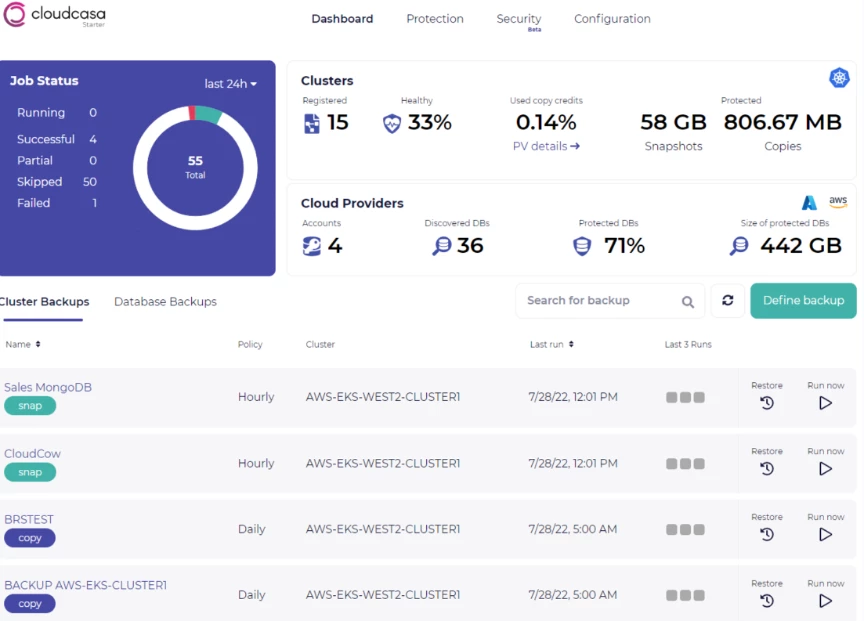
Step-by-Step: Protecting NKP Clusters with CloudCasa
CloudCasa has highly granular RBAC and file level restore capabilities to achieve a number of different data protection scenarios. Below is a practical guide to setting up and running CloudCasa protection on your NKP clusters for a basic data protection scenario.
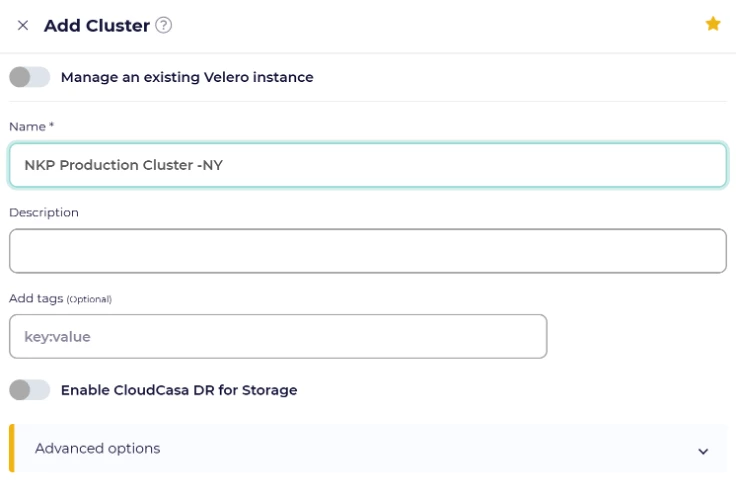
Step 1: Connect Your NKP Cluster to CloudCasa
- Sign in to your CloudCasa dashboard at cloudcasa.io.
- Go to Clusters → Add Cluster.
- Copy the provided registration command.
- On your NKP management node, run:
- kubectl apply -f (generated).yaml
This installs the lightweight CloudCasa agent that securely connects your cluster to CloudCasa.
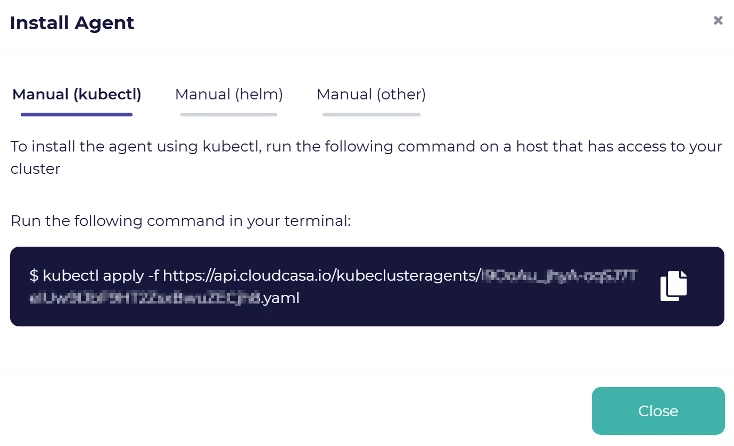
CloudCasa supports automated agent installation using tools like Helm, Ansible, or CI/CD pipelines, enabling consistent, hands-free deployment across multiple Kubernetes clusters.
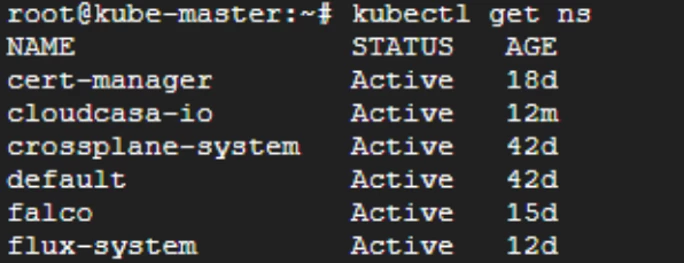
Once the command has been applied, you can run “kubectl get ns” to verify that cloudcasa-io is active and running.
Step 2: Discover and Verify Applications
Once connected, CloudCasa automatically detects your namespaces, workloads, and PVCs.
To verify:
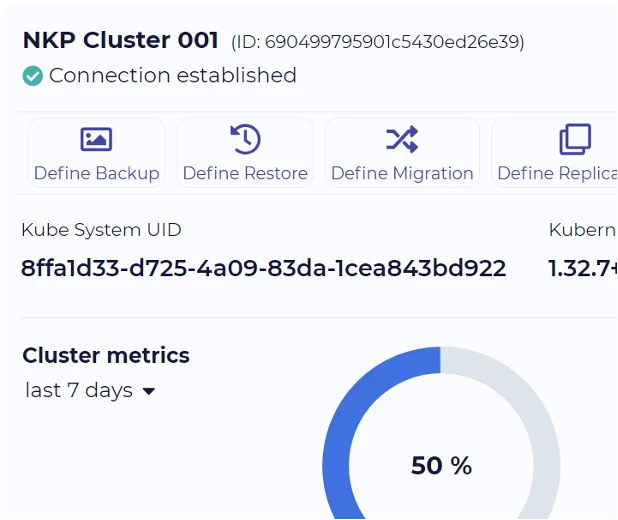
You can go to the cluster overview and click into the cluster you created and look for the connection established status.
Step 3: Create a Backup Policy
- Navigate to Define Backup.
- Choose Full Cluster or Namespace level protection.
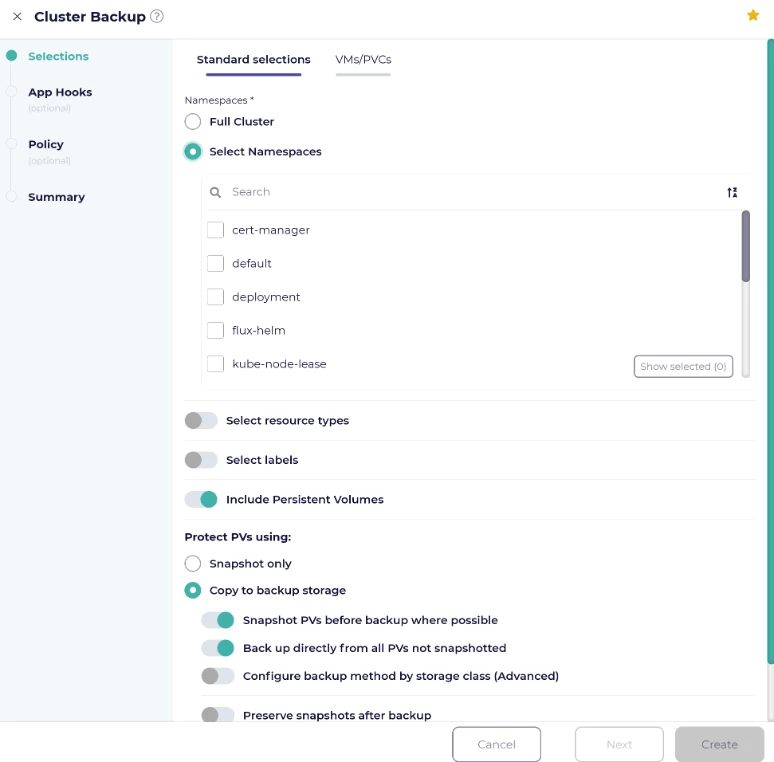
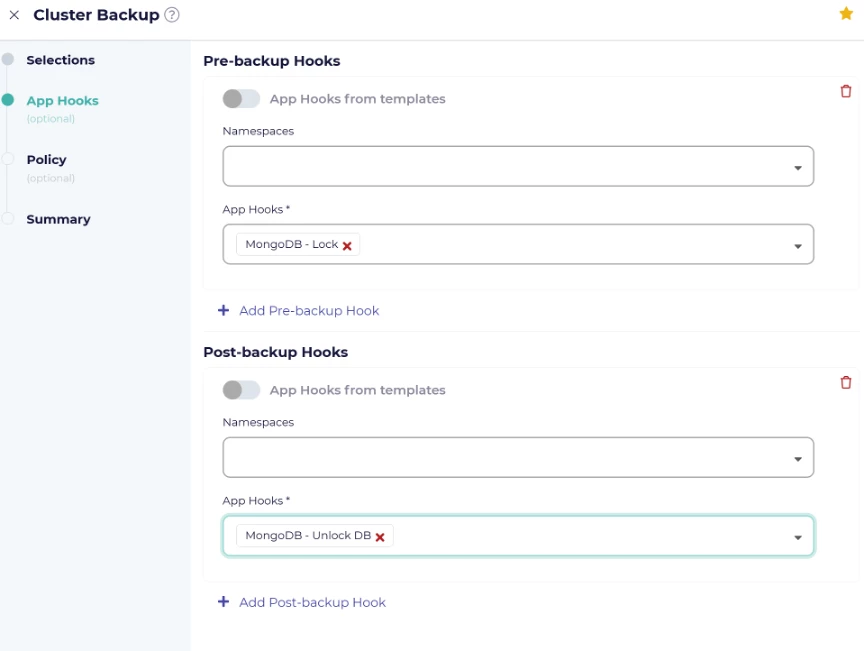
- Select any hooks required , in this example we used MongoDB lock table and unlock table after backup for a consistent backup of the MongoDB running
- Set your schedule policy (e.g., daily at midnight) and retention period.
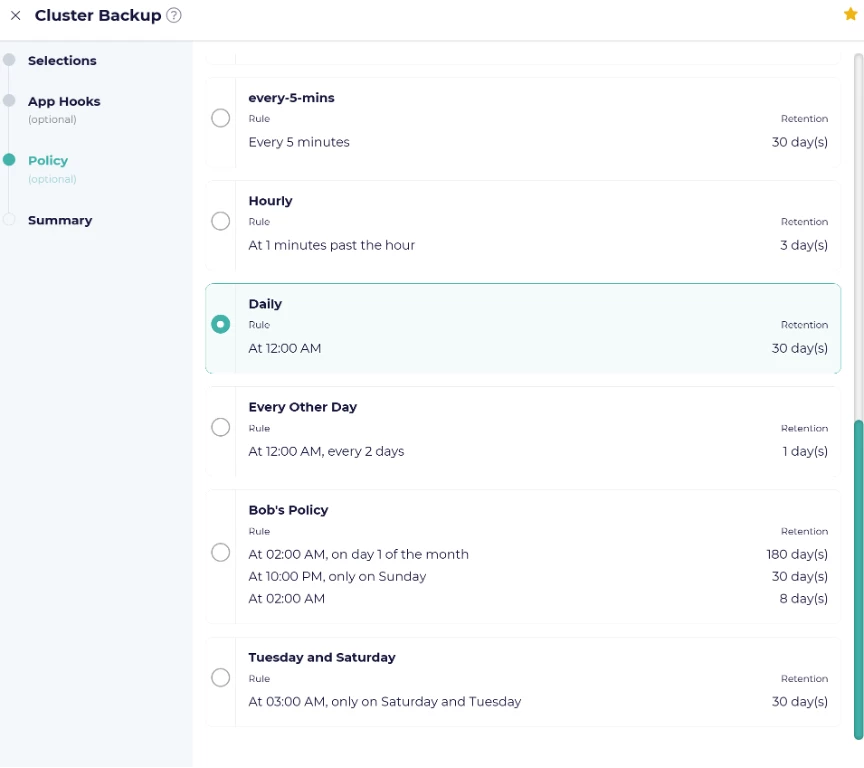
- Name the backup and click on create to create your first backup.
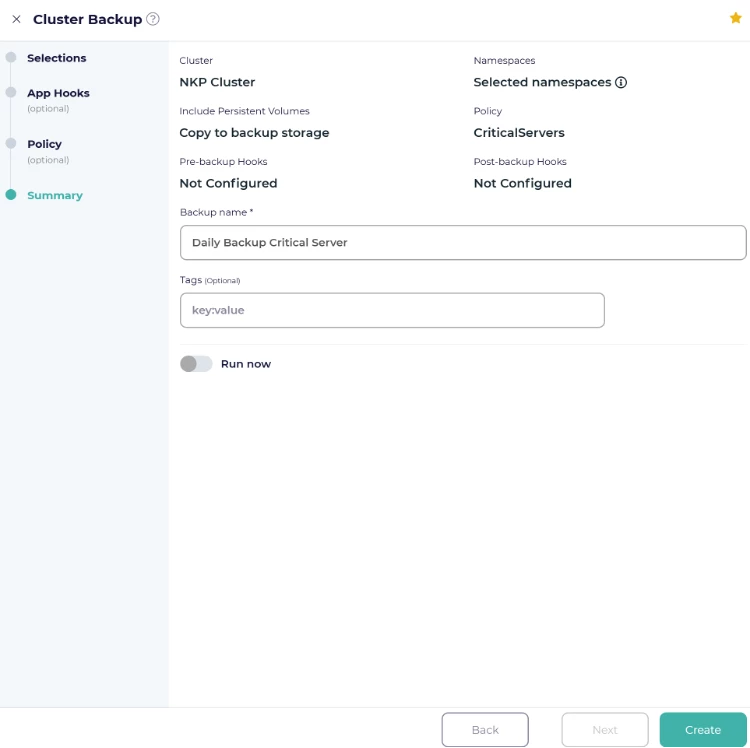
Step 4: Perform and Validate a Backup
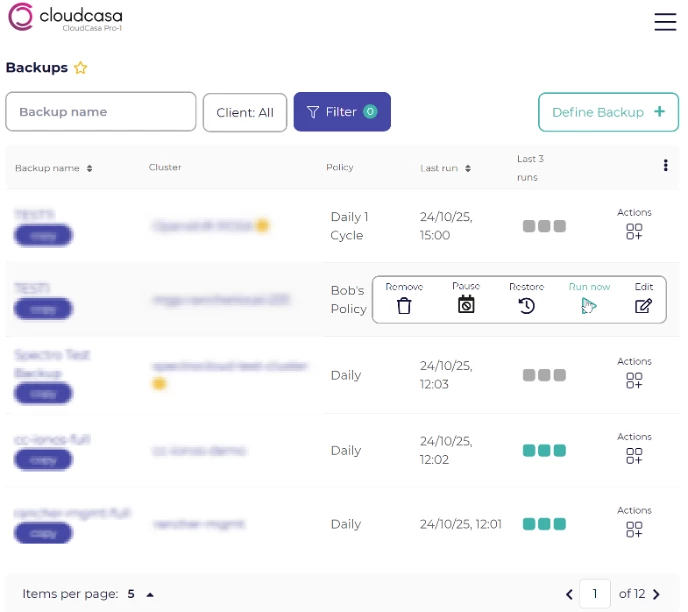
To run a manual backup:
Trigger it directly from the CloudCasa console using “Run Now” under your defined policy.
After the job completes, confirm backup status and volume snapshot logs.
Step 5: Restore When Needed
Restores can be full or granular:
- Full Restore: Rebuild the entire namespace or cluster.
- Partial Restore: Select only specific resources or PVCs.
- File-Level Restore: Browse and download single files from PVs.
CloudCasa tracks every restore job for auditing and compliance.
Best Practices for Securing NKP with CloudCasa
- Use Nutanix Objects immutable object storage for backup targets.
- Enable RBAC mapping between NKP and CloudCasa users.
- Schedule test restores periodically to validate recovery points.
- Tag critical workloads for automated inclusion in backup policies.
Architecture Overview
In a typical deployment:
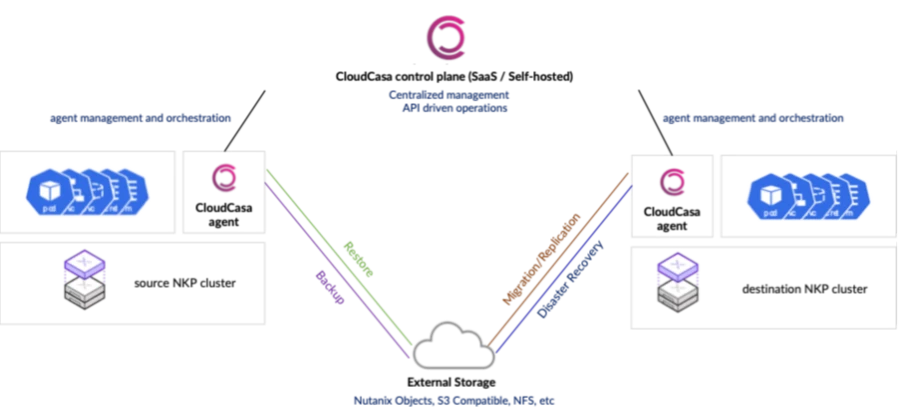
- NKP clusters run on Nutanix infrastructure.
- CloudCasa agent runs inside each cluster.
- CloudCasa service manages backup policies, schedules, and metadata in a secure SaaS layer.
- Backup data flows to S3-compatible storage (CloudCasa SaaS, Nutanix Objects, or any secure endpoint).
The combination of Nutanix Kubernetes Platform and CloudCasa delivers a powerful, certified, and secure Kubernetes ecosystem.
You gain enterprise-grade protection with the agility and simplicity of a cloud-native tool — without the burden of agents or complex infrastructure.
With CloudCasa certified for NKP, your containerized workloads are safer, recoverable, and future-ready.
Get started today:
Visit www.cloudcasa.io to connect your NKP cluster and experience data protection in minutes.
©2025 Nutanix, Inc. All rights reserved. Nutanix, the Nutanix logo and all Nutanix product and service names mentioned are registered trademarks or trademarks of Nutanix, Inc. in the United States and other countries. All other brand names mentioned are for identification purposes only and may be the trademarks of their respective holder(s).