



It is a turbulent time in the data center. It’s a time of rapid scale. Hyperconverged Infrastructure (HCI) continues to scale and is designed to deliver resilient compute and storage across the data center. Nutanix Cloud Infrastructure software stands firm, supporting an array of workloads and holding its ground against complexity and sprawl.
Yet a shadow remains. With HCI’s strength, the lingering grip of data gravity and cluster boundaries persists. Binding virtual machines or workloads to the storage of a single cluster, restricting resource placement and forcing operators to choose between available compute and available storage capacity. The Infrastructure endures, but flexibility is under siege.
For years, the Jedi of the data center have learned to operate within these constraints, balancing capacity across clusters, moving workloads and planning migrations. They have come to accept the trade-offs as a cost of scale. However, as environments grow larger and more distributed, those boundaries become harder to ignore and can increase operational complexity.
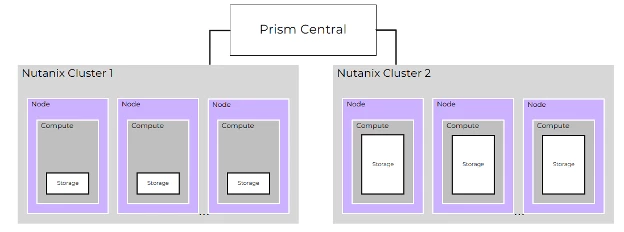
Hyperconverged infrastructure has changed how many organizations deploy compute and storage, bringing simplicity and scalability into a single platform. Over time, the market has evolved to offer even more flexibility, and customers have asked for ways to easily separate compute and storage resources. In the 7.5 AOS release combined with AHV 11, we introduced a generally available capability that delivers exactly that for our platform with elastic VM storage. Customers can now provision storage for virtual machines from another hyperconverged cluster. In practical terms, this means the VM executes on one cluster, but its virtual disks are backed by storage from a different cluster. This approach is designed to allow you the freedom to scale compute and storage independently, without changing your existing workflows.
While Nutanix has always supported the concept of compute and storage heavy nodes in the same cluster, elastic VMstorage allows you to leverage existing storage from another cluster without adding infrastructure. As this blog progresses we will explore how this capability works and highlight a few use cases it enables. So if you are ready, buckle up because when this baby hits 88mph…oh wait, different futuristic reference, you can see where this is going. Let’s dive in!
No need to unlearn what you have learned
What exactly is elastic VM storage? Simply put, it's the ability to define the storage location for a VM that differs from where it runs.
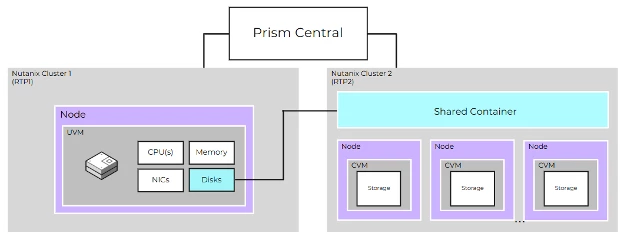
This is made possible by allowing our AHV hypervisor to place virtual disks on an AOS storage container located on a separate Nutanix cluster. As the image above shows, a VM is created on one cluster, but the virtual machine is consuming storage located on a different cluster. You probably already noticed an interesting notation in the image, the notion of a “shared container”. With the generally available release of AOS 7.5, Prism Central 7.5 and AHV 11, a storage container can now be created with a property that allows it to be shared with other clusters. Pretty cool!
Why would this be necessary? The reason, not all clusters scale in the same manner. Compute demands spike in one area, while storage sits idle somewhere else. We have a Han and Chewie situation here. While both are great on their own, together they are amazing. With elastic VM storage, it is designed to allow compute and storage to scale independently, without changing your existing workflows.
Now, some might be using the force and thinking “This is not the storage we are looking for, you already mentioned that Nutanix supports the concept of compute or storage heavy nodes in the same cluster and isn’t that scaling of storage?” You would be correct, however this is the storage you are looking for. Using elastic VM storage helps you maximize available resources without reconfiguring deployments or expanding infrastructure. This capability helps organizations optimize cost, improve utilization, and stay ahead of unpredictable growth patterns. It’s about making infrastructure work harder for you, not the other way around.
I know what you are thinking, how does this all work? I thought you’d never ask! Let’s start with a picture, because they are supposed ‘to paint a thousand words’ or so they say.
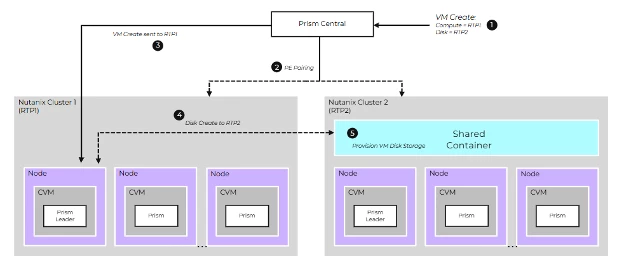
What you see diagrammed here is a high-level overview of the creation of a new virtual machine. We have a single Prism Central instance managing two clusters: RTP1 and RTP2. The process starts when the operator initiates the VM creation in the UI. What isn’t shown is the creation of the container with the setting ‘shared.’ It’s fairly straightforward, just a simple setting during the same container creation workflow that we all know and love that allows it to be utilized from another cluster.
As the operator moves through VM creation in Prism Central, they will select the compute location as cluster RTP1. Once they reach the disk attach step, they will choose a container that exists on cluster RTP2. This container will serve as the storage location for the VM’s virtual disks. Once the workflow is complete and the admin clicks ‘Create,’ this is where the magic begins. Prism Central checks whether RTP1 and RTP2 have an established pairing relationship. If it's discovered they do not, the two clusters will be paired automatically! Wait what, you mean someone doesn’t have to manually define who is paired to who? Get out of here. No we cannot. We are serious! Did we just become best friends? YUP!
Once the pairing step finishes (#2 in the above image), the VM create request is sent to RTP1. This request will also include details for the disks that will reside on a remote cluster, in this case RTP2. From there, Prism Element on RTP1 initiates a disk create request to RTP2 (#4 in the above image). And just like that you have an elastic VM! Oh and not to be left out, elastic VM storage can be managed using v4 APIs if that is your tool of choice. This workflow should look and feel pretty familiar and that’s on purpose! No need to make change as complicated as the triple lindy! When you add new features you should try to minimize the impacts to maintain operational simplicity.
Punch it to Ludicrous Speed
Compute where you need it, storage where you have it. Resource imbalance can leave storage stranded that could be tapped into for use. Elastic VM storage can help you scale smarter. You can support the dynamic nature of business and growth without creating silos or deploying extra hardware just to balance needs. This is a natural evolution of the Nutanix Cloud Infrastructure platform, designed to keep the simplicity you expect while providing the flexibility and agility you need.
It’s often said the only constant in the world is change, this is particularly true of technology. Having the right tools to navigate the ever changing technology landscape is key. This expansion with our Nutanix Cloud Infrastructure platform continues to help customers embrace the current and future of data and application services with confidence. If you are interested in this new feature, reach out to your Nutanix Partner or local Nutanix Account team to get more information.
Oh wait, one more thing, how many different subtle or not so subtle movie references did you catch in this blog (hint 80’s, 90’s and early 2000’s)? If you guessed six you would be correct. And with that, may storage be with you!
©2026 Nutanix, Inc. All rights reserved. Nutanix, the Nutanix logo and all Nutanix product and service names mentioned are registered trademarks or trademarks of Nutanix, Inc. in the United States and other countries. All other brand names mentioned are for identification purposes only and may be the trademarks of their respective holder(s).