


Every site adds hardware to buy, power and maintain. When each location also carries capacity for occasional batch jobs, that cost repeats across your environment. Moving eligible processing onto shared NC2 capacity can reduce the hardware needed at each site and the operational effort tied to it. The business case starts with fewer servers to refresh and less time spent maintaining distributed infrastructure, while keeping essential local services close to the work. This can help with hardware shortages and extended delivery lead times are making customer rethink their current architecture at remote sites.
Some work at distributed sites has a deadline measured in minutes or has to keep running through a WAN outage. Other work can wait for a link and still meet its processing window. Overnight reconciliation, reporting, transcoding and delay-tolerant scoring can run centrally.
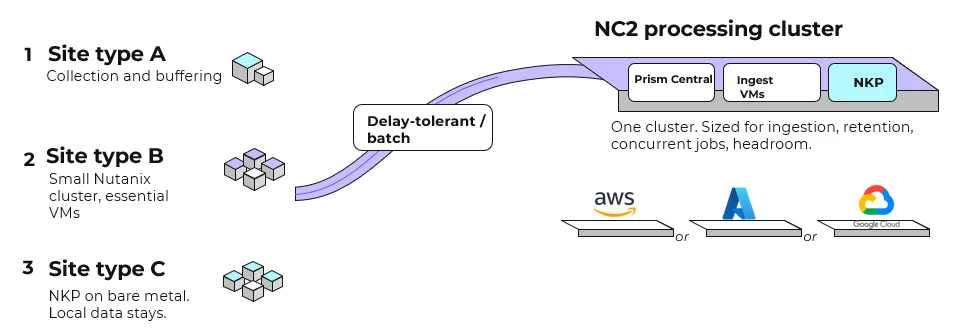
Infrastructure architects and IT leaders can use this pattern where they already run Nutanix or have a supported non-Nutanix estate they can move from. It fits mixed environments of any size. With 20, 50 or 100 sites, the processing workload determines how much central capacity to build.
What the site still has to do
Most sites still need collection and buffering: they capture events or files and forward them when the link allows. The equipment closet remains an ingest point.
A small Nutanix cluster can run the VMs the floor relies on, such as access control, a historian or a label or print service. Those services stay with the building.
Where local services run on Kubernetes, NKP can run on bare metal. Nutanix Kubernetes Platform documents pre-provisioned and air-gapped installs. If the site can be cut off, the local data and dependencies those services need stay at the site. Application portability on NKP means redeploying and moving the state that application uses.
Sites retain the local data copies they need during an outage when batch processing moves centrally.
A processing plane on NC2, placed on a cloud you choose
Delay-tolerant processing moves from the sites to a Nutanix Cloud Clusters (NC2) cluster sized for that work. NC2 runs the Nutanix stack on bare-metal instances in the customer's AWS, Azure or Google Cloud account. The cluster uses the same Prism operations.
You choose the cloud for each cluster. Moving to a different cloud later means another cluster and a supported move design.
Cost follows instance type, node minimums, how much you ingest, how long you keep it and how many jobs overlap.
Moving VMs and Kubernetes workloads
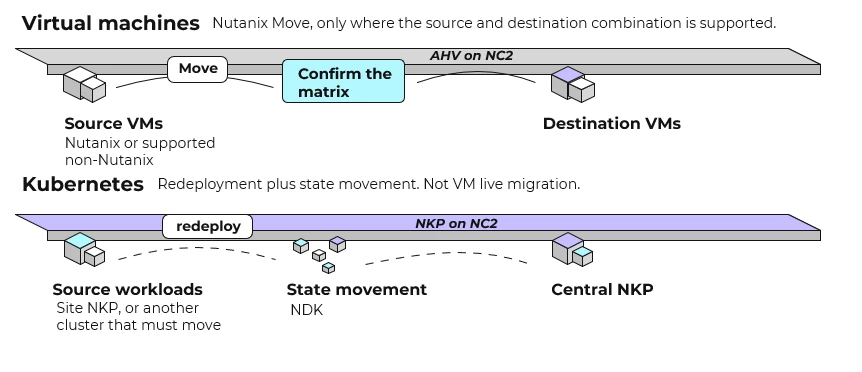
Where the source and destination combination is supported, Nutanix Move can bring existing VMs, including from non-Nutanix platforms, onto AHV on the NC2 cluster.
For Kubernetes, redeploy the cluster or workloads, then move state using the system that owns it. NKP can run on the NC2 cluster for the centralized processing, and on bare metal at the site when that is the local requirement.
Write Flow Network Security(FNS) policies on the destination. For applications arriving from a non-Nutanix source, write Flow Network Security policies against categories on the NC2 cluster. FNS secures the VMs on that cluster, and native managed cloud services keep their own cloud security controls.
Department tenancy on the shared cluster with Projects
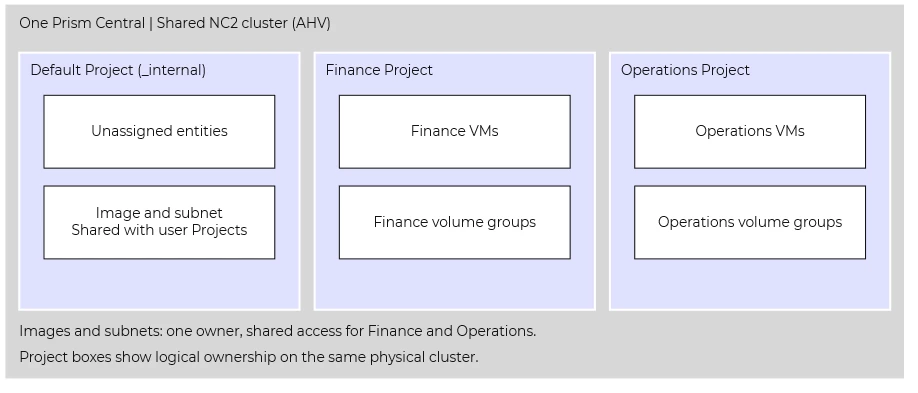
Several departments can share one NC2 cluster, with one Prism Central and one cloud bill. In pc.7.6, each department gets its own boundary through Projects. Its VMs go in a user Project that the department administers.
Each AHV VM and each volume group belongs to exactly one project. Ownership comes from the project, while categories label and group. Anything not assigned to a user Project stays in Default Project, the catch-all. Project-based VM tenancy covers AHV.
Each user Project defines placement through its own resource group: the AHV clusters it can place workloads on, with selected non-system storage containers. Several projects' resource groups can use the same cluster as a placement target. Default Project sees all physical infrastructure.
Projects can share images, OVAs, subnets and VPCs. Categories belong to the project that created them, so Finance and Operations can each have Environment: Production. Category sharing runs from Default Project to user Projects.
A department writes Flow Network Security policies in its user Project for the VMs that project owns, using the project's own categories. Each Flow entity (policy, address group, service group, entity group) belongs to exactly one project, and sharing it doesn't change its owner. User-Project policy configuration is documented, including intra-tier rules on application and shared service policies.
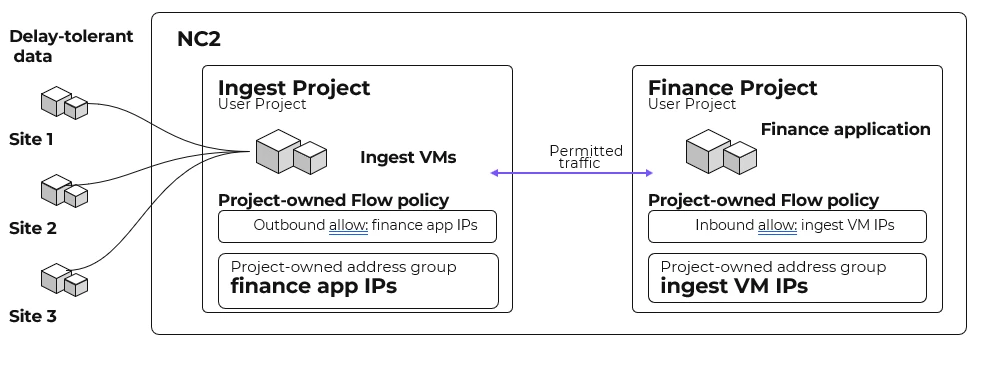
Finance can use Environment: Production in its Flow policies without selecting Operations VMs carrying the same key-value pair in their own project. A Finance administrator can change those policies within the department's boundary. That reduces the coordination needed to manage policies as more departments join the processing plane.
Flow applies category-based policies to VMs that match their categories, including newly created VMs assigned those categories. Departments can reuse that policy configuration as workloads grow.
Where each 7.6 Flow feature runs
The 7.6 family includes Projects, FQDN rules, rule-centric policies, Flows/Rules analytics and NC2 secure-access / CVM protections.
FQDN rules and policy hit logs run in Default Project. FQDN rules use IPv4 and explicit domain names, for VM workloads outside rule-centric mode. A department that needs either feature for a policy places that policy in Default Project, and the rest of its policies live in the department's own project.
Size the cluster from the volume of data arriving from sites and its arrival window, retention time and overlapping batch jobs. Allow headroom for a node or job failure. You can easily add more nodes to our NC2 cluster with the NC2 portal or have it orchestrated.
Use the next hardware refresh to put numbers behind the opportunity. Compare the equipment purchases and site maintenance you can avoid with the full cost of shared NC2 capacity and connectivity. Include procurement timing: where suitable cloud capacity is available, moving eligible processing can let you expand without waiting for new servers at every site. Confirm NC2 instance availability in the target cloud region before committing to a schedule. Look at using Reserved Instances when possible.
Where the pilot proves the economics, consolidation can free budget for services the business needs and give the IT team more time to improve them. Start with the processing that can move, then let measured cost and operational results determine how far to expand.

