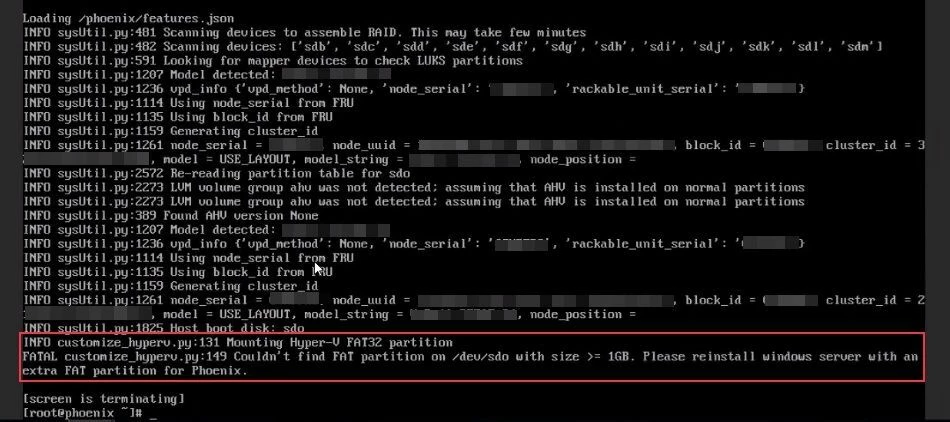


The deployment of AHV/AOS through Phoenix ISO on a Hyper-V host failed before the actual imaging process could begin. During the Hyper-V customization stage, Phoenix terminated as it cannot find the required FAT32 partition. The deployment therefore stopped before Phoenix could continue with the normal AHV/AOS installation workflow.
💡 𝗥𝗼𝗼𝘁 𝗖𝗮𝘂𝘀𝗲 𝗔𝗻𝗮𝗹𝘆𝘀𝗶𝘀:
- The underlying issue was related to the existing storage/partition metadata on the Hyper-V host.
- Phoenix's Hyper-V customization logic was evaluating the existing disk layout and detecting the disk as having a previous partition structure.
- The customize_hyperv.py script specifically flags sdo as your host boot disk. It triggers a function called Mounting Hyper-V FAT32 partition to search for a pre-existing staging partition.
- Because /dev/sdo only contains standard Windows OS layout partitions (with an EFI system partition of only 99MB), it fails the hardcoded check for a size >= 1GB and triggers the FATAL halt.
- The critical point is that the problem was not an AHV or AOS package failure. It was a disk-layout / residual partition metadata issue encountered during Phoenix's Hyper-V preparation stage.
🔧 𝗙𝗶𝘅 & 𝗦𝗼𝗹𝘂𝘁𝗶𝗼𝗻:
You need to wipe the partition tables (MBR/GPT metadata) at the beginning of the drive so the Phoenix installer sees it as a completely blank, uninitialized raw disk.
1️⃣Drop to a shell/terminal within the Phoenix installer environment (or boot into a live Linux USB if you prefer).
|
2️⃣ Identify the target disk (based on your error, it was mapped as /dev/sdo or /dev/sdb). Double-check using 𝘭𝘴𝘣𝘭𝘬 or 𝘧𝘥𝘪𝘴𝘬 -𝘭.
|
3️⃣ Run dd to zero out the first 20 Megabytes of the drive, destroying the stubborn partition signatures: 𝘴𝘶𝘥𝘰 𝘥𝘥 𝘪𝘧=/𝘥𝘦𝘷/𝘻𝘦𝘳𝘰 𝘰𝘧=/𝘥𝘦𝘷/𝘴𝘥𝘰 𝘣𝘴=𝟣𝘔 𝘤𝘰𝘶𝘯𝘵=𝟧𝟢 𝘴𝘵𝘢𝘵𝘶𝘴=𝘱𝘳𝘰𝘨𝘳𝘦𝘴𝘴
|
4️⃣ Then force the operating system to reread the partition table: 𝘣𝘭𝘰𝘤𝘬𝘥𝘦𝘷 --𝘳𝘦𝘳𝘦𝘢𝘥𝘱𝘵 /𝘥𝘦𝘷/𝘴𝘥𝘰
Because you successfully overwrote the master partition definitions, the Phoenix installation script will no longer find any valid old layout metadata to parse. Instead, it will treat the disk as completely raw space and automatically set up its own clean partition scheme.