Question

Cluster creation stuck after Foundation – Ergon service never comes up (Genesis loop, RPC/NFS checked)

  • December 20, 2025
  • 11 replies
  • 126 views

Forum|alt.badge.img

Hello Nutanix Community,

I’m reaching out for help after spending a significant amount of time troubleshooting an issue where a Nutanix cluster cannot complete initialization. I would truly appreciate any insight from the community, as I believe I have exhausted all standard troubleshooting paths.

This cluster was previously created successfully and had been running in production without issues.

However, due to security-related changes in our IT infrastructure, we were required to re-address the entire environment, including:

  • CVM IPs

  • Hypervisor IPs

  • IPMI IPs

Because of this requirement, I intentionally chose the cleanest and officially recommended approach, which was:

  1. Reclaim licenses

  2. Stop the cluster

  3. Destroy the cluster

  4. Rebuild the cluster from scratch using Nutanix Foundation

This was not an accidental failure during a first-time installation.
The issue only started after performing a controlled teardown and reinstallation due to the IP address changes.
 

Support experience and request for community help

I have already contacted Nutanix Support in my region regarding this issue.
Unfortunately, I was informed that this case is considered out of scope, and therefore no further assistance could be provided.

I must say that this is deeply disappointing, as we have renewed Maintenance & Support (MA) every year and have always expected to receive full technical support when encountering critical issues such as this — especially on hardware and clusters that were previously running successfully.

At this point, I sincerely hope that the Nutanix community can help provide insight, guidance, or direction to resolve this problem.

Any advice, experience, or suggestion would be greatly appreciated.
Thank you very much in advance for your time and support.


11 replies

Forum|alt.badge.img+3
  • Outrider
  • December 22, 2025

Hi, 
what is your hardware model on your three servers?
what version of AOS you have tried ?what is the version of foundation you have tried ?
what is the hypervisor you have used ?
what is the network connectivity between three nodes (active-passive, LACP)?
are you able to ping each CVM, hypervisor (from each node to other nodes, and to gateway)


Forum|alt.badge.img
  • Author
  • Adventurer
  • December 24, 2025

Hi Jamali,
thank you very much for your response. Please find the details below:
1. Hardware model : NX-1175S-G7

2. AOS versions : 6.10.1
3. Foundation versions  : 5.10
4. Hypervisor : AHV-20230302.103003
5 network configuration : 

  • Switch ports are configured as standard VLAN trunks

  • On the AHV/CVM side, NIC bonding is active-backup

  • MTU is 1500, consistent across all nodes and switch ports

6. Connectivity tests

Yes, all connectivity checks pass:

  • All CVMs can ping each other

  • All hypervisors can ping each other

  • CVM ↔ Hypervisor communication works

  • All nodes can ping the gateway

  • No packet loss observed


Forum|alt.badge.img+3
  • Outrider
  • December 28, 2025

honesty It is strange, but Is it possible to do below activity?

are you able to build a single or two node cluster?
have you tried using different version of foundation and AOS/AHV version.


JeroenTielen
Forum|alt.badge.img+8
  • Vanguard
  • December 28, 2025

@kittikhun do you have more interfaces in the nodes then the two, which are in a bond? Ifso, try to run the crashcart before creating the cluster. 


JeroenTielen
Forum|alt.badge.img+8
  • Vanguard
  • December 28, 2025

O, and when the cluster is starting grap a cup of coffee. This can take some minutes. 


Forum|alt.badge.img
  • Author
  • Adventurer
  • January 4, 2026

jamali.ahmad Thanks for the suggestion.
I have already tried multiple combinations of Foundation versions as well as different AOS/AHV versions, but I’m still hitting the same issue during cluster creation.

I haven’t tried building a 1-node or 2-node cluster yet. I wanted to confirm whether it’s a supported or recommended approach to first create a 2-node cluster and then add the third node afterward.

My concern is around RF2—would starting with two nodes cause any limitations or issues when scaling out to three nodes later?

I’d appreciate your guidance on whether this is a valid troubleshooting step.


Forum|alt.badge.img
  • Author
  • Adventurer
  • January 4, 2026

JeroenTielen Thanks for the suggestion, and just to clarify:
the interfaces are not configured with LACP.

Each node has two NICs connected, using the default active-backup bonding mode (no aggregation on the switch side). The switch ports are configured as simple VLAN trunks, not LACP.

There are no additional active interfaces beyond these two.

I’ll still double-check the interface state and try running the crashcart before the next cluster creation attempt, just to rule this out.


Jamie Terrell
Forum|alt.badge.img+2

If you have a support contract, you should be able to get assistance with this. 6.10 is a little old but still under support. I have had some weird issues with foundation and support had to do some of their internal mojo to get it going. Also, side note, reassigning the IPs on the CVMs and AHV hosts are not that complicated. But I would agree with ​@JeroenTielen  and use crashcart to configure. 


Forum|alt.badge.img
  • Author
  • Adventurer
  • January 22, 2026

Thank you for the guidance and suggestions. I would like to provide an update on the troubleshooting steps I have taken so far.

I have already used network crashcart to reconfigure and verify the networking on all nodes, including CVM and AHV management interfaces, to rule out any misconfiguration at the network layer.

As part of further isolation, I tested cluster creation on a per-node basis:

  • Two nodes are able to create a single-node cluster successfully.

  • These two nodes can also be combined to form a 2-node cluster with a witness without any issues.

  • However, there is one specific node that consistently fails during cluster creation.

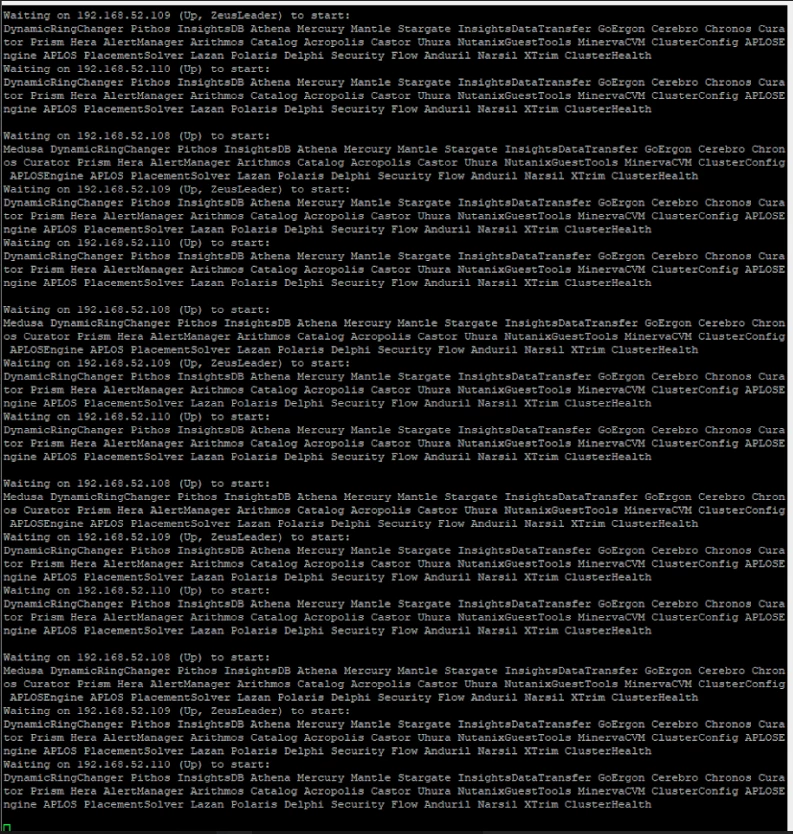
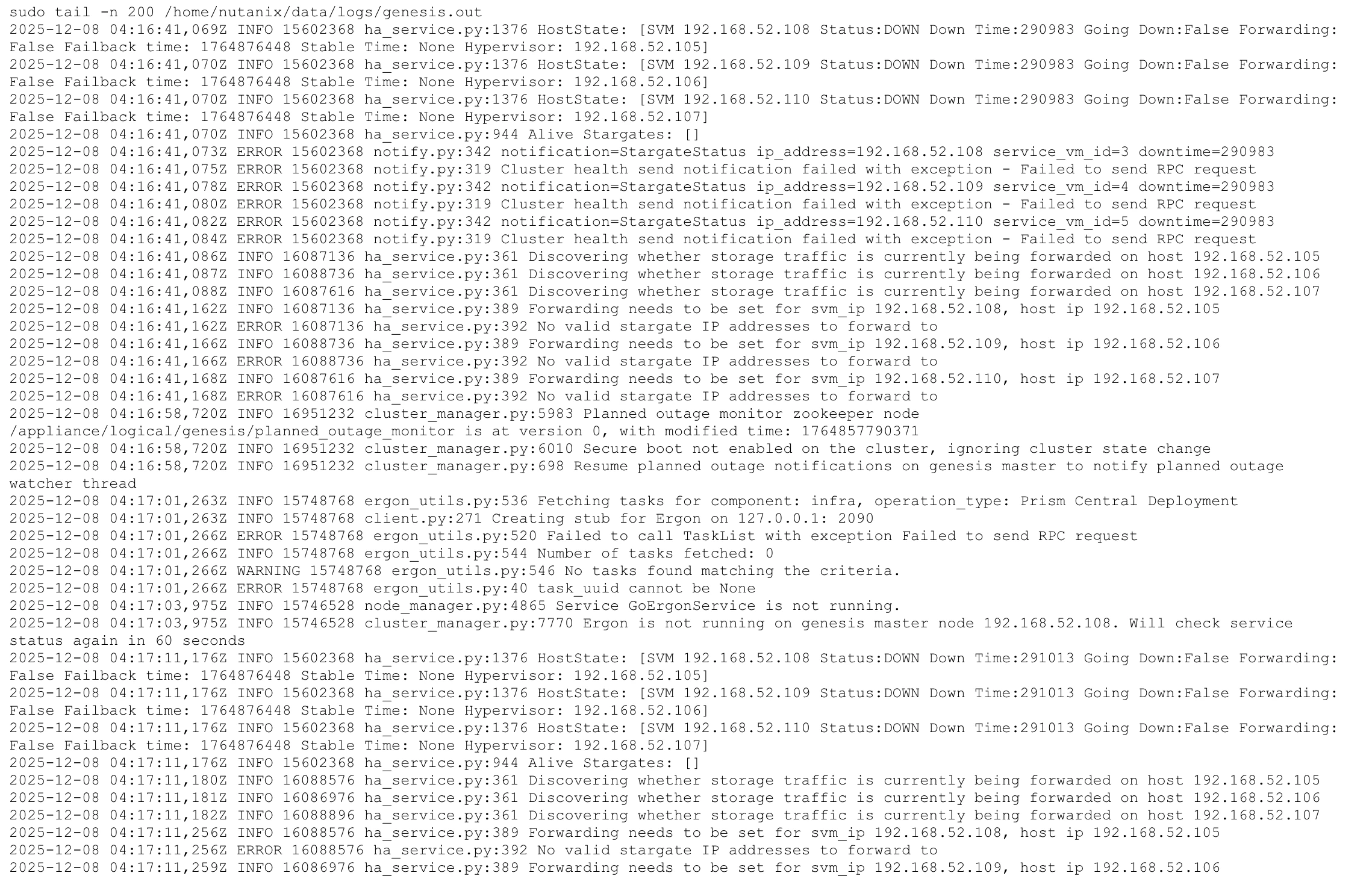
On this problematic node, the cluster creation fails because the Medusa service cannot start, which in turn prevents dependent services from starting. This behavior directly correlates with the same Medusa-related logs that I previously shared in my original post, indicating that the issue is persistent and node-specific rather than related to Foundation version, AOS/AHV version, or network configuration.

Based on these results, it appears that the issue is isolated to this particular node, potentially at the OS, service, or underlying hardware level, rather than a general cluster design or RF2/RF3 limitation.

Regarding support: although I do have an active Maintenance Agreement (MA), engaging regional support for advanced Foundation/state-level remediation would require additional paid services, and the quoted cost is relatively high. For this reason, I am continuing to investigate and troubleshoot the issue independently before proceeding further.

If you have any recommendations on additional diagnostics for Medusa startup failures (beyond crashcart and re-foundation), I would greatly appreciate your insight.


JeroenTielen
Forum|alt.badge.img+8
  • Vanguard
  • January 22, 2026

I assume this is second hand hardware? Or was this hardware running Nutanix before? Are you 100% sure the hardware in that specific node is on the HCL? Or is it different then the working nodes? Are all hardware components correctly installed and working? Is the BIOS tempered? Can you compare BIOS settings between the working and the non working? 


Forum|alt.badge.img
  • Author
  • Adventurer
  • January 22, 2026

Thanks for checking and for the detailed questions.

This is not second-hand hardware. The nodes were purchased brand-new and have been in use since around 2022, previously running Nutanix in a production cluster without issues.

The re-cluster was required due to security and network redesign requirements, including re-IP and proper VLAN tagging. In the previous configuration, the cluster was not able to use additional VLANs because VLAN tagging was not correctly configured, which led me to perform a full cluster stop → destroy cluster → re-foundation → re-create cluster process.

After re-foundation:

  • The issue is isolated to one specific node (node 108), which consistently fails during cluster creation.

On this node, the failure occurs because the Medusa service does not start, which blocks subsequent services. This behavior matches the same logs previously shared and remains consistent across multiple Foundation and AOS/AHV version attempts.

There have been no BIOS changes or modifications on any node. However, as suggested, I can compare the BIOS settings between the working nodes and the failing node via IPMI to rule out any configuration drift.

As a follow-up question:
Are there any additional logs or services you would recommend checking beyond genesis.out for Medusa startup failures during cluster creation?