Question

How do I stick to LTS ?

  • May 19, 2022
  • 5 replies
  • 368 views

Dominix_pf
Forum|alt.badge.img+2

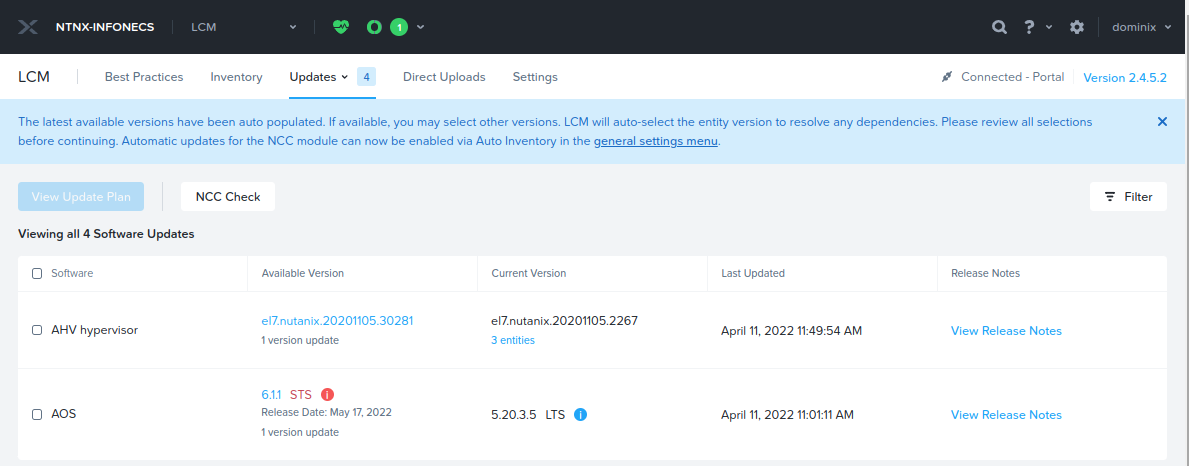
I have some clusters where LCM propose some upgrade to STS version, but I want to stick to LTS. is there a way to disable some version so LCM display only “Enabled version”.

BTW, there is a filter for disabled updates, so I guess there might be a way to disable some updates.

This topic has been closed for replies.

5 replies

DavidN
Forum|alt.badge.img+6
  • Trendsetter
  • May 23, 2022

I looked on on of our test AHV clusters and it only shows the next LTS version available… 

It would be a great feature I think to ask for/have, “Prefer the LTS version(s)” option. Feel free to bring it up in the “Ideas” section here: https://next.nutanix.com/ideas - I’d vote for it!

Neither the LCM 2.4 documentation, nor it’s release notes indicate there is a way to “filter”  or pick LTS over STS currently...

Life Cycle Manager Guide

Release Notes | Life Cycle Manager


JeroenTielen
Forum|alt.badge.img+8

If you are running LTS is wil always choose LTS during LCM. If I click on the AOS version then I can choose STS. But that is my experience ;)

But always check your versions before running LCM ;) 


Dominix_pf
Forum|alt.badge.img+2
  • Author
  • Trailblazer
  • May 23, 2022

Hi @JeroenTielen  this is clearly no my case , I am in LTS and STS is  proposed as an upgrade (with a red alert, sure,  but I have some colorblind in my team … so they may not notice)


JeroenTielen
Forum|alt.badge.img+8

Ah you are running 5.20.3.5. Then the 6.1.1 STS is the only upgrade available. (5.20.3.5 → 6.1 is not an available upgrade path).

More info here: https://portal.nutanix.com/page/documents/upgrade-paths


Dominix_pf
Forum|alt.badge.img+2
  • Author
  • Trailblazer
  • May 23, 2022