



This post was authored by Jesse Gonzalez — Cloud Native & AI Solutions Architect, Nutanix
This final part of the series integrates the components introduced in Parts 1 and 2—LMCache, Nutanix Files, and GDS—to validate the complete solution. We will provide concrete performance benchmarks to compare the combined LMCache, Nutanix Files Storage, and NVIDIA GPUDirect Storage (GDS) stack against a baseline using traditional local caching. This comparison will focus on inference throughput, latency (Time to First Token, or TTFT), and overall cost efficiency. The series concludes by demonstrating the significant real-world cost savings and scalability achieved through this integrated architecture.
The theory is sound: intelligent cache management combined with a CPU-bypassing, high-speed remote storage path should tame LLM inference costs and boost performance. But in the demanding world of production AI, performance is measured in milliseconds and dollars. This final installment of the series moves beyond architecture to present empirical evidence.
We will outline the test environment, the workloads used and the metrics that prove the solution's efficacy, ultimately making the case for this architecture as the blueprint for next-generation, context-heavy LLM deployments.
KV Cache Offloading with Nutanix Files Benchmark Results
Before we dive into the test scenarios, it's important to note that the following examples assume that the Nutanix Infrastructure has been configured in accordance with the Nutanix Files Storage Performance Profile for AI Workloads guidelines.
To demonstrate the benefits of using LMCache with Nutanix Files Storage and GDS for offloading KV caches, we will walk through two LMCache walkthrough scenarios that highlight different aspects of this integration, with the exception that we'll be tailoring it slightly to leverage Nutanix Files Storage as the remote storage backend with GDS acceleration
- LMCache Quickstart: Example Walkthrough: We'll be quickly walking through the LMCache Quickstart to validate a single inferencing request works with between vLLM, LMCache, Nutanix Files Storage and ensure GDS Backend is enabled.
- LMCache Benchmarking: Tutorial Walkthrough: Once we have the basics covered, we will walkthrough benchmarking the vLLM instance with and without LMCache and GDS Backend being enabled.
Upon completion of both examples, we will review results and provide insights on how offloading KV caches to Nutanix Files Storage over GDS using RoCEv2 (SR-IOV + NFSoRDMA) and LMCache, we can run inference workloads at scale.
Nutanix Infrastructure Overview
To provide context for the test scenarios, here is a brief overview of the Nutanix infrastructure used in our lab environment:
Software Versions
- Nutanix Prism Central/AOS: 7.3
- Nutanix File Server/File Server Manager: 5.2
Hardware Configuration:
- Nutanix AHV Cluster: 3x Node with 4x NVIDIA L40S 48GB GPUs and Mellanox ConnectX-6 Dx 100GbE RDMA - enabled NICs per node.
Virtual Machine Configuration:
- Inference Node VM: A single Ubuntu 24.04 VM configured with SR-IOV NIC and 2x NVIDIA L40S GPUs.
- Nutanix Files: 3x FSVMs with SR-IOV NICs and NFS v4 enabled.
Setting the Stage: Identifying Inference Scaling Parameters
In our lab environment, we'll be leveraging the open source HuggingFace Qwen3-8B LLM Model, as it supports large context lengths (up to 32K tokens). It is often referenced by many experiments used by other solutions, most likely due to smaller GPU footprint and resource requirements.
Let's analyze the inference scaling capabilities of the Qwen3-8B model when deployed on NVIDIA L40S GPUs. The focus will be on how concurrency would traditionally only scale by adding GPUs and is highly dependent on the workload characteristics / profile of how the LLM models would be consumed.
To begin, let's outline the initial parameters needed for our analysis:
- Hugging Face Model: Qwen/Qwen3-8B
- Model MAX Context Length: 32768 tokens
- GPU Device: NVIDIA L40s - 48.0 GB
Model Loading Memory is calculated based on the model size and the degree of Tensor Parallelism (TP) used during model loading. The higher the TP, the lower the memory footprint per GPU. The remainder of the memory is the Available Memory for KV Cache + Other (i.e., activation).
The Available GPU KV Cache Capacity is calculated during initialization to determine the max token capacity (ex. 165,776 tokens) for ALL user inferencing requests.
The following table summarizes the memory breakdown and available GPU KV cache capacity for both 1 GPU and 2 GPU configurations for the Qwen3-8B model.
| Parameter | 1 GPU | 2 GPUs |
|---|---|---|
| Tensor Parallelism (TP) | 1 | 2 |
| Model Loading Memory | 22.88 GB | 11.44 GB |
| Available Memory for KV Cache + Other | 25.12 GB | 36.56 GB |
| Available GPU KV Cache Capacity | 165,776 tokens | 331,552 tokens |
Based on the available GPU KV cache capacity, we can begin to estimate the maximum number of simultaneous sessions (concurrency) that can be supported, all that is needed is an understanding of the target average context length for your tests.
Below are some typical average context length and user interaction use cases being leveraged with Generative AI enabled applications.
| Average Context Length (tokens) | Interaction Type | Typical Usage |
|---|---|---|
| 256 tokens | Very short interactions | Quick Q&A, simple commands, short code snippets |
| 512 tokens | Short conversations | ChatGPT-style dialogue, basic assistance, brief explanations |
| 1K tokens | Standard interactions | Customer service, document Q&A, code assistance |
| 2K tokens | Extended conversations | Technical discussions, detailed analysis, longer documents |
| 4K tokens | Complex tasks | Paper analysis, code review, comprehensive reports |
| 8K tokens | Long-form content | Book chapters, large codebases, research documents |
| 16K tokens | Very long context | Multi-document analysis, extensive code refactoring |
Using something like the LLM Inference VRAM & GPU Requirement Calculator we were able to estimate the maximum concurrency based on the available GPU KV cache capacity and average context length.
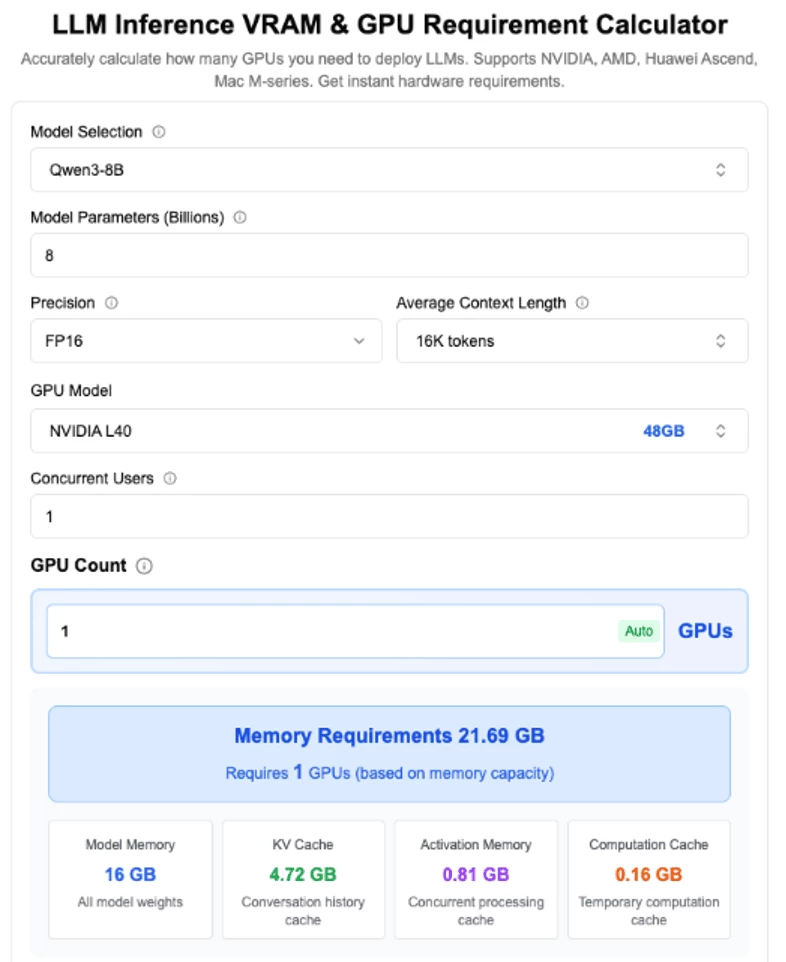
The following table summarizes the maximum concurrency achievable by reducing the average context length per request, for both 1 GPU and 2 GPU configurations.
| Context Length (tokens) | 1 GPU (max concurrent users) | 2 GPUs (max concurrent users) |
|---|---|---|
| 32,768 | 5.06 | 10.12 |
| 16,384 | 10.12 | 20.25 |
| 8,192 | 20.25 | 40.50 |
| 2,048 | 81 | 162 |
| 1,024 | 162 | 324 |
| 512 | 324 | 648 |
| 256 | 648 | 1,296 |
As you can see from the above table, the maximum concurrency is highly dependent on both the number of GPUs and the average context length per request.
Common Prerequisites for All Test Scenarios
The below steps are only high-level outline on what was done to get LMCache working with Nutanix Files Storage and GDS. For detailed instructions, please refer to the LMCache documentation
- Prepare your environment: Install vLLM (or another inference engine) and LMCache on your inference node. Ensure your GPU and NIC support RDMA and that SR‑IOV is enabled.
- Mount the NFS share with RDMA and Verify GDS: On the inference node, mount the remote file system using the rdma option. Verify GDS support with NVIDIA’s gdscheck tool.
- Configure LMCache with GDS Backend: Create a directory on the remote share to hold cache files. Set LMCache options (chunk_size, cufile_buffer_size) in a YAML file and point gds_path to your mounted directory. See GDS Backend Details for additional details.
Prepare your environment:
- Install LMCache as per the LMCache Installation Guide
- Install LMBench for benchmarking tests. See LMCache Benchmarking Guide
## Clone LMCache Benchmarking Repository and setup virtual environment
git clone https://github.com/LMCache/LMBenchmark.git
cd LMBenchmark
uv venv --python 3.12
source .venv/bin/activate
# LMCache wheels are built with the latest version of torch.
# vllm is required for LMCache to work; you may also choose to install it separately.
uv pip install lmcache vllm

## Install lmcache and vllm on same virtual environment
uv pip install -r requirements.txt
Mount the NFS share with RDMA and Verify GDS Support:
- Prepare the remote mount. On the storage side, configure your Nutanix Files export to allow NFS over RDMA and GDS. Example below is using /gds. On the client VM, mount the share. A typical mount command looks like:
## mount directory with RDMA option
sudo mount -o rdma,port=20049 <fileserver-fqdn>:/gds /mnt/gds
## Example
$ sudo mount -o rdma,port=20049 files-sriov.romanticism.cloudnative.nvdlab.net:/gds /mnt/gds
## Validate
$ mount | grep rdma
files-sriov.romanticism.cloudnative.nvdlab.net:/gds on /mnt/gds type nfs4 (rw,relatime,vers=4.0,rsize=1048576,wsize=1048576,namlen=255,hard,proto=rdma,port=20049,timeo=600,retrans=2,sec=sys,clientaddr=10.122.7.56,local_lock=none,addr=10.122.7.15)- Verify GDS support. Assumes CUDA Toolkit, Mellanox OFED and NVIDIA Drivers are installed.The first command prints supported GPUs; the second reads a test file (create one with
dd if=/dev/zero of=/mnt/gds/cache/testfile bs=4K count=1). Both should report “supports GDS” and “read_verification: pass”.
## Run the `gdscheck` tool from the CUDA toolkit to confirm that your GPUs and file system support GPU Direct Storage.
sudo /usr/local/cuda/gds/tools/gdscheck -p
## Create GDS cache directory and 4K testfile to validate GDS is working
mkdir -p /mnt/gds/cache
dd if=/dev/zero of=/mnt/gds/cache/testfile bs=4096 count=1
sudo /usr/local/cuda/gds/tools/gdscheck -f /mnt/gds/cache/testfileConfigure LMCache with GDS Backend
- Follow the GDS Backend Details to create an LMCache config file that points to your mounted Nutanix Files Storage share. Below is an example of running vLLM with LMCache using GDS Backend directly via environment variables:
## Set LMCache environment variables for GDS Backend
LMCACHE_CHUNK_SIZE=256 \
LMCACHE_USE_EXPERIMENTAL="True" \
LMCACHE_GDS_PATH="/mnt/gds/cache" \
LMCACHE_CUFILE_BUFFER_SIZE="8192" \
LMCACHE_LOCAL_CPU="False" \
vllm serve "Qwen/Qwen3-8B" \
   --port 8000 \
   --tensor-parallel-size 1 \
   --gpu-memory-utilization 0.85 \
   --enable-prefix-caching \
   --disable-log-requests \
   --kv-transfer-config \
   --block-size 256 \
   '{"kv_connector":"LMCacheConnectorV1", "kv_role":"kv_both"}'
Basic LMCache with GDS Cache Validation
To illustrate how LMCache works with Nutanix Files Storage and GDS, let’s consider a simple example using vLLM to serve a Qwen-3 8B model with and without LMCache.
These steps are adapted from the LMCache Quickstart guide, but modified to use Nutanix Files Storage as the remote storage backend with GDS acceleration.
Test LMCache without GDS:
- Start the inference server with LMCache. Launch your model server, passing a KV‑transfer configuration that tells it to use LMCache. For vLLM, the command could be:
vllm serve Qwen/Qwen3-8B \
    --host 0.0.0.0 --port 8000 \
--kv-transfer-config '{"kv_connector":"LMCacheConnectorV1","kv_role":"kv_both"}'- Test and tune. Send multiple prompts to the server via curl to validate LMCache is working. The first request caches the prompt. The second reuses the cached prefix and only loads the missing chunk.
curl -X POST http://localhost:8000/generate \
     -H 'Content-Type: application/json' \
     -d '{"prompt": "Hello, world!", "max_tokens": 20}'
Test LMCache with GDS Enabled:
- If you haven't already done so, start the inference server with LMCache and GDS Configurations.. Launch your model server, passing a KV‑transfer configuration that tells it to use LMCache. For vLLM, the command could be:
## Start vLLM server with LMCache using GDS backend
## Set LMCache environment variables for GDS Backend
LMCACHE_CHUNK_SIZE=256 \
LMCACHE_USE_EXPERIMENTAL="True" \
LMCACHE_GDS_PATH="/mnt/gds/cache" \
LMCACHE_CUFILE_BUFFER_SIZE="8192" \
LMCACHE_LOCAL_CPU="False" \
vllm serve "Qwen/Qwen3-8B" \
   --port 8000 \
   --tensor-parallel-size 1 \
   --gpu-memory-utilization 0.85 \
   --enable-prefix-caching \
   --block-size 256 \
   --kv-transfer-config \
   '{"kv_connector":"LMCacheConnectorV1", "kv_role":"kv_both"}'
The server will begin offloading cache blocks to the remote GDS path as it processes requests.
- Test and tune. Send multiple prompts to the server via curl to validate LMCache is working. The first request caches the prompt. The second reuses the cached prefix and only loads the missing chunk.
curl -X POST http://localhost:8000/generate \
     -H 'Content-Type: application/json' \
     -d '{"prompt": "Hello, world!", "max_tokens": 20}'
You should be able to re-run the same prompt multiple times and observe that the subsequent request returns faster because it hits the cache.
For additional details, please refer to the LMCache Quickstart guide.
Benchmarking LMCache with GDS Cache Walkthrough
Important Metrics for LLM Serving
- Time To First Token (TTFT): How quickly users start seeing the model's output after entering their query. Low waiting times for a response are essential in real-time interactions, but less important in offline workloads. This metric is driven by the time required to process the prompt and then generate the first output token.
- Time Per Output Token (TPOT): Time to generate an output token for each user that is querying our system. This metric corresponds with how each user will perceive the "speed" of the model. For example, a TPOT of 100 milliseconds/tok would be 10 tokens per second per user, or ~450 words per minute, which is faster than a typical person can read.
- Latency: The overall time it takes for the model to generate the full response for a user. Overall response latency can be calculated using the previous two metrics: latency = (TTFT) + (TPOT) * (the number of tokens to be generated).
- Throughput: The number of output tokens per second an inference server can generate across all users and requests.
LMCache Benchmarking
With the basic LMCache with GDS validation complete, we can now proceed to benchmark the performance of our LLM model deployed with LMCache and GDS backend using the LMCache Benchmarking Long Doc QA workload generator.
Long Doc QA Workload Recommender:
The LMCache Benchmarking guide walks through leveraging a Workload Recommender script that analyzes your target Model (i.e., Qwen3-8b) against the underlying hardware and generates a list of scripts with the optimal parameters that could be leveraged for deploying vLLM with and without LMCache.
In our case - Our inference node VM configured with 32 vCPUs and 64 GB of RAM with 2x NVIDIA L40S GPUs - 48GB of memory each.
## Run the benchmark script to see the recommended output
python benchmarks/long_doc_qa/long_doc_qa_recommender.py --model Qwen/Qwen3-8B

## Example Output
Model weights total gb: 15.256433486938477
Usable gpu memory for model weights per gpu: 29.952935791015626
Tensor Parallel Recommendation: 1
Tokens in prefix cache: 173632
Per GPU KV cache GiB: 23.85
GiB / 1K tokens per gpu: 0.1373594729082197
Total tokens storable: 293631

1. vLLM Deployment:
-----------------

PYTHONHASHSEED=0 \
VLLM_WORKER_MULTIPROC_METHOD=spawn \
vllm serve Qwen/Qwen3-8B \
--tensor-parallel-size 1 \
--load-format dummy

2. LMCache Deployment:
--------------------

export CUDA_VISIBLE_DEVICES=0,1
export VLLM_LOGGING_LEVEL=INFO
export PYTORCH_CUDA_ALLOC_CONF=expandable_segments:True

PYTHONHASHSEED=0 \
VLLM_WORKER_MULTIPROC_METHOD=spawn \
NCCL_CUMEM_ENABLE=0 \
LMCACHE_MAX_LOCAL_CPU_SIZE=40 \
vllm serve Qwen/Qwen3-8B \
--tensor-parallel-size 1 \
--load-format dummy \
--kv-transfer-config \
'{"kv_connector": "LMCacheConnectorV1", "kv_role": "kv_both"}'

3. Multi-Round QA Workload Generation:
----------------------------------------

python benchmarks/long_doc_qa/long_doc_qa.py \
--model Qwen/Qwen3-8B \
--num-documents 27 \
--document-length 10000 \
--output-len 100 \
--repeat-count 1 \
--repeat-mode tile \
--max-inflight-requests 4
Since we are focusing on demonstrating the performance benefits of offloading KV caches to Nutanix Files Storage over GDS using LMCache, we will be leveraging the additional vLLM deployment commands.
4. LMCache Deployment with GDS:
--------------------

## run vllm server with GDS Backend
PYTHONHASHSEED=0 \
LMCACHE_LOCAL_CPU=False \
LMCACHE_CHUNK_SIZE=256 \
LMCACHE_GDS_PATH="/mnt/gds" \
LMCACHE_CUFILE_BUFFER_SIZE=4096 \
LMCACHE_USE_EXPERIMENTAL=True \
vllm serve Qwen/Qwen3-8B \
--tensor-parallel-size 1 \
--load-format dummy \
--gpu-memory-utilization 0.75 \
--enable-prefix-caching \
--block-size 256 \
--kv-transfer-config \
'{"kv_connector": "LMCacheConnectorV1", "kv_role": "kv_both"}'

5. LMCache Deployment with both GDS and CPU Offload:
--------------------

## run vllm server with both CPU and GDS Backend Offload Enabled
PYTHONHASHSEED=0 \
LMCACHE_LOCAL_CPU=True \
LMCACHE_CHUNK_SIZE=256 \
LMCACHE_MAX_LOCAL_CPU_SIZE=40 \
LMCACHE_GDS_PATH="/mnt/gds" \
LMCACHE_CUFILE_BUFFER_SIZE=4096 \
LMCACHE_USE_EXPERIMENTAL=True \
vllm serve Qwen/Qwen3-8B \
--tensor-parallel-size 1 \
--load-format dummy \
--gpu-memory-utilization 0.75 \
--enable-prefix-caching \
--block-size 256 \
--kv-transfer-config \
'{"kv_connector": "LMCacheConnectorV1", "kv_role": "kv_both"}'
Qwen3-8B vLLM (Basic KV Cache)
In this scenario, since we're not leveraging LMCache, all KV cache operations are handled directly in GPU memory. Which means that the 32 vCPUs on the inference node were mostly idle during this benchmark.
Warmup round mean TTFT: 1.246s
Warmup round time: 44.145s
Warmup round prompt count: 27

=== BENCHMARK RESULTS ===
Query round mean TTFT: 1.583s
Query round time: 75.449s
Query round prompt count: 46
Query round successful prompt count: 46
As we can see from the above results, the average Time to First Token (TTFT) is 1.583s seconds, and the total query round time is 75.449s seconds for 46 prompts.
In a real-world scenario, the TTFT should be less than 1 second to ensure a good user experience. These days, many applications expect near-instant responses from LLMs, especially for interactive use cases like chatbots or real-time content generation. A TTFT of over 1 second can lead to noticeable delays, which may frustrate users and detract from the overall experience. Therefore, optimizing TTFT is crucial for maintaining user engagement and satisfaction.
Qwen3-8B vLLM (with LMCache - CPU Offload)
Warmup round mean TTFT: 1.332s
Warmup round time: 45.897s
Warmup round prompt count: 27

=== BENCHMARK RESULTS ===
Query round mean TTFT: 0.321s
Query round time: 40.475s
Query round prompt count: 46
Query round successful prompt count: 46
From this example, we can see that by offloading the KV cache to CPU memory using LMCache, we were able to achieve a reduction in the average Time to First Token (TTFT) from 1.292s to 0.270s, and a reduction in total query round time from 75.449s to 40.475s. That's a 79% reduction in TTFT and a 46% reduction in total query round time!
Qwen3-8B vLLM (with LMCache - GDS Backend)
## First Warmup Run with GDS and CPU Offload Disabled
=== BENCHMARK RESULTS ===
Query round mean TTFT: 1.634s
Query round time: 55.106s
Query round prompt count: 46
Query round successful prompt count: 46

## Second Run with GDS and CPU Offload Disabled
=== BENCHMARK RESULTS ===
Query round mean TTFT: 1.256s
Query round time: 50.857s
Query round prompt count: 46
Query round successful prompt count: 46
From this example, we can see that by offloading the KV cache exclusively to Nutanix Files using GDS and LMCache, we temporarily increase the average Time to First Token (TTFT), while new prefill token chunks are asynchronously stored into the NFS share, but on subsequent runs, we were able to achieve a reduction in TTFT from 1.583s to 1.256s and a reduction in total query round time from 75.449s to 50.857s. That's a 21% reduction in TTFT and a 33% reduction in total query round time!
While the performance gains are more modest compared to CPU offload, leveraging remote storage via GDS and LMCache effectively removes the ceiling on total KV cache capacity — local CPU memory is finite and fixed, whereas remote storage like Nutanix Files can scale to accommodate virtually any workload size.
Now let's see what happens when we combine both approaches — configuring LMCache to offload the KV cache to CPU memory first, then spilling over to Nutanix Files via GDS when local memory capacity is exhausted. This tiered approach aims to give us the best of both worlds: the low latency of CPU offload with the near-infinite capacity of remote storage.
Qwen3-8B vLLM (with LMCache - GDS and CPU Backend)
## First Run with CPU Offload and GDS enabled
=== BENCHMARK RESULTS ===
Query round mean TTFT: 0.329s
Query round time: 40.039s
Query round prompt count: 46
Query round successful prompt count: 46

## Second Run with CPU Offload and GDS enabled
=== BENCHMARK RESULTS ===
Query round mean TTFT: 0.309s
Query round time: 33.062s
Query round prompt count: 46
Query round successful prompt count: 46
From this example, we can see that by offloading the KV cache to both CPU memory and Nutanix Files via GDS using LMCache, we were able to achieve a reduction in the average Time to First Token (TTFT) from 1.583s to 0.309s, and a reduction in total query round time from 75.449s to 33.062s. That's an 81% reduction in TTFT and a 56% reduction in total query round time compared to the baseline without LMCache!
This tiered approach effectively gives us the best of both worlds — the data locality and low latency of CPU offload, combined with the near-infinite scalability of remote storage via Nutanix Files and GDS.
Key Takeaways from the Benchmark Results
The benchmarks clearly demonstrate the compounding benefits of KV cache offloading across three configurations, all compared against a baseline mean TTFT of 1.583s and a total query round time of 75.449s.
- CPU offload alone delivered a significant improvement, reducing mean TTFT from 1.583s to 0.270s — a 79% reduction — and cutting total query round time from 75.449s to 40.475s, a 46% reduction. This highlights the immediate latency benefits of keeping KV cache close to the GPU in fast CPU memory.
- GDS-based offloading to Nutanix Files alone showed more modest but still meaningful gains, bringing mean TTFT down to 1.256s (21% reduction) and total query round time to 50.857s (33% reduction). While the latency improvement is smaller, this approach removes the ceiling on total cache capacity, enabling near-infinite scalability through remote storage.
- The combined tiered approach — *CPU memory first, spilling over to Nutanix Files via GDS* — delivered the best overall results, reducing mean TTFT to 0.309s (81% reduction) and total query round time to 33.062s (56% reduction). This confirms that the tiered strategy successfully captures the low-latency benefits of CPU offload while leveraging the scalability of remote storage, giving us the best of both worlds.
Conclusion
As context lengths continue to grow, smarter caching strategies will be essential to delivering responsive, cost-effective AI applications. Offloading KV cache to remote storage can significantly enhance the performance and scalability of LLM inference systems.
By intelligently managing and offloading KV cache, LMCache combined with Nutanix Files Storage and NVIDIA GPUDirect Storage (GDS) can unlock new levels of performance and scalability for large language model inference.
Some of the key benefits include:
- Increased Context Lengths: Offloading KV Cache to larger storage tiers allows for handling longer context windows, enabling more complex and contextually rich interactions with LLMs.
- Higher Throughput: By reducing the memory pressure on GPUs, offloading KV Cache can lead to improved throughput, allowing more concurrent requests to be processed efficiently.
- Cost Efficiency: Utilizing cost-effective storage solutions for KV Cache offloading can reduce the need for expensive high-capacity GPUs, unlocking the potential for significant cost savings.
- Scalability: Offloading KV Cache enables easier scaling of LLM deployments, as storage solutions can be scaled independently of GPU resources.
- Improved Latency: By offering larger KV Cache tiers, we can avoid expensive KV cache recomputation, driving towards ower latency, faster response times and overall better user experience.
- High Performance: SR-IOV is designed to provide dedicated network resources for inference workloads, reducing contention.
- Enterprise-Ready: Nutanix Files Storage provides robust data management features, including snapshots, replication, and ransomware protection.
This final post in our series provided a high-level overview of the fundamentals of why KV cache management matters and how LMCache, combined with Nutanix Files Storage and GDS can transform remote storage into a high-speed cache tier. Stay tuned for future posts where we explore further customizations to tailor the deployment to your specific workloads using advanced AI infrastructure optimizations! In the meantime, Happy deploying! 🚀
References / Further Reading
- LMCache GitHub
- NVIDIA GPUDirect Storage
- Nutanix Files Product Page
- Nutanix Files Performance Profile for AI Workloads
- Nutanix Kubernetes Platform
- vLLM Project
- HackerNoon: Optimizing LLM Performance with LM Cache
- NVIDIA Dynamo Blog
- LLM Inference VRAM & GPU Requirement Calculator
- KV Caching Explained: Optimizing Transformer Inference Efficiency
©2026 Nutanix, Inc. All rights reserved. Nutanix, the Nutanix logo and all Nutanix product and service names mentioned are registered trademarks or trademarks of Nutanix, Inc. in the United States and other countries. All other brand names mentioned are for identification purposes only and may be the trademarks of their respective holder(s). This content reflects an experiment in a test environment. Results, benefits, savings, or other outcomes described depend on a variety of factors including use case, individual requirements, and operating environments, and this publication should not be construed as a promise or obligation to deliver specific outcomes.