Read the latest news, technology and community insights
Most views
Every data center uses file, object or volume storage. Why not use some for free? Nutanix Unified Storage, the simple, flexible, and software-defined storage solution from Nutanix solves complex storage challenges for the modern datacenter. And now, Nutanix AOS customers get 1 TB of Nutanix Unified Storage capacity for free per AOS cluster. This gives Nutanix AOS customers the chance to experience this powerful unified storage solution in their own environment and for many, it’s enough to provide a department share for small workloads.What is Nutanix Unified Storage?Nutanix Unified Storage™ (NUS) is a software-defined data services platform that consolidates the management and protection of siloed block, file, and object storage into a single, unified platform. NUS harnesses the power of rich data services such as analytics, ransomware protection, lifecycle management, and data protection. These features enable organizations to seamlessly adapt to the ever-changing requirements of mode
This post was authored by Mike McGhee Technical Marketing Engineer at Nutanix The Ever-Expanding Universe of DataFrom enterprise applications to the internet of things (IoT), the number of connected devices which produce data is growing at a staggering rate. Business Insider forecasts that by 2020 more than 24 billion internet-connected devices will be installed around the globe [1]. It’s no wonder analysts from IDC predict that by 2025 the world will produce 175 zettabytes of data, a tenfold increase from what was generated in 2016 [2]. The vast majority of this data is forecast to be unstructured. While much of this unstructured data will reside within Object Storage based services, a large amount, and likely the most actively accessed, will reside in network attached storage (NAS) leveraging the SMB and NFS protocols within datacenters. Traditional systems with their inherent limits on managing unstructured data at scale will be unable to handle the coming data explosion.
This blog was authored by Gourab Baksi Principal Product Manager NutanixThis first blog in the three-part series on Metro Availability for AHV focuses on how to achieve zero data loss with Protection Policies in Prism Central at VM granularity.For mission-critical applications in various industry sectors like banking, capital markets, insurance, healthcare, and emergency life support services, 24x7x365 uptime is key for the business to function unhindered. In such cases, applications need to have transparent visibility into underlying IT infrastructure failures, including hardware components (disk, network cards, power supply), racks, clusters, or sites. A 2014 Gartner study puts the cost of downtime at $5,600 per minute and can go as high as $540,000 per hour for mission-critical applications.One of our core principles at Nutanix is to ensure the continuous availability of data for all applications running on the platform. To achieve seamless business continuity, we have built High Av
I am delighted to share our growing list of Nutanix Technology Champions (NTC) for 2021. This group of IT professionals are from every cloud, application and technology group. Their diverse backgrounds, experiences, and expertise help their organizations and the virtualization community to challenge the status quo.This has been a challenging year with COVID, families coping with distance learning and the changing dynamics of working from home. But these NTCs continued in the face of unprecedented uncertainty, delivering the applications and services their companies, clients and friends needed.In addition, they continued to mentor and encourage others showcasing what being part of a community is all about.I'm looking forward to another exciting year and learning from many of you. Take the time to get to know one another and congratulate each other on social media, use the hashtag #NutanixNTC and keep the conversation going.One more thing - What can I do if I did not make the list this y
This post was authored by Michael Haigh, Technical Marketing Engineer, Nutanix You’re likely aware that Kubernetes Pods (and containers in general) are ephemeral, meaning it’s expected that they can die at any time. If you’re new to Kubernetes, this can be quite alarming, however Kubernetes objects like ReplicaSets or Deployments will automatically replace these failed Pods. This replacement of Pods does present a problem around network connectivity. While each Pod has a unique IP that’s internal to the Kubernetes cluster, a newly generated Pod is not guaranteed to have the same IP. This means that you cannot rely on Pod IPs to access your Kubernetes based application. Instead, Kubernetes has three main ways of providing external access to your application: NodePort: A Kubernetes Service which exposes your Pods via a port (generally 30000–32767), which when used in conjunction with a Kubernetes node’s IP (http://nodeIP:port) provides external access. This is the easiest way to provide
In the first post in this series I compared the actual Usable Capacity between Nutanix ADSF vs VMware vSAN on the same hardware. We saw approximately 30-40% more usable capacity delivered by Nutanix. Next we compared Deduplication & Compression technologies where we learned Nutanix has outright capacity efficiency, flexibility, resiliency and performance advantages over vSAN. Then we looked at Erasure Coding where we learned the Nutanix implementation (called EC-X) is both dynamic & flexible by balancing performance and capacity efficiencies in real time. Next we switched it up and discussed how both solutions can scale capacity & we learned while vSAN has numerous constraints which make scaling less attractive, Nutanix allows customers to scale storage capacity by adding individual drives, HCI node/s or storage only nodes without manual intervention. But all these advantages Nutanix has over vSAN don’t mean a thing unless the platform is also highly resilient to failures.
In part 1 of Deduplication & Compression Comparison – Nutanix ADSF vs VMware vSAN, we talked about data reduction/efficiency technologies which apply further storage capacity efficiencies to the usable capacity. In part 2, we’ll look deeper at how, when and where the data reduction takes place. The following table shows the storage tiers the data reduction technologies are supported for both products: vSAN data reduction technologies are NOT applied in the high performance “cache” tier whereas they are with Nutanix where in-line compression for writes is on by default and Deduplication is supported. With vSAN, Deduplication and Compression are only applied once the data is cold and de-staged to the capacity tier. Going back to the reference I made earlier that VMware has consistently been saying that they do not support data reduction on hybrid intentionally for performance reasons. It begs the question then why they do not apply these valuable technologies to their “all-flash” cac
With Nutanix Metro Availability you can achieve a RPO of zero (0). This blog post will explain how to set this up.First let me explain my lab:I have two Nutanix clusters (Cluster-1 and Cluster-2) fresh foundationed with AOS 5.20.3.5 and ESX 7.0 U2. DNS and NTP are configured, and I created Storage Containers with the following names (all this is done on BOTH clusters, except the vCLS containers):METRO_1-2 This is for guest vm's running on Cluster-1 which are synced to Cluster-2; Set the advertised capacity to the real capacity; METRO_2-1 This is for guest vm's running on Cluster-2 which are synced to Cluster-1; Set the advertised capacity to the real capacity; vCLS-1 (Only on Cluster-1) This is for the vCLS virtual machine created by vCenter; vCLS-2 (Only on Cluster-2) This is for the vCLS virtual machine created by vCenter. The three containers. Screenshot is from Cluster-2. On Cluster-1 there is a vCLS-1For metro availability you need to have both Nutanix clusters in the same VM
This post was authored by Dwayne Lessner, Principal Technical Marketing Engineer AOS 5.17 in my mind should be officially named the “Disaster Recovery” release. This release provides many great updates for customers using Nutanix Leap: DR orchestration to keep their business running. This release gives more flexibility to protection topologies, reduces system overhead, gives users more choice and reduces recovery point objective times. Single Prism Central Support In past releases in order to perform DR orchestration between two different sites you would have to have Prism Central (PC) at each location forming an availability zone. An availability zone in Nutanix is what one PC manages as a fault domain. This makes good sense in large environments if you were to failover, you would still need a management plane to initiate the action. For smaller sites that want to utilize leap for deploying a PC VM at each site can take of a lot of resources. So now with 5.17 you can replicate between
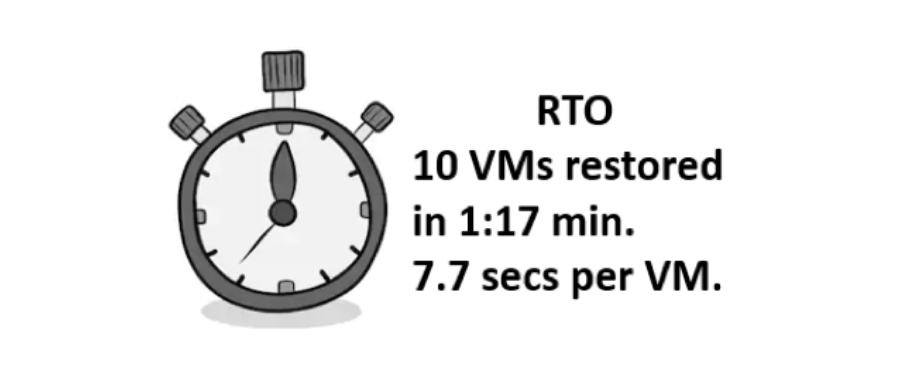
This post was authored by Dwayne Lessner Principal Technical Marketing Engineer Nutanix There is an old saying, “The devil is in the details”. If you have ever assumed something and then had to pay more, fix something or be left in a spot were what you bought wasn’t going to work, you have felt this pain. Late last year I wrote an article around the importance of Recovery Point Objectives (RPO) along with providing the Recovery Time Objectives (RTO). I wanted to share some more technical details of my on-premises lab cluster that I am using to connect to the Xi East Region. I want to prove Xi Leaps SLA around RTO while maintaining performance of your application when you do failover. Proven ResultsDuring my testing I was able to achieve: A restore time under 8 sec per VM The same virtual machine on-prem or in Xi could achieve the same performance, +600,000 transaction per minute Nutanix snapshots are efficient over the wire to Xi when creating VMs from the same image
This post was authored by Sarah Hernandez Member of Technical Staff - Prism UI It is no secret that automation has become a necessary part of IT Operations to ensure the success of your business. With automation comes with the benefits of reducing manual, repetitive tasks, minimizing human errors, and enabling IT teams to scale operations without needing to increase headcount. However, automation also introduces a new level of complexity with larger unknowns and risks. When you start letting the machine take actions without the proper intelligence, things can quickly spiral out of control. Teams are often reluctant to start automating tasks, due to the risk that they could spend more time debugging issues in the automation, than if they just did the tasks manually in the first place. Today there are many tools that offer ways to automate operations in the data center, but none of them are able to remove the complexity that can help alleviate the fears and risks of automating tasks
This post was authored by Laura Jordana Technical Marketing Engineer, Nutanix **Update: Nutanix Buckets was recently renamed to Nutanix Objects** The upcoming release of Nutanix Objects will provide simple, scalable S3-based object storage, with support for common S3 APIs. Nutanix Buckets object storage is deployed and managed from within Nutanix Prism and provides an S3 endpoint over HTTP or HTTPS that any S3-compatible application can connect to. Many popular backup applications are compatible with the S3 protocol and are an ideal use case for Nutanix Buckets. Why Use Object Storage For Backups?Backup has never been an exciting topic in the world of technology. Nobody really cares about backups until they are needed, and backups are a critical part of any IT environment. One of the key questions to be answered when designing a backup strategy is determining where and on what type of storage the backups should be kept. This could be almost any type of storage, including NFS/CIFS-ba
This post was authored by Michael Haigh, Technical Marketing Engineer NutanixWhether you’re using traditional VM based infrastructure, or newer container based infrastructure, having a way to implement Role Based Access Control (RBAC) is absolutely critical. Implementing RBAC for your Nutanix Karbon Kubernetes clusters is straightforward once you understand Kubernetes RBAC authentication.The previous link has great information and resources, but to summarize, there are four main objects that are relevant:A Role grants access to Kubernetes resources in a single namespace. For instance, you might create a Role named pod-reader which only has read access to pods in the defaultnamespace. A ClusterRole grants access to Kubernetes resources cluster wide, irrespective of namespace. A RoleBinding ties the permissions granted via a Role to a specific user or set of users. So if you had a user named Paul who you wanted to give rights to read pods in a single namespace, you first create the pod
In the first post in this series, I compared the actual Usable Capacity between Nutanix ADSF vs VMware vSAN on the same hardware. We saw approximately 30-40% more usable capacity delivered by Nutanix. Next, we compared Deduplication & Compression technologies where we learned Nutanix has outright capacity efficiency, flexibility, resiliency and performance advantages over vSAN. Then we looked at Erasure Coding where we learned the Nutanix implementation (called EC-X) is both dynamic & flexible by balancing performance and capacity efficiencies in real-time. vSAN, on the other hand, has a rudimentary “All or nothing” approach which can lead to higher front end impact and does not dynamically apply Erasure Coding to the most suitable data. Now let’s learn how both platforms can scale storage capacity: Here we see from a typical “tick-box” comparison that both platforms can add individual drives or additional nodes to scale capacity. As you’ve probably gathered from my previous f
When considering Hyper-converged (HCI) products, often vendors, partners, value-added resellers & customers compare multiple solutions which of course makes perfect sense. During these comparisons, marketing material, in many cases “Tick-Box” style slides being compared and worse still being taken on face value which can lead to incorrect assumptions for critical architectural/sizing considerations such as capacity, resiliency and performance. Let me give you a simple example: A customer chooses/needs 16 nodes to meet their requirements and they choose the most popular form factor being a 4 node per 2 rack unit (4N2U) for the density, power efficiency and high performance. The nodes are populated with 6 x 1.92TB drives (All-Flash) as the cost of flash was justified for their use case/s. So we’re left with 16 hosts * 6 drives = 96 total drives 96 x 1.92TB drives with a formatted capacity of ~ 1.78TB = 170.88TB Then the customer compares vSAN and Nutanix which both use replication as
This post was authored by Mike McGhee, Director TMM - NC2, NUS, NDB at NutanixNutanix has long supported a feature called a volume group. A volume group is a logical construct used to create and group virtual disks for the purpose of storage presentation to VMs or physical servers. Database instances like Oracle (including RAC) and Microsoft SQL Server (including Failover Cluster Instances (FCI) are commonly used in conjunction with volume groups. Volume groups were designed to serve several purposes, including:Decoupling VM and storage lifecycles Snapshot and storage replication based on volume group (virtual disk) boundaries instead of VM boundaries Storage presentation for physical (bare metal) workloads Sharing storage for clustering between multiple VMs or physical servers Scaling up storage performance for applications running in a single VM or physical serverIt is this last point of scaling up performance where I’d like to focus. Nutanix makes it possible to load balance virtual
This week on the podcast Dwayne chats with Mike McGhee Technical Marketing Engineer about our upcoming release of AOS 5.17 and some of the new features - like Sync support for AHV, NearSync for Support for Metro (ESXi), network segmentation for replication and much more. There is lots to get excited about in this release, enjoy this episode! I hope you and your family are safe. Lets do what we can to help those in our local communities. Follow us on Twitter Mike McGheeDwayne LessnerAngelo LucianiNutanix Nation Resources Nutanix online communityNutanix community blogXTribeNutanix user groups If you enjoy The Nutanix Community podcast, consider providing a rating and review in iTunes or your podcasting platform of choice. It helps people find the show easier and will help me make improvements in the series by seeing what you have to say. Subscribe to the podcast using iTunes, Spotify or Google
This post was authored by Gabe Contreras, Nutanix Services Consulting Architect When it comes to running Elasticsearch on any platform getting the right settings can take time to get right based on your use case. Small throughput deployments may have been deployed in the cloud, but what about deployments processing millions of documents a minute? It’s no surprise that many companies run these larger deployments on bare-metal. Numerous Nutanix customers have made the leap to running Elasticsearch on our Enterprise Cloud. Our customers have found the following benefits: Faster provisioning Simplified Infrastructure Improved availability Greater flexibility Increased efficiency In most real-world Elasticsearch and general big data environments, these advantages outweigh any potential benefits you might get from running on bare metal. For Nutanix customers the ability to better manage and run big data applications and general server virtualization is a major factor.
This post was written by Derek Seaman, Customer Success Enterprise Architect, Nutanix Early on in Nutanix’s history we focused on being the best and simplest HCI solution on the market. Market share, customer response and industry analyst feedback prove that we succeeded in that vision. However, Nutanix kept innovating and our vision has evolved into private cloud, hybrid cloud, and a multi-cloud strategy. As the Nutanix product portfolio has expanded our customers and the field have asked for a concise reference architecture clearly showing how all the pieces fit together, guided by best practices. The result of this effort is the Nutanix Private Cloud Reference Architecture. Reference Architecture Contents One of the key sections in the reference architecture is the Design Objectives. All of the subsequent design decisions in the document are based on these Design Objectives. Some Design Objectives for each customer may be different than what we have defined, which in turn may al
In today’s rapidly evolving software landscape, containerization has become the go-to method for deploying applications efficiently. However, in the rush to deliver new applications, containers are often deployed in an uncoordinated, siloed fashion, resulting in what is sometimes called “shadow IT”.The Pitfalls of Running Container Workloads in a SilosWhen organizations deploy containerized applications without a centralized orchestration system, they often encounter several challenges:Lack of Scalability – Without an orchestrator, scaling applications becomes a manual, error-prone task that can lead to performance bottlenecks.Inconsistent Deployments – Managing multiple container environments independently may lead to discrepancies in configurations, resulting in failed deployments and finger-pointing between teams when there’s a problem, increasing downtime.Resource Inefficiency – Without a scheduler to allocate resources dynamically, workloads may either over-utilize or under-utiliz
Enterprise AI doesn’t have to be complex — learn how Nutanix Enterprise AI 2.5 helps organizations deploy secure, scalable AI without the hype.AI is moving fast — and for many enterprises, it’s becoming overwhelming.In this episode of the Nutanix Community Podcast, host Dwayne sits down with Mike Bermond, Technical Marketing Evangelist at Nutanix, to cut through the noise and talk about what practical enterprise AI really looks like today.They break down the latest Nutanix Enterprise AI 2.5 release and explore how organizations can deploy large language models securely, simplify identity and access management, improve GPU efficiency, and use AI Labs to test real-world use cases — without getting lost in hype or complexity.More importantly, this conversation tackles AI fatigue head-on, offering grounded advice on where to start, how to prioritize quick wins, and why keeping AI simple is often the smartest strategy.If you’re responsible for AI, infrastructure, or platform strategy — or j
This post was authored by Sudeep Goswami, CEO, Traefik Labs and Aniket Daptari, Sr Director Product Management, NutanixThe Real Challenges Behind the Buzzwords Unified Application Intelligence: The Nutanix and Traefik Labs Joint Solution Under the Hood: How the Integration Works What This Looks Like: A Real Application Flow The Time to Act Is NowThe infrastructure world is in the middle of a tectonic shift, and it's not a single earthquake. It's three hitting at once.Enterprise IT teams are navigating a VMware displacement wave triggered by the Broadcom acquisition. They're managing the coexistence of legacy applications on virtual machines alongside modern microservices running in Kubernetes. And they're under pressure to operationalize AI, embedding inference directly into production applications, not as a science experiment but as a business-critical capability.Each of these shifts alone would be a multi-year transformation. Together, they're redefining what enterprise infrastructur
What a great way to start the new decade, here are your 2020 Nutanix Technology Champions (NTC). This group of IT professionals, are from every cloud, application and technology group. Their diverse backgrounds, experiences, and expertise help their organizations and the virtualization community to challenge the status quo. Last year we introduced the NTC Elite designation and this year I am excited to add one more person to that list. The power of mentoring and encouraging others to strive for more is what being part of a community is all about. NTC Elite is for those that have also earned their NPX designation. This past year has been opportunity for us to see other grow, learn and get out of their comfort zone. From blogging, running user groups and being fully immersed in our .NEXT conference experience. I'm looking forward to another exciting year and learning from many of you. Take the time to get to know one another and congratulate each other on social media, use the hash
This post was authored by Nutanix Technology Champion (NTC) Mattias Sundling, Head of Datacenter and Cloud Services, A3 Being a Service Provider we constantly onboard customers that have been running on-prem virtual environments. The majority of them are running on VMware ESXi and Microsoft Hyper-V. In order to streamline the process of moving these workloads to our public cloud service with minimum impact on VM availability and time spent on our side we have been using Nutanix Move (previously called Xtract) since its first beta version. That release was over a year ago and supported VMware ESXi. So, we were quite excited to see there was a beta program for Move with Hyper-V support. We installed the new version that runs as a virtual appliance on your target AHV cluster and connected it to a customer’s Hyper-V hosts. Nutanix Move then pulls all inventory from all hosts and allows you to create a migration plan of selected VMs. By supplying administrator/root credentials all gue
In this episode of the Nutanix Community Podcast, we head to Sweden to talk with Jonas Hogman, Infrastructure Architect and Nutanix Technology Champion, about his deep-dive three-part blog series on deploying Nutanix Enterprise AI on non-NKP infrastructure.Jonas shares insights from his latest Nutanix User Group event in Stockholm, why automation is hot in the Nordics, and how data sovereignty is shaping AI strategies across Europe. We also explore what it takes to start small with AI projects, lessons learned from mixing Rancher and Nutanix, and his advice for anyone thinking about joining the NTC program.If you’re curious about the future of automation, AI, and community innovation — this one’s for you!ResourcesJonas Hogman LinkedIn Company Post 1: Deploying Nutanix Enterprise AI on a Non-Nutanix Managed Kubernetes Cluster Post 2: Deploying NAI Post 3: Deploy the first LLM Step Into the Spotlight: Nutanix Technology Champion 2026 Applications Now OpenIf you have any questions, feel
Already have an account? Login
Enter your E-mail address. We'll send you an e-mail with instructions to reset your password.